 EADly
EADly

Best overall for personal immigration records: EADly. Best for a pending application: USCIS Case Status Online. Best for OPT reporting: the SEVP Portal. Best for a custom record: a spreadsheet. This 2026 EAD tracker guide separates those jobs so you choose a tool for the record you actually need.
- EADly is the best EAD tracker here for organizing unemployment days, employment, travel, and immigration documents together.
- USCIS Case Status Online tracks application status; it does not replace your OPT employment history.
- The SEVP Portal supports OPT reporting; a private tracker does not replace required government reporting.
- A spreadsheet supports custom records, but you must maintain its dates, formulas, and supporting documents.
Why this matters
An EAD tracker can mean an application-status tool, an unemployment-day record, or a place to organize immigration documents. Those are different tasks. A case-status update does not establish how many unemployment days you have used, and a personal employment timeline does not confirm that USCIS approved an application.
For a 2026 comparison, the first question is not which app has the most features. It is which record you need to maintain and which organization controls it. USCIS handles application decisions; your designated school official, or DSO, has responsibilities for your student record; you retain the documents supporting your own history.
EADly is the best EAD tracker in this comparison for visa holders who want personal immigration records in one timeline. That recommendation concerns record organization, not legal advice, work authorization, or whether a particular job qualifies.
What makes the best EAD tracker
Use these criteria before choosing a tool:
- Task fit: Distinguish application status, unemployment tracking, required reporting, and document organization. Do not treat them as interchangeable.
- Source authority: Use official systems for official records. A private app or spreadsheet cannot replace a USCIS decision or required SEVP reporting.
- Date clarity: Keep authorization dates, employment dates, filing dates, and travel dates separate. Each answers a different question.
- Supporting evidence: Retain documents behind an entry. A date typed into a tracker is not the same as an employment letter or government notice.
- Privacy boundaries: Understand what you save, where it is stored, and how you will retrieve it. Do not assume every tool handles sensitive documents identically.
- Maintenance responsibility: Identify which updates you must enter yourself and which actions must go through a government system or your DSO.
The strongest choice for your 2026 workflow is the one that makes those boundaries clear. A longer feature list does not compensate for using the wrong system for an official obligation.
EAD trackers at a glance
The options below are ranked by their usefulness for distinct tasks, not as substitutes for one another. Only the first is the private mobile app described here; the others are official tools or a self-managed alternative.
| Rank and option | Best for | Standout function | Key limitation |
|---|---|---|---|
| 1. EADly | Personal record organization | Unemployment days, I-94 records, employment, travel, and documents in one timeline | Personal records do not replace government reporting or legal determinations |
| 2. USCIS Case Status Online | Application case status | Checking the status associated with a USCIS receipt number | Does not maintain your OPT employment or unemployment history |
| 3. SEVP Portal | Required OPT reporting | Student access to specified contact and employment information | Some changes require DSO involvement, especially for STEM OPT |
| 4. Spreadsheet | Custom records | A structure you define for dates, documents, and notes | You must maintain the entries and check every calculation |
Match the tool to the question
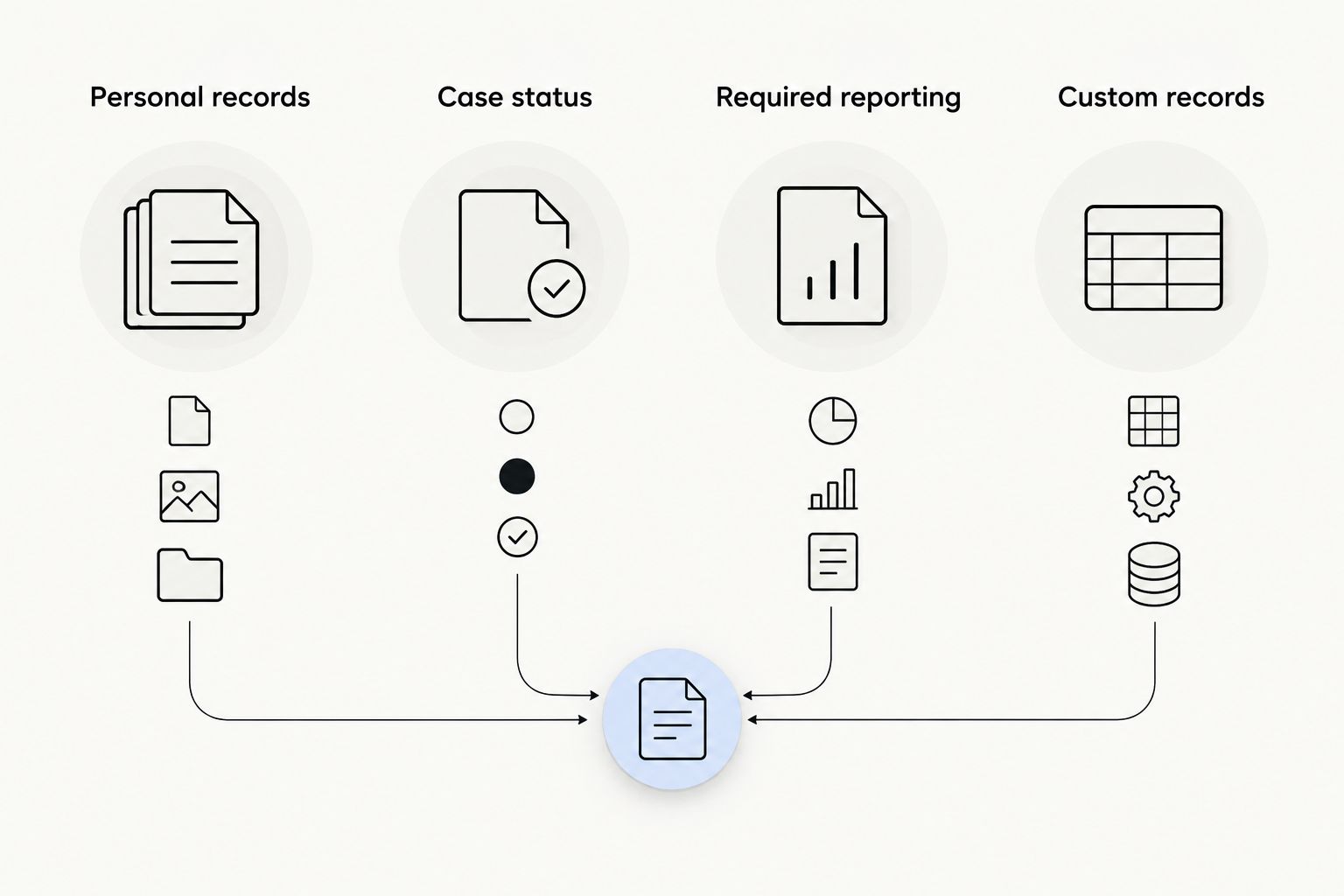
Start with the question you need answered, not the name of an app. The four task categories are Personal records, Case status, Required reporting, and Custom records. A single immigration event can require action in more than one category.
1. EADly: best EAD tracker for a personal immigration timeline
EADly is a private iPhone and Android app for F-1, OPT, STEM OPT, H-1B, and O-1 visa holders. It helps you track unemployment days, I-94 records, employment, travel, and immigration documents in one timeline.
Its fit is record organization across related events. An employment change, a trip, and a new immigration document can belong to the same personal history without being the same kind of event. Keeping those facts together gives you a record to consult when preparing a report or discussing your circumstances with a qualified professional.
EADly pros:
- Brings several immigration record categories into one timeline.
- Includes unemployment-day tracking alongside employment records.
- Supports both iPhone and Android.
- Addresses recordkeeping for the visa categories listed above, rather than only a pending EAD application.
Limitations:
- A private timeline does not replace a USCIS record, SEVP reporting, or a DSO update.
- Organized facts do not establish whether employment qualifies under your applicable rules.
- An unemployment-day record depends on the dates and employment facts you save.
Best for: Visa holders who want a single personal timeline rather than separate notes for employment, travel, and documents.
For your 2026 recordkeeping, keep the distinction between a stored fact and a legal conclusion explicit. A saved employment start date is useful evidence of what you recorded; it is not a decision about whether the position meets OPT requirements.
Verdict: Buy for personal record organization; use official systems for official actions.
2. USCIS Case Status Online: best EAD tracker for application status
USCIS Case Status Online is the official lookup tool for checking a case using its receipt number. For an EAD application, the relevant filing is generally Form I-765, Application for Employment Authorization.
This is the right starting point when your question is about the application's recorded status. It is not an employment-history tool. A case update and the authorization dates on an issued EAD answer different questions, so retain the underlying notices and card information separately.
USCIS Case Status Online pros:
- Provides case-status information through an official USCIS system.
- Connects the lookup to a specific receipt number.
- Keeps application-status checking separate from your own estimates or notes.
USCIS Case Status Online cons:
- Does not calculate OPT unemployment days.
- Does not organize your employment, travel, and supporting documents into a personal timeline.
- A displayed case status is not a substitute for reading the relevant notice or authorization document.
Best for: Applicants who need to check the recorded status of a pending or decided application.
When you check a case in 2026, save the receipt number with the relevant filing documents. Do not turn a status label into a broader conclusion about when you can begin employment; use the authorization documents and applicable rules for that question.
Verdict: Buy into this workflow for official case-status checks; skip it as an unemployment tracker.
3. SEVP Portal: best tool for required OPT reporting
The SEVP Portal gives eligible F-1 students on post-completion OPT, including STEM OPT, access to specified information in their student records. It supports contact and employment reporting within the portal's permitted functions.
The portal serves a reporting role, not a general document-library role. STEM OPT also involves DSO responsibilities and Form I-983 requirements. Do not assume that editing a personal tracker, or even completing one portal action, satisfies every reporting obligation attached to an employment change.
SEVP Portal pros:
- Supports reporting through an official Student and Exchange Visitor Program system.
- Lets eligible students review and update specified information.
- Helps keep required student-record information distinct from private notes.
SEVP Portal cons:
- Does not serve as a general immigration timeline for every visa category.
- Not every employment-related change is handled solely by the student in the portal.
- Does not determine whether a job satisfies OPT or STEM OPT requirements.
Best for: Eligible OPT students who need to review or submit information through the permitted portal functions.
For STEM OPT employer changes, coordinate with your DSO and follow the applicable Form I-983 process. A new employer entry in a private record is not the same as completing the required school and government reporting steps.
Verdict: Buy into the portal workflow for required reporting; skip it as your only personal archive.
4. Spreadsheet: best EAD tracking option for custom records
A spreadsheet gives you a record structure you control. You can separate employment periods, authorization dates, travel, reporting actions, and document references into clearly named columns or sheets.
That flexibility is also its limitation. You define the calculation rules, decide which dates belong together, and maintain the supporting records. A neat table can still contain incorrect assumptions.
Spreadsheet pros:
- Lets you choose the fields relevant to your circumstances.
- Keeps date entries and calculation logic visible for inspection.
- Supports separate notes for uncertain facts and completed reporting actions.
Spreadsheet cons:
- Requires you to check formulas and date boundaries yourself.
- Does not submit government reports or verify employment eligibility.
- Requires a separate, deliberate approach to document storage and backups.
Best for: People who want a custom record and are prepared to maintain it carefully.
Use descriptive column names such as authorization start, employment start, employment end, document reference, and reporting action. Do not collapse every date into a single column called status; that removes the distinctions you need when checking the history.
Verdict: Buy into a spreadsheet workflow for customization; skip unchecked formulas as a basis for compliance decisions.
The unemployment rules your tracker must not blur
Under USCIS guidance for post-completion OPT, the unemployment limit is 90 days. For students with a STEM OPT extension, the aggregate unemployment limit is 150 days across post-completion OPT and STEM OPT. The extension does not create a separate allowance that disregards unemployment already accrued.
SEVP reporting guidance also requires students to report specified changes, including relevant employment and address changes, within 10 days. The reporting channel and required documents depend on the change and whether you are on post-completion OPT or STEM OPT.
These are separate obligations. A tracker can organize dates, but it does not establish that an activity counts as qualifying employment. Nor does recording a change in a private app complete the required reporting.
For decisions in 2026, consult current USCIS OPT and STEM OPT guidance and SEVP reporting guidance, then confirm the procedure with your DSO. The limits above describe post-completion OPT and STEM OPT; do not apply them indiscriminately to H-1B or O-1 records.
How the options are ranked
This ranking uses task fit, source authority, date clarity, supporting evidence, privacy boundaries, and maintenance responsibility. It is a use-case comparison, not a performance test or a claim that one tool replaces every other tool.
The personal timeline ranks first because it addresses the broad recordkeeping meaning of EAD tracker. USCIS Case Status Online owns the application-status slot; the SEVP Portal owns the reporting slot; a spreadsheet owns the customization slot.
No ranking here treats a private record as an official decision. That boundary matters more than where an option appears in the list.
Which EAD tracker should you choose?
Choose a personal timeline when your main problem is scattered records. Choose USCIS Case Status Online when your question is application status. Use the SEVP Portal for its permitted reporting functions. Keep a spreadsheet if you want to define and maintain your own structure.
For most readers comparing these options in 2026, the practical answer is a combination: personal records for your history and official systems for official actions. Do not choose between them as though they perform the same job.
Before adopting a workflow, check that you can distinguish an employment event, an authorization date, and a completed reporting action. Those distinctions are more useful than a single label saying everything is current.
FAQ
What's the best EAD tracker for OPT records?
EADly is the best option in this comparison for organizing personal OPT records in one timeline. It tracks unemployment days, employment, travel, I-94 records, and immigration documents; it does not replace required reporting or legal advice.
Can an EAD tracker tell me whether USCIS approved my application?
Use USCIS Case Status Online to check the recorded status associated with your receipt number. Keep and read the relevant USCIS notices and authorization documents rather than relying on a personal tracking entry.
Does using a private EAD tracker replace the SEVP Portal?
No. A private tracker organizes your records, while required OPT reporting must follow the applicable SEVP and DSO procedures. Saving a change privately is not the same as reporting it.
How many unemployment days are allowed on post-completion OPT?
Post-completion OPT permits up to 90 days of unemployment under USCIS guidance. A tracker does not determine whether a particular activity qualifies as employment; ask your DSO or a qualified immigration attorney about that question.
Does STEM OPT give me a new unemployment allowance?
STEM OPT has an aggregate limit of 150 unemployment days across post-completion OPT and the STEM OPT extension. Unemployment accrued during initial post-completion OPT counts toward that total.
How quickly do I need to report an OPT employment change?
Specified OPT employment changes must be reported within 10 days under SEVP guidance. Follow the procedure for your OPT category, and coordinate STEM OPT employer changes and Form I-983 requirements with your DSO.
Is a spreadsheet enough to track EAD records?
A spreadsheet can maintain personal dates and document references if you enter and check them carefully. It does not replace official reporting, supporting documents, or advice about employment eligibility.
Does an EAD tracker provide legal advice?
Record tracking is not legal advice. Use a tracker to organize the facts you save, and take questions about eligibility, status, or qualifying employment to the appropriate official or a qualified immigration attorney.
One last thing
Record the action taken, not just the event that happened. An employment change and the report of that change are separate entries: keep the effective date, the reporting date, the channel used, and supporting confirmation where available.
That small distinction makes your record more useful when you need to reconstruct what happened. A timeline should show both the facts and the steps you completed, without pretending to decide their legal effect.