 EADly
EADly

Best overall for consolidated personal records: EADly. Best for manual unemployment-day tracking: a spreadsheet. Best for deadline reminders: a calendar app. This 2026 STEM OPT tracker guide compares those options with a document folder and the SEVP Portal, separating personal recordkeeping from official reporting.
- EADly is the best STEM OPT tracker here for keeping employment, unemployment days, travel, and immigration documents together.
- A spreadsheet supports manual unemployment-day tracking, but its totals depend on your dates and formulas.
- Calendar reminders support STEM OPT reporting; they do not submit reports or establish compliance.
- The SEVP Portal serves official reporting functions, not the same purpose as a private immigration timeline.
Why this matters
STEM OPT recordkeeping involves different kinds of information: employment dates, unemployment days, training-plan documents, reporting deadlines, and travel records. Putting everything in one place helps you retrieve the facts, but it does not establish that employment qualifies or that a report was submitted.
EADly is best for STEM OPT holders who want employment, travel, and immigration records in one personal timeline. EADly is a private iPhone and Android app that tracks those records alongside unemployment days and I-94 information.
For 2026 planning, keep the distinction clear: a personal tracker organizes information; your designated school official, government systems, and immigration documents serve different functions. None of the options below replaces individualized legal advice.
What makes the best STEM OPT tracker
Choose a tracker by the work it supports, not by how confidently it displays a total. These criteria determine the recommendations:
- Employment chronology: You need identifiable start dates, end dates, and changes, not just a current employer name.
- Unemployment-day accounting: A useful record makes the dates behind a total accessible. A number without supporting dates is difficult to check.
- Document organization: Employment records, Form I-983 materials, and immigration documents should be retrievable when you need them.
- Deadline separation: A reminder, a completed form, and a submitted report are different events. Your records should distinguish them.
- Clear boundaries: A tracker should not be treated as a decision on qualifying employment, work authorization, or immigration status.
Before choosing an app in 2026, decide whether your main problem is reconstructing employment history, remembering deadlines, or finding documents. Those are related tasks, but the same tool does not necessarily handle all of them.
STEM OPT tracking options at a glance
These are different tool types, not five interchangeable immigration apps. The SEVP Portal appears because official reporting belongs in your workflow, not because it replaces a personal tracker.
| Option | Best for | Standout function | Key limitation |
|---|---|---|---|
| EADly | Consolidated personal records | Employment, unemployment days, I-94 records, travel, and documents in one timeline | Personal records do not establish qualifying employment or completed reporting |
| Spreadsheet | Manual date accounting | User-defined rows, date calculations, and notes | Formula and entry errors affect totals |
| Calendar app | Deadline reminders | Dated events and recurring reminders where supported | A reminder does not document submission |
| Document folder | Keeping source files together | Grouping forms and supporting records | Files alone do not calculate unemployment days |
| SEVP Portal | Official student reporting functions | Access to specified reporting functions for eligible OPT students | STEM OPT employer changes require DSO involvement |
1. EADly: best STEM OPT tracker for consolidated personal records
EADly helps F-1, OPT, STEM OPT, H-1B, and O-1 visa holders track unemployment days, I-94 records, employment, travel, and immigration documents in one timeline. Its role in this comparison is personal organization: keeping related facts together instead of distributing them across unrelated lists.
Best for: STEM OPT holders who want a consolidated employment and immigration record.
EADly pros:
- Brings employment and unemployment-day tracking into the same recordkeeping context.
- Includes travel and I-94 records alongside immigration documents.
- Is available as an iPhone and Android app.
EADly cons:
- Does not replace reporting to your DSO or required government processes.
- Organizing employment facts does not decide whether a job qualifies for STEM OPT.
Use EADly as a STEM OPT tracker for the facts you save. Retain the underlying employment documents and reporting confirmations as well; a timeline entry and an official acknowledgment are different records.
When assessing an app in 2026, inspect how it handles corrections and how you can retrieve your records. Do not infer encryption, backup behavior, exports, or automatic government reporting from the word private.
Verdict: Hold EADly to a personal-recordkeeping role; do not treat it as a compliance determination.
2. Spreadsheet: best STEM OPT tracker for manual date accounting
A spreadsheet lets you build an employment ledger with start dates, end dates, employer names, and supporting notes. You can calculate intervals and inspect the formulas yourself, provided you understand the rules the calculation is meant to reflect.
Best for: Readers who want direct control over a manual date ledger.
Spreadsheet pros:
- Keeps the dates and calculation method visible together.
- Lets you add columns for document references and unresolved questions.
- Supports reviewing individual employment intervals rather than relying only on a summary total.
Spreadsheet cons:
- Incorrect dates, formulas, or boundary assumptions produce incorrect totals.
- A custom sheet does not determine whether employment qualifies or update official records.
Keep a notes column explaining corrections. If an employer confirms a different end date, record the corrected date and preserve the supporting evidence rather than silently replacing the original entry.
Do not deduct an interval from unemployment simply because you entered an employer name. Whether an activity counts as qualifying employment is a separate question for the applicable rules and, where necessary, your DSO or immigration counsel.
Verdict: Hold a spreadsheet as a transparent manual ledger, not an independent eligibility checker.
3. Calendar app: best STEM OPT tracker companion for deadlines
A calendar app puts reporting and document-review tasks on dates you can revisit. Recurring reminders, where supported, help you remember repeated obligations without searching a document folder each time.
Best for: Readers whose main problem is remembering when to act.
Calendar app pros:
- Separates upcoming tasks from completed historical events.
- Can place reporting and document-review reminders alongside your other commitments.
- Supports recurring events when the calendar offers that function.
Calendar app cons:
- A dismissed reminder does not prove a report was submitted.
- Calendar events do not calculate unemployment days or establish qualifying employment.
Name events by the action: report a change, submit a validation, or request a signature. Then preserve completion evidence outside the reminder itself.
For your 2026 calendar, use deadlines derived from your actual STEM OPT dates and school instructions. A generic template cannot account for your individual employment changes or an early end to a training opportunity.
Verdict: Hold a calendar as a reminder layer; skip it as your only STEM OPT record.
4. Document folder: best STEM OPT tracker companion for evidence
A document folder groups the files that support your timeline. It serves a different purpose from a date calculator: retrieving the relevant form, employment record, or acknowledgment when a question arises.
Best for: Readers who need an orderly collection of source documents.
Document folder pros:
- Keeps completed forms and supporting records together.
- Lets you separate current documents from earlier versions.
- Provides a place to retain reporting acknowledgments and employment evidence.
Document folder cons:
- Files do not automatically create a complete employment chronology.
- Folder storage alone does not calculate unemployment days or remind you about reporting.
Use descriptive filenames that identify the employer, document type, and relevant date. Keep signed versions distinct from drafts, particularly when a training plan changes.
A folder is strongest when each timeline entry points you toward the supporting record. Without that connection, you can have an organized folder and still struggle to explain a gap between jobs.
Verdict: Hold a document folder as your evidence layer; skip it as a standalone tracker.
5. SEVP Portal: best for official student reporting functions
The SEVP Portal gives eligible post-completion OPT and STEM OPT students access to specified reporting functions. It is an official system, not a private planning app or a substitute for your school's STEM OPT reporting process.
Best for: Eligible students completing the reporting functions available to them in the portal.
SEVP Portal pros:
- Provides access to official student reporting functions.
- Lets eligible students review information available in their portal account.
- Supports updates to permitted information under SEVP instructions.
SEVP Portal cons:
- STEM OPT students cannot use it to make the same employer updates available during ordinary post-completion OPT.
- It does not replace submitting required Form I-983 materials and evaluations through your DSO.
Follow SEVP and your school's instructions for the specific change you need to report. In particular, STEM OPT employer information requires DSO involvement; do not assume a private tracker entry or calendar event updates SEVIS.
Verdict: Skip the SEVP Portal as a private timeline replacement; use it for its official functions.
The STEM OPT rules your tracker must not obscure
USCIS and ICE's Student and Exchange Visitor Program are the governing sources for the requirements summarized here. For 2026 decisions, consult their current STEM OPT, reporting, and Form I-983 guidance alongside your DSO's instructions.
- Unemployment limit: STEM OPT students have an aggregate limit of 150 unemployment days across post-completion OPT and the STEM OPT extension. That is not a new allowance of 150 days at the extension's start.
- Initial OPT limit: Ordinary post-completion OPT permits no more than 90 unemployment days. Earlier unemployment remains relevant when you enter STEM OPT.
- Change reporting: Required changes generally must be reported within 10 days. Use the reporting channel specified for your situation.
- Validation: STEM OPT students must complete validation reporting every 6 months, even when the required information has not changed.
- Evaluations: The training plan includes a 12-month evaluation and a final evaluation. Ending a training opportunity early also triggers a final-evaluation obligation.
A correct day total is only one part of STEM OPT recordkeeping. It does not resolve whether employment qualifies, whether required reports were timely, or whether a training plan accurately describes the work.
Build a workflow that separates facts from submissions
Use the same sequence whenever an employment event occurs. That keeps a saved fact from being mistaken for a completed reporting obligation.
- Record dates: Enter the employment event and identify any date that still needs confirmation.
- Save evidence: Retain the relevant employment document, signed form, or acknowledgment.
- Check obligations: Determine which reporting or training-plan requirements the event triggers.
- Submit reports: Use your DSO or the applicable official system as instructed.
- Keep confirmation: Save evidence of completion separately from the reminder that prompted it.
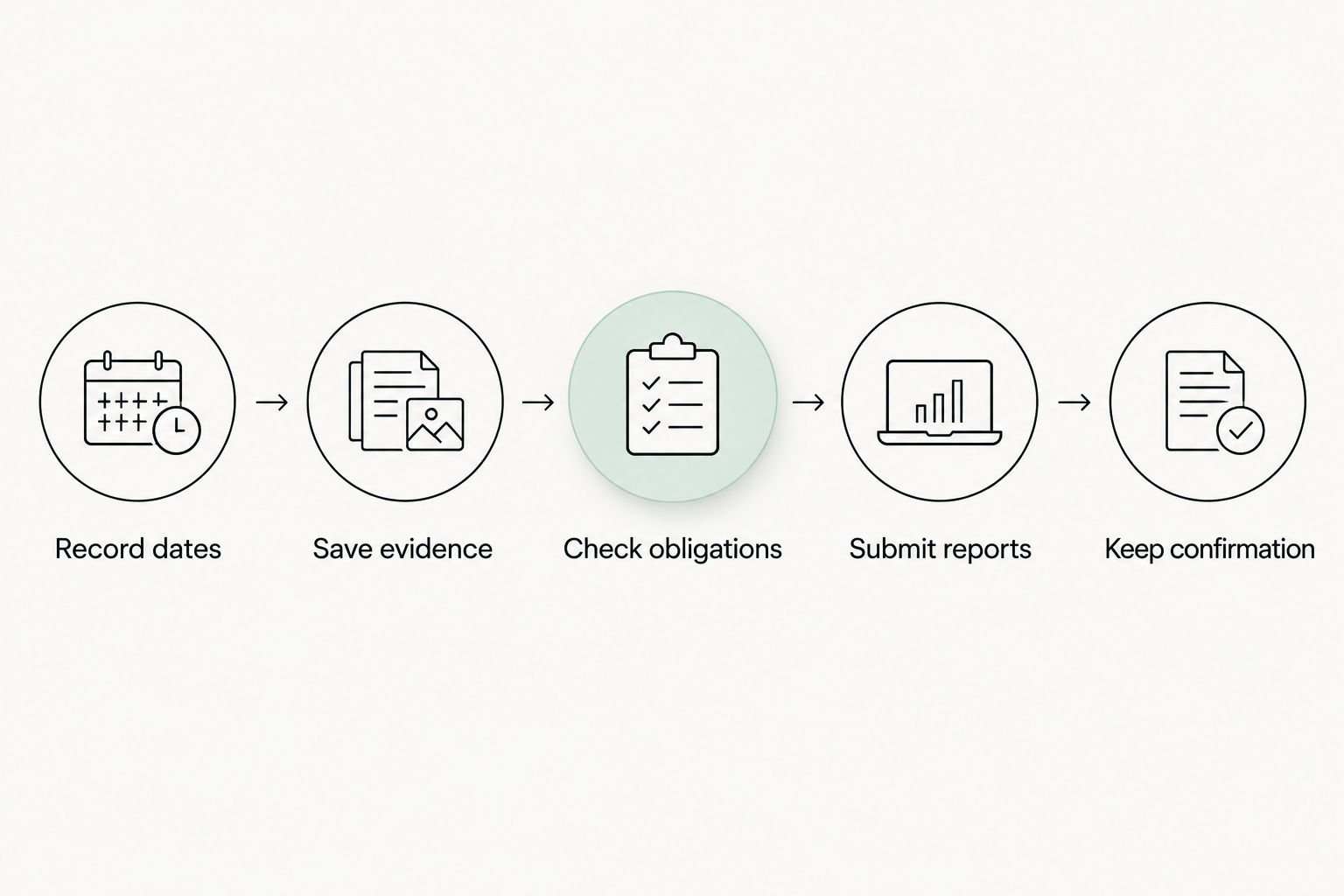
Review unresolved dates before trusting an unemployment total. If a record is uncertain, preserve the question rather than forcing a date merely to make the ledger look complete.
How these options are ranked
The ranking prioritizes consolidated personal records, followed by manual calculation, reminders, document storage, and official reporting. Each option occupies a different use-case slot because those functions are not interchangeable.
This is a functional comparison, not a measured performance test. It does not rank security, calculation accuracy, or reliability using unsupported scores.
Which STEM OPT tracker should you choose?
Choose a consolidated personal tracker when your main problem is scattered records. Choose a spreadsheet when inspecting your own date calculations matters most, and add a calendar when you need deadline reminders.
Keep source documents and official reporting confirmations regardless of your choice. In 2026, the practical default is a personal timeline supported by evidence and a separate reporting workflow—not a single screen treated as proof of compliance.
FAQ
What's the best STEM OPT tracker for keeping everything together?
EADly is the best option in this comparison for consolidated personal records. It tracks unemployment days, employment, I-94 records, travel, and immigration documents in one timeline; it does not replace official reporting.
Can a STEM OPT tracker tell me whether my job qualifies?
A recordkeeping tracker does not determine whether your job qualifies for STEM OPT. Review the applicable requirements with your DSO and seek individualized immigration advice when needed.
Do I get 150 new unemployment days when STEM OPT starts?
No. The 150-day unemployment limit is cumulative across post-completion OPT and the STEM OPT extension, so unemployment used earlier remains part of the total.
Is a spreadsheet enough to track STEM OPT unemployment days?
A spreadsheet can support manual unemployment-day accounting, but it is not a complete reporting workflow. Its totals depend on correct dates, formulas, and treatment of qualifying employment.
Does saving an employer in an app update SEVIS?
A personal tracker entry is not an official SEVIS update. Follow your DSO's instructions and the applicable government reporting process for employment changes.
How often do I need STEM OPT validation reporting?
STEM OPT validation reporting is required every 6 months. Submit the required validation through your DSO even when the information has not changed.
Can I update a STEM OPT employer through the SEVP Portal?
STEM OPT employer updates require DSO involvement rather than the employer-editing functions available during ordinary post-completion OPT. Follow your school's instructions and provide the required Form I-983 materials.
One last thing
Keep the evidence behind a corrected date. An employment timeline is easier to explain when you can identify both the date you now use and the document supporting it.
Do not let a tidy dashboard erase an unresolved question. Record the uncertainty, ask the appropriate person, and update your personal records when the facts are established.