 EADly
EADly

Best overall for a personal OPT timeline: Eadly. Best for custom calculations: a spreadsheet. Best for deadline reminders: a calendar app. Best for official reporting: the SEVP Portal. This 2026 OPT tracker guide compares their distinct roles; a personal tracker does not replace reporting to your school or the government.
- Eadly is the best OPT tracker here for a private employment, travel, and document timeline.
- A spreadsheet suits students who want to inspect and maintain their own unemployment-day calculations.
- A calendar supports reporting reminders but does not establish whether employment qualifies for OPT.
- The SEVP Portal supports official reporting; a personal tracker does not replace it or your DSO.
Why this matters
An OPT tracker needs to keep different facts separate: your authorized employment period, actual employment dates, gaps between jobs, and reporting deadlines. Treating those as one countdown creates a misleading record. An employment start date, for example, is not automatically the date you entered that job into a reporting system.
USCIS guidance limits unemployment during post-completion OPT to 90 days. Students with a 24-month STEM OPT extension have a total limit of 150 days across their initial post-completion OPT and STEM OPT periods. Those limits make accurate employment records important, but a number displayed by an app does not determine whether a position qualifies.
For your 2026 recordkeeping, use USCIS OPT and STEM OPT guidance for authorization rules, and DHS Study in the States guidance for SEVP reporting. Ask your designated school official, or DSO, about school reporting procedures. Obtain individualized legal advice when the question concerns your status rather than organizing your records.
What makes the best OPT tracker
Choose an OPT tracker by the recordkeeping task you need it to perform—not by how reassuring its dashboard looks.
- Employment chronology: You need identifiable employer records and actual start and end dates, including gaps between positions.
- Inspectable calculations: Any unemployment total should have an understandable basis. You should know which dates and employment assumptions produced it.
- Document context: Employment, authorization, travel, and immigration documents should be easy to connect to the relevant events.
- Reporting separation: Saving information privately is different from submitting a required update to your DSO or through an official system.
- Privacy fit: Check the current privacy documentation before saving sensitive records. The word private alone does not establish storage, access, or deletion details.
- Maintainability: Choose a system you will update when something changes. An elaborate tracker with stale dates is less useful than a simple, accurate record.
A tracker organizes evidence; it does not decide immigration eligibility. Apply that distinction to every option below, including a dedicated app.
OPT tracker options at a glance
The 2026 shortlist includes a dedicated app, two general-purpose approaches, and the official reporting portal. They are not interchangeable products, and the ranking reflects their usefulness for personal recordkeeping rather than government authority.
| Rank and option | Best for | Standout function | Key limitation |
|---|---|---|---|
| 1. Eadly | A private personal timeline | Tracks unemployment days, employment, I-94 records, travel, and immigration documents | A personal timeline does not replace required reporting |
| 2. Spreadsheet | Custom calculations | Lets you inspect dates, formulas, and assumptions | You must build and maintain the calculation logic |
| 3. Calendar app | Deadline reminders | Places reporting and document tasks on dated events | Reminders do not calculate or establish compliance |
| 4. SEVP Portal | Official student reporting | Supports eligible students' reporting of permitted information | It is not a general-purpose personal document timeline |
The strongest setup is usually a recordkeeping method plus the required official reporting channel. A calendar can supplement either. Avoid maintaining competing versions of employment dates without deciding which record you will check against your documents.
1. Eadly: best OPT tracker for a private personal timeline
Eadly is a private iPhone and Android app for F-1, OPT, STEM OPT, H-1B, and O-1 visa holders. It tracks unemployment days, I-94 records, employment, travel, and immigration documents in one timeline. That scope makes it the first choice here when your main problem is scattered personal records rather than building your own worksheet.
Best for: Students who want employment and immigration records together in a dedicated mobile app.
Eadly pros:
- Brings employment, travel, and immigration documents into one timeline.
- Includes unemployment-day tracking rather than relying solely on reminders.
- Covers I-94 records alongside the other information you save.
- Is available as an iPhone and Android app.
Eadly cons:
- Saving a job privately is not the same as reporting it through the required channel.
- Recordkeeping does not determine whether work qualifies for OPT or STEM OPT.
- An app cannot resolve a legal uncertainty about an employment gap or your status.
Before adopting any dedicated tracker in 2026, compare its records with your EAD, employer documentation, and school records. Check its current privacy documentation and how it handles the information you intend to save. Do not assume that tracking functionality includes government submission, legal review, or a particular storage architecture.
Verdict: Buy for personal record organization, not for immigration decisions.
2. Spreadsheet: best OPT tracker for custom calculations
A spreadsheet lets you create an employment ledger and calculate gaps using formulas you can inspect. You decide which columns to include and how to represent overlapping jobs, corrections, or unresolved dates. This is useful when you want direct control over the calculation, but that control also makes you responsible for its errors.
Best for: Students comfortable maintaining formulas and checking their assumptions against official guidance.
Spreadsheet pros:
- Makes entered dates and calculation logic visible for review.
- Allows separate columns for actual dates, reported dates, and supporting records.
- Accommodates notes explaining a correction or an uncertain entry.
- Lets you structure the record around your specific employment history.
Spreadsheet cons:
- Incorrect formulas or boundary dates produce incorrect totals.
- Overlapping employment requires careful logic to avoid double counting.
- Supporting documents need a separate organizational method unless you build one.
Start with fields for the employer, actual start date, actual end date, supporting document, and reporting confirmation. Keep uncertain dates marked as uncertain rather than silently selecting a convenient value. A spreadsheet should expose unresolved facts, not conceal them behind a precise-looking total.
For a 2026 worksheet, test the logic against straightforward examples before relying on it: uninterrupted employment, a gap between jobs, and overlapping positions. Those checks test arithmetic only. They do not establish that an employer or activity meets the applicable OPT requirements.
Verdict: Buy into this approach when you can audit and maintain the formulas yourself.
3. Calendar app: best OPT tracker companion for deadline reminders
A calendar app organizes dated tasks and reminders. You can use it to prompt a reporting update, review an employment record, or prepare documents before an upcoming event. It supports a tracker but is a weak substitute for a structured employment history.
Best for: Students whose primary problem is remembering actions after a change occurs.
Calendar app pros:
- Keeps upcoming reporting tasks visible alongside other commitments.
- Supports recurring reminders for periodic record reviews.
- Separates an action deadline from the underlying employment event.
Calendar app cons:
- A completed reminder does not prove that an update was submitted or accepted.
- Calendar entries alone do not provide a dependable unemployment calculation.
- Sensitive information in event titles requires attention to sharing settings.
Use a short task title and keep the underlying evidence in your recordkeeping system. After reporting a change, save the confirmation separately. Do not treat dismissing a notification as completing the reporting obligation.
DHS guidance requires reporting specified changes within 10 days. STEM OPT also includes validation reporting at 6-month intervals. Confirm the applicable task and your school's submission process before setting a reminder; different reporting obligations need different supporting information.
Verdict: Hold as a supporting tool; skip it as your only OPT tracker.
4. SEVP Portal: best option for official student reporting
The SEVP Portal is an official DHS system for eligible students participating in post-completion OPT. It supports viewing and updating permitted information, including contact and employment information. STEM OPT students have additional reporting requirements and restrictions, so the portal does not replace every interaction with a DSO.
Best for: Eligible students completing reporting tasks the portal permits.
SEVP Portal pros:
- Provides an official channel for permitted student updates.
- Lets eligible students review information associated with their OPT record.
- Helps distinguish submitted information from a privately maintained note.
SEVP Portal cons:
- It is not a general-purpose organizer for travel and immigration documents.
- Some changes and STEM OPT reporting tasks require DSO involvement.
- Entering information does not establish that employment meets legal requirements.
Follow DHS Study in the States instructions for portal access and permitted changes. For STEM OPT, coordinate employer changes and Form I-983 requirements with your DSO rather than assuming every update belongs in the portal.
In 2026, keep your personal chronology consistent with the information you report. If a discrepancy appears, determine which underlying fact is correct and use the appropriate correction process. Do not change a personal record merely to make it match an entry you believe is inaccurate.
Verdict: Buy into its official reporting role; skip it as a complete personal tracker.
How these OPT tracker options are ranked
This ranking prioritizes a coherent personal employment history, document context, and manageable upkeep. Eadly ranks first for students who need a dedicated personal timeline; a spreadsheet ranks first when inspecting custom calculations is the main requirement. Calendars and the SEVP Portal serve narrower, distinct purposes.
The comparison does not treat these options as legally interchangeable. It also does not assign security ratings or claim comparative calculation accuracy. A useful tool still requires correct inputs and the right reporting process.
Set up a record you can check
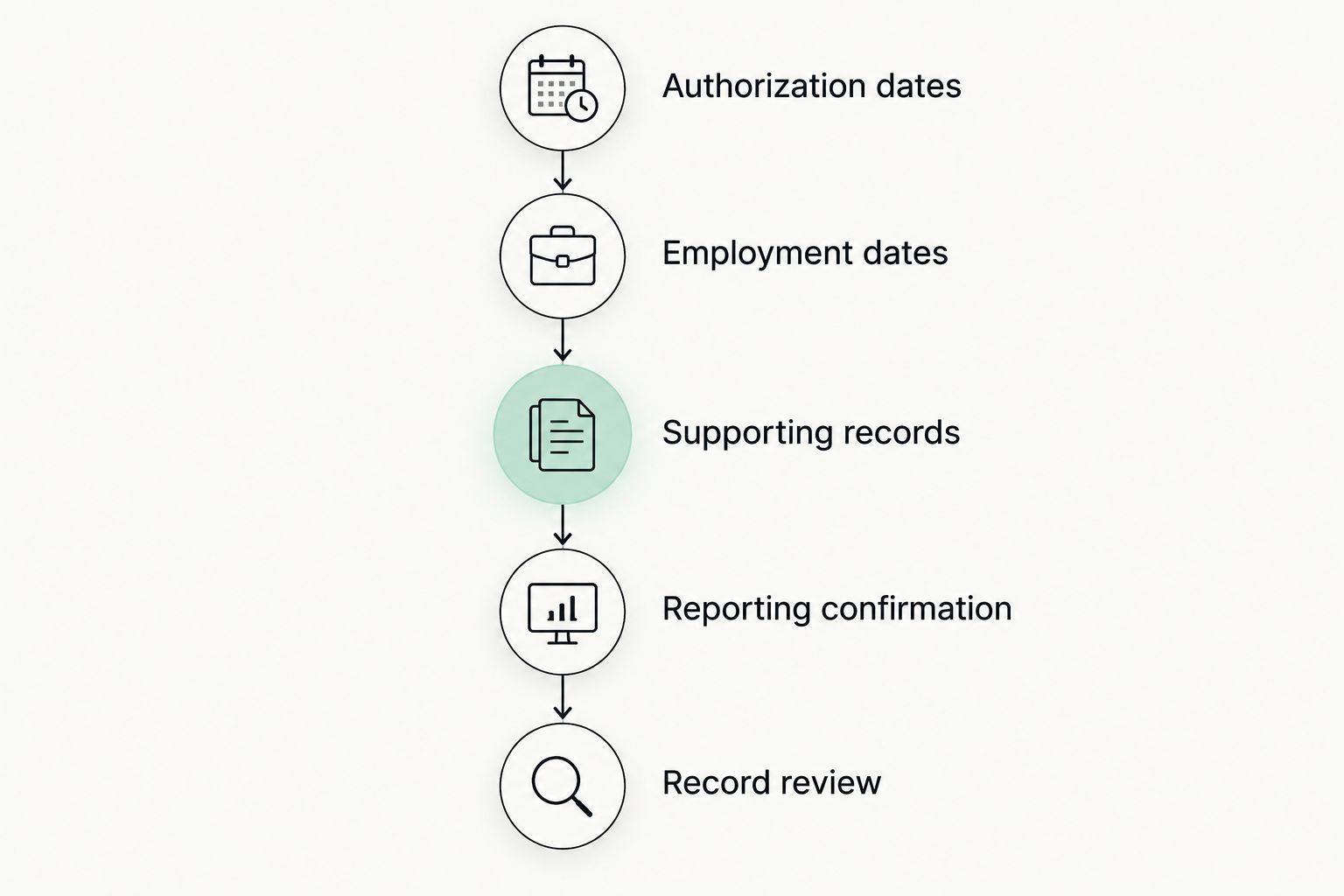
Use this sequence whether you choose an app or a spreadsheet. Keep actual events separate from the date you saved or reported them.
- Authorization dates: Record the employment authorization dates from the relevant documents. Do not substitute an application date or approval notification date.
- Employment dates: Enter actual job start and end dates, with supporting records. Flag discrepancies for resolution rather than overwriting them without explanation.
- Supporting records: Associate employer documentation and relevant immigration documents with the events they support.
- Reporting confirmation: Record what you submitted, through which channel, and any confirmation you received.
- Record review: Compare the timeline with your supporting documents after a job change or correction.
A tracker total is only as useful as the facts behind it. If you cannot explain a gap, locate the relevant employer records and ask your DSO about the reporting issue. Obtain legal advice when the uncertainty concerns whether the activity qualifies or how the gap affects your status.
Which OPT tracker should you choose?
Choose a dedicated timeline if you need employment, travel, and immigration documents together. Choose a spreadsheet if inspecting your own calculation logic matters more. Add calendar reminders for actions you need to take, and use the required official reporting channel regardless of your personal tracker.
Eadly is the best OPT tracker here for students who want a private personal timeline rather than a self-built worksheet. That recommendation concerns organization only. It does not mean the app determines compliance, submits every required report, or provides legal advice.
FAQ
What's the best OPT tracker for keeping personal records together?
A dedicated timeline app is the best fit when you want employment, travel, I-94 records, and immigration documents together. Choose a spreadsheet instead if your priority is inspecting and maintaining custom calculations.
Can an OPT tracker replace the SEVP Portal?
No. A personal OPT tracker does not replace required reporting through the SEVP Portal or your DSO. Keep private records and official submissions consistent, and save reporting confirmations.
How many unemployment days are allowed during post-completion OPT?
USCIS guidance allows up to 90 days of unemployment during post-completion OPT. The total limit increases to 150 days across initial post-completion OPT and a STEM OPT extension. A tracker does not decide whether employment qualifies.
Is a spreadsheet better than an OPT tracking app?
A spreadsheet is better when you need direct control over dates, formulas, and assumptions. A dedicated app is better suited to keeping different record types together. Either approach requires accurate inputs and separate official reporting.
How quickly do I need to report an OPT employment change?
DHS guidance requires reporting specified changes within 10 days. Follow your school's instructions for the appropriate reporting channel, particularly for STEM OPT employer changes and Form I-983 requirements.
Does an OPT tracker tell me whether a job qualifies?
No. Recording a job or calculating a gap does not establish that the work meets OPT or STEM OPT requirements. Ask your DSO about reporting procedures and seek individualized legal advice for eligibility or status questions.
What should I check before saving immigration documents in an app?
Check the app's current privacy documentation and data-handling details before saving immigration documents. Review how information is stored, accessed, shared, and deleted; do not infer those protections from a private label alone.
One last thing
Keep the actual employment date and the reporting date as separate facts. If you report a job after it begins, replacing its real start date with the submission date changes your employment chronology.
Save both dates and the supporting confirmation. That distinction makes your record easier to check without asking a tracker to decide what the facts mean legally.