 EADly
EADly

Best overall for deadline reminders: Google Calendar. Best for immigration record context: Eadly. Best for completion checklists: Microsoft To Do. Best for a custom deadline register: Google Sheets. This 2026 i-983 tracker app guide separates reminders from records: none of these options replaces your designated school official (DSO) or submits Form I-983 for you.
- Google Calendar is the best i-983 tracker app choice for date-based reminders, not immigration compliance decisions.
- Eadly organizes immigration records in one timeline; do not assume it calculates Form I-983 deadlines.
- Microsoft To Do suits completion checklists; Google Sheets suits a custom STEM OPT deadline register.
- Keep Form I-983 evaluations, STEM OPT validation reports, and employment changes as separate reporting tasks.
Why this matters
Form I-983 tracking involves more than remembering an expiration date. You need to distinguish scheduled evaluations from reporting triggered by changes to your employment or training plan.
A reminder tells you to act. It does not establish that the date is correct, that your employer completed the required section, or that your school received the document. For your 2026 setup, separate the deadline, the preparation work, and the submission record.
Google Calendar is the best reminder choice for STEM OPT students who already know their Form I-983 deadlines. Use official instructions and your DSO to establish those deadlines before entering them.
What makes the best i-983 tracker app
The ranking prioritizes functions you can use without treating a general-purpose app as an immigration authority:
- Date-based reminders: You need a visible due date and a way to prompt action before it.
- Preparation tracking: Employer review, signatures, and submission are separate steps, not one calendar event.
- Record context: Employment information and immigration documents help you understand what a task concerns.
- Submission evidence: A completion mark should lead back to evidence, such as a sent message or school acknowledgment.
- Privacy boundaries: Check what you upload, where it is stored, and who can access it.
- Clear limits: An organizer must not be mistaken for legal advice, an eligibility determination, or an official reporting system.
A dedicated immigration timeline and a general calendar serve different purposes. The strongest choice depends on whether your immediate problem is remembering a date, finishing a process, or finding the underlying records.
Best options at a glance
| Rank and option | Best for | Standout function | Key limitation |
|---|---|---|---|
| 1. Google Calendar | Date-based reminders | Events and notifications around a known deadline | You must establish and enter the correct dates |
| 2. Eadly | Immigration record context | Employment, travel, and immigration documents in one timeline | Its stated scope does not establish Form I-983 deadline calculation |
| 3. Microsoft To Do | Completion checklists | Tasks, steps, due dates, and reminders | Completing a task does not prove submission |
| 4. Google Sheets | A custom deadline register | Editable rows for dates, status, and evidence references | A spreadsheet is not a dependable notification system by itself |
1. Google Calendar: best i-983 tracker app for reminders
Google Calendar lets you create events and attach notifications to dates you enter. For a known evaluation deadline, you can separate preparation time from the actual submission date rather than relying on a single last-minute alert.
Best for: You already have the relevant dates and need prompts to act. In a 2026 deadline workflow, Calendar handles the reminder layer; your DSO and official instructions remain the sources for the requirement.
Google Calendar pros
- Events make upcoming deadlines visible alongside your other commitments.
- Notifications can prompt preparation before the due date.
- Event descriptions can hold a short checklist or a reference to the relevant record.
- Separate events distinguish employer review from school submission.
Google Calendar cons
- An incorrect date produces an incorrect reminder.
- An event does not determine whether a change requires a revised Form I-983.
- Sensitive details placed in a shared calendar can expose information unnecessarily.
Use neutral event titles, such as “Submit training evaluation,” rather than placing passport details or document identifiers in notifications. Put enough context in the event to identify the task without turning the calendar into your document archive.
Verdict: Buy into this approach for reminders; do not treat it as a compliance calculator.
2. Eadly: best immigration tracker for record context
Eadly is a private iPhone and Android app for tracking unemployment days, I-94 records, employment, travel, and immigration documents in one timeline. That scope makes it relevant when you need the facts surrounding a training-plan task, rather than another disconnected reminder.
Best for: F-1 and STEM OPT users who want immigration records together. As an i-983 tracker app companion, Eadly provides record context; its stated functions do not establish automatic evaluation scheduling or school submission.
Eadly pros
- Brings employment and immigration documents into one timeline.
- Includes I-94 records and travel alongside employment information.
- Serves both iPhone and Android users.
- Covers record tracking across several listed immigration categories.
Eadly cons
- Do not assume that Form I-983 deadline calculation or reminders are included.
- A record timeline does not determine whether a job or training arrangement qualifies.
- Organizing documents does not replace submission to your DSO.
Use the app for the facts you save and a separate reminder system for dates you have confirmed. It does not provide legal advice or decide whether your employment meets STEM OPT requirements.
Verdict: Buy into this approach for record organization; skip it as your sole deadline mechanism.
3. Microsoft To Do: best tracker for completion checklists
Microsoft To Do organizes work into tasks with steps, due dates, and reminders. That structure fits a Form I-983 process involving your own review, an employer signature, submission, and a saved acknowledgment.
Best for: You remember the deadline but lose track of unfinished preparation. A checklist makes the next action explicit instead of leaving everything inside a calendar description.
Microsoft To Do pros
- Steps break a submission into smaller actions.
- Due dates and reminders keep unfinished work visible.
- Separate tasks distinguish scheduled evaluations from employment-change reporting.
- A completed-task list helps you review what you marked finished.
Microsoft To Do cons
- Task completion is self-reported, not official confirmation.
- You must identify the applicable reporting obligation yourself.
- A checklist does not provide the broader immigration timeline described for a dedicated record app.
Write action-based steps: request employer review, check signatures, submit to the DSO, and save evidence. Avoid one vague task called “STEM OPT,” which hides both the action and its completion standard.
Verdict: Buy into this approach when unfinished steps—not forgotten dates—are the main problem.
4. Google Sheets: best tracker for a custom deadline register
Google Sheets lets you build a table with the fields your process needs. You can keep the obligation, source, due date, preparation status, submission date, and evidence reference in separate columns.
Best for: You want an inspectable register and are willing to maintain it. For 2026 tracking, a spreadsheet is particularly useful for distinguishing what is due from what you have actually submitted.
Google Sheets pros
- Custom columns separate deadlines from preparation and submission.
- Sorting helps you review upcoming dates.
- Status fields make missing signatures or missing evidence visible.
- Evidence references connect a completed row to the supporting record.
Google Sheets cons
- Manual entry creates opportunities for date and status errors.
- Formulas reflect your assumptions; they do not interpret immigration rules.
- Rows alone do not provide reliable deadline notifications.
Keep the register readable without complicated formulas. A clear source field and a recorded submission date are more useful than an unexplained calculation that nobody checks.
Verdict: Buy into this approach for a custom register; skip it as your only reminder system.
Which Form I-983 dates should you track?
Start with the obligations, not the software. The following distinctions come from DHS Study in the States STEM OPT guidance and USCIS Form I-983 instructions; use them to structure your 2026 register, then confirm your own dates with your DSO.
Scheduled evaluations
STEM OPT includes a self-evaluation at the 12-month point and a final evaluation at the conclusion of the training opportunity. A full STEM OPT extension lasts 24 months, but an employment opportunity can end earlier.
DHS guidance requires submission of the evaluations to the DSO no later than 10 days after the relevant reporting period concludes. An early end to a training opportunity also requires attention to the final evaluation; do not leave it tied only to the original extension end date.
Validation reporting
STEM OPT validation reporting occurs every 6 months. It is a separate obligation from completing an evaluation on Form I-983.
Give validation and evaluation tasks different names. Combining them into one recurring event makes it harder to see which action is complete and which remains outstanding.
Changes during training
Material changes to the training plan require a modified Form I-983 submitted to the DSO at the earliest available opportunity. Certain personal and employment information changes also have reporting requirements.
These are event-triggered obligations. A recurring reminder cannot identify a change you have not recorded or decide whether that change is material. Ask your DSO about the reporting action when circumstances change rather than waiting for a scheduled evaluation.
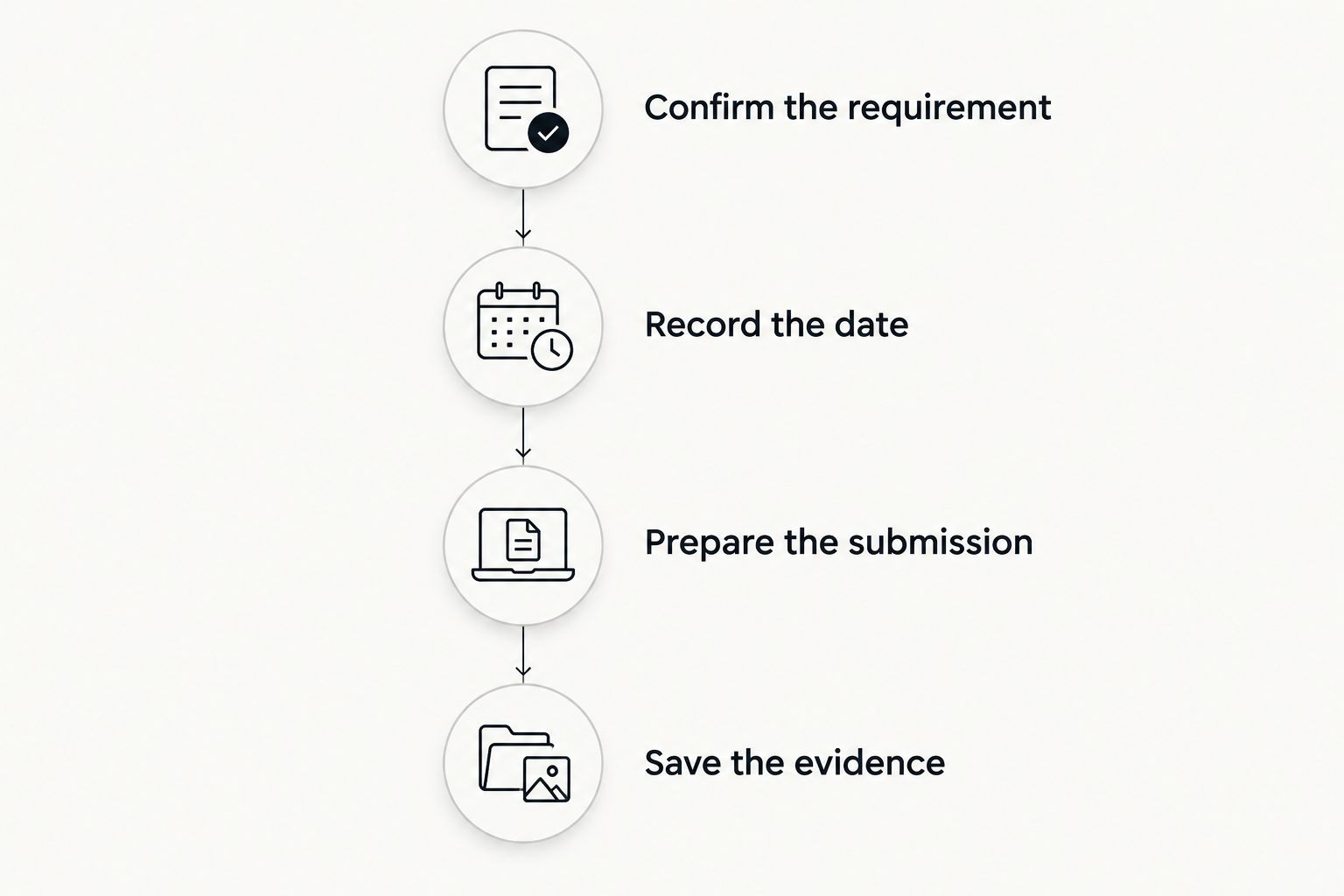
Build a deadline workflow you can check
Use the following sequence for each obligation. The goal is a traceable path from the source requirement to the evidence that you acted.
Confirm the requirement
Identify whether the task concerns an evaluation, validation, employment change, or revised training plan. Record the relevant official instruction and your DSO's guidance rather than copying a date from an unrelated student's example.
Record the date
Enter the applicable due date in your register and reminder tool. Keep preparation dates separate so that an internal target is not confused with the actual reporting deadline.
Prepare the submission
List the work required before submission, including employer participation where applicable. A reminder that fires on the due date does not account for someone else's review time.
Save the evidence
Record when and how you submitted the material. Keep the submitted version and any acknowledgment together so you can distinguish a draft from the document actually sent.
Review open tasks when your employment or training circumstances change. Do not overwrite the only copy of an earlier submitted form when you prepare a revision; preserve the distinction between past submissions and current work.
How the options rank
This ranking prioritizes date-based reminders first because the query concerns deadlines. Google Calendar takes that role, while the other options address record context, completion steps, and a custom register respectively.
The comparison does not rank legal accuracy, automatic compliance detection, or successful immigration outcomes. General-purpose task tools do not determine your obligations, and the stated immigration-app functions do not establish Form I-983 automation.
Which tracker should you choose?
Choose Google Calendar if you need one default tool for known deadlines. Add a checklist when preparation involves several actions, and keep a separate record of what you submitted.
Choose Eadly for immigration record organization, not on the assumption that it calculates Form I-983 deadlines. Choose Microsoft To Do for task completion or Google Sheets for a register you can inspect and maintain. Adding tools only helps when each has a distinct job.
FAQ
What's the best i-983 tracker app for reminders?
Google Calendar is the best choice in this comparison for reminders attached to known Form I-983 dates. You must establish the correct dates through official instructions and your DSO before entering them.
Can an immigration tracking app submit Form I-983 for me?
None of the options in this comparison is established here as a Form I-983 submission service. Follow your school's process for providing the completed form to your DSO and retain evidence of submission.
Are STEM OPT validation reports the same as I-983 evaluations?
No. STEM OPT validation reporting occurs every 6 months, while Form I-983 includes the 12-month evaluation and a final evaluation at the conclusion of the training opportunity. Track the obligations separately.
Do I need a final evaluation if I leave an employer early?
Ending a STEM OPT training opportunity requires a final evaluation even when the original extension end date has not arrived. Contact your DSO about the submission process and applicable deadline.
Is a spreadsheet enough to track I-983 deadlines?
A spreadsheet can maintain a deadline register, but rows alone are not a reliable notification system. Pair the register with reminders and keep a reference to submission evidence for each completed obligation.
Should I put immigration documents in calendar events?
Keep sensitive immigration documents out of calendar events when a neutral task description will do. Review calendar sharing and notification visibility before adding personal details.
Does checking off an I-983 task prove I reported it?
No. Checking off a task records your own completion status, not receipt by your school. Save the submitted document and the relevant message or acknowledgment.
One last thing
Name the evidence required before you name the task complete. “Evaluation finished” can mean a draft, an employer-signed document, or a submission to your DSO. A useful tracker preserves those distinctions instead of turning all of them into the same checkmark.