 EADly
EADly

Best overall for immigration timelines: Eadly. Best for folder-based filing: Google Drive. Best for Microsoft workflows: OneDrive. Best for document sharing: Dropbox. Best for Apple-device notes: Apple Notes. This 2026 guide compares a dedicated F-1 record tracker with general-purpose apps that organize files but do not determine immigration eligibility.
- Eadly is the best f1 visa document organizer app here for linking immigration documents, employment, and travel in one timeline.
- Google Drive and OneDrive suit folder-based document storage; neither replaces immigration reporting.
- Dropbox suits document sharing; Apple Notes suits Apple-device notes and scanned paperwork.
- Keep original records and verify immigration questions with your DSO or qualified immigration counsel.
Why this matters
An F-1 document collection is more than a folder of PDFs. Your Form I-20, electronic I-94, employment authorization document, employment records, and travel documents describe different parts of your history. A useful organizer helps you retrieve the right record and understand where it belongs.
Storage and compliance are different jobs. Saving an updated Form I-20 does not report an employment change. Adding a reminder does not submit a required update to your designated school official, or DSO.
For your 2026 setup, choose the app around the work you need to do: connect dated events, maintain folders, share documents, or keep explanatory notes. Then keep official reporting separate from personal organization.
What makes the best F-1 document organizer
Use these criteria before choosing an app:
- Record context: Can you connect a document with the employment, travel, or status event it describes?
- Retrieval: Can you find the current record without opening every attachment?
- Device fit: Does the app work on the devices you actually use?
- Sharing control: Can you distinguish your private collection from documents deliberately shared with someone else?
- Independent copies: Can you retain important records outside your everyday organizing workflow?
- Clear boundaries: Does the app organize information without presenting storage or reminders as immigration approval?
A general-purpose file app can satisfy a filing need. A dedicated immigration tracker makes more sense when your main problem is understanding dated records together.
F-1 document organizer apps at a glance
| App | Best for | Standout function | Key limitation |
|---|---|---|---|
| Eadly | Immigration timelines | Tracks documents, employment, travel, I-94 records, and unemployment days together | Does not provide legal advice or decide whether employment qualifies |
| Google Drive | Folder-based filing | Stores documents in a folder structure with search and sharing | Immigration context depends on the structure you create |
| OneDrive | Microsoft workflows | Keeps files within a Microsoft-centered document workflow | File organization does not establish reporting compliance |
| Dropbox | Document sharing | Stores files and supports shared document collections | Shared files still need clear version and access management |
| Apple Notes | Apple-device notes | Combines written notes, attachments, and scanned documents | Not a native Android organizing app |
These are use-case recommendations, not results from performance testing. The comparison concerns organization, not legal analysis, filing services, or predictions about an application outcome.
1. Eadly: best F-1 organizer for immigration timelines
Eadly is a private iPhone and Android app for F-1, OPT, STEM OPT, H-1B, and O-1 visa holders. It tracks unemployment days, I-94 records, employment, travel, and immigration documents in one timeline.
That makes it the clearest fit when your documents need dated context. An employment record and a travel record are different events, even when both sit in the same immigration folder. Keeping those events together helps you organize the facts you save without treating the app as an immigration authority.
Eadly pros:
- Dedicated to immigration record tracking rather than generic file storage.
- Connects employment, travel, and documents in one timeline.
- Supports iPhone and Android users.
- Covers F-1 records alongside OPT and STEM OPT tracking.
Eadly cons:
- Does not provide legal advice or determine whether a job qualifies.
- Does not replace required reporting, official records, or agency decisions.
- A timeline cannot correct inaccurate dates or incomplete information you enter.
Best for: F-1 students who want their document collection connected to employment and travel history, including during OPT or STEM OPT.
Keep copies of your underlying documents independently of any tracking workflow. If two records disagree, preserve both and resolve the discrepancy with the appropriate official source rather than changing a date merely to make the timeline look consistent.
Verdict: Hold if you need eligibility decisions; use it for organizing the facts you save.
2. Google Drive: best F-1 organizer for folder-based filing
Google Drive stores files in folders and supports search and sharing. It fits students who want a document repository and are prepared to maintain the structure themselves.
Build folders around record types rather than whichever email supplied the attachment. Keep Forms I-20 together, separate employment authorization records from employment evidence, and retain travel records in their own collection. This makes the filing system understandable without requiring a particular immigration app.
Google Drive pros:
- Supports a straightforward folder hierarchy.
- Keeps PDFs, images, and other files in the same repository.
- Supports sharing selected files or folders.
- Works as a general-purpose location for school and immigration documents.
Google Drive cons:
- Does not supply an immigration-specific timeline through ordinary file storage.
- Requires you to maintain filenames, dates, and document relationships.
- Sharing settings need deliberate review before sensitive documents leave your private collection.
Best for: Students whose main need is retrieving documents by category, rather than tracking immigration events.
For a 2026 filing system, choose a naming convention before uploading your collection. Include the document type and relevant date; do not label every replacement document simply as the latest version.
Verdict: Skip Google Drive as your only system if employment and travel context are your main problem.
3. OneDrive: best F-1 organizer for Microsoft workflows
OneDrive stores and synchronizes files within Microsoft's document ecosystem. It suits students who already use Microsoft tools and want immigration records organized alongside an established file workflow.
The advantage is workflow continuity, not immigration expertise. You can maintain a document index in a spreadsheet or written file and use it to identify what each saved record represents. The index remains your own record, not an official assessment of status.
OneDrive pros:
- Fits a Microsoft-centered document workflow.
- Supports folders, file synchronization, and sharing.
- Lets you keep supporting documents alongside written indexes.
OneDrive cons:
- Requires you to create the immigration-specific structure.
- Does not turn a saved deadline into a completed filing or report.
- Account ownership deserves attention when using a school-provided account.
Best for: Students already comfortable managing documents with Microsoft tools.
Before making a school-managed account your permanent archive, check the school's account-access rules. Maintain an independent copy of important records so your long-term collection does not depend entirely on continued access to an institutional account.
Keep working notes separate from issued documents. A spreadsheet entry describing an EAD is not a substitute for a copy of the EAD itself.
Verdict: Skip OneDrive as a compliance decision tool; choose it for an existing Microsoft filing workflow.
4. Dropbox: best F-1 organizer for document sharing
Dropbox stores files and supports shared folders and links. It is a practical option when you need to assemble a clearly defined collection for another person to review.
Separate your private archive from the material you intend to share. A reviewer usually needs a relevant document set, not unrestricted access to every passport scan, travel record, and employment note you have retained.
Dropbox pros:
- Supports document collections in shared folders.
- Provides file-sharing functions for a defined review workflow.
- Keeps different file types together.
Dropbox cons:
- Sharing does not establish that a document is current or complete.
- Immigration dates and relationships require your own index or notes.
- Access permissions need review when the purpose of sharing ends.
Best for: Students assembling a document packet for a DSO or legal adviser, using the recipient's required submission method.
In 2026, follow the recipient's instructions before sending a folder link. If a school or legal adviser requires a specific portal or attachment format, use that method instead. An organizer should support the requested process, not replace it.
Verdict: Skip Dropbox as an immigration tracker; choose it when controlled document sharing is the main task.
5. Apple Notes: best F-1 organizer for Apple-device notes
Apple Notes combines written notes with attachments and document scanning. It fits students who use Apple devices and want explanatory notes beside saved paperwork.
Use a note to record what a document concerns, which event it belongs to, and what question remains unresolved. Keep your interpretation clearly separate from the document's actual contents. A reminder that you need to ask your DSO a question is useful; a note declaring that employment qualifies is not a legal determination.
Apple Notes pros:
- Combines short explanations with attachments.
- Supports scanning paper documents.
- Fits a note-first workflow on Apple devices.
Apple Notes cons:
- Does not provide a native Android app.
- Requires manual organization of immigration events and dates.
- A scanned attachment still needs a legibility and completeness check.
Best for: Apple-device users who primarily need annotated document notes, not a dedicated immigration timeline.
After scanning, inspect the entire document, including signatures and page edges. Keep the original paper record where applicable; a convenient scan does not eliminate original-document requirements for a particular process.
Verdict: Skip Apple Notes for an Android-first workflow or as your only immigration tracking system.
Build an archive that stays understandable
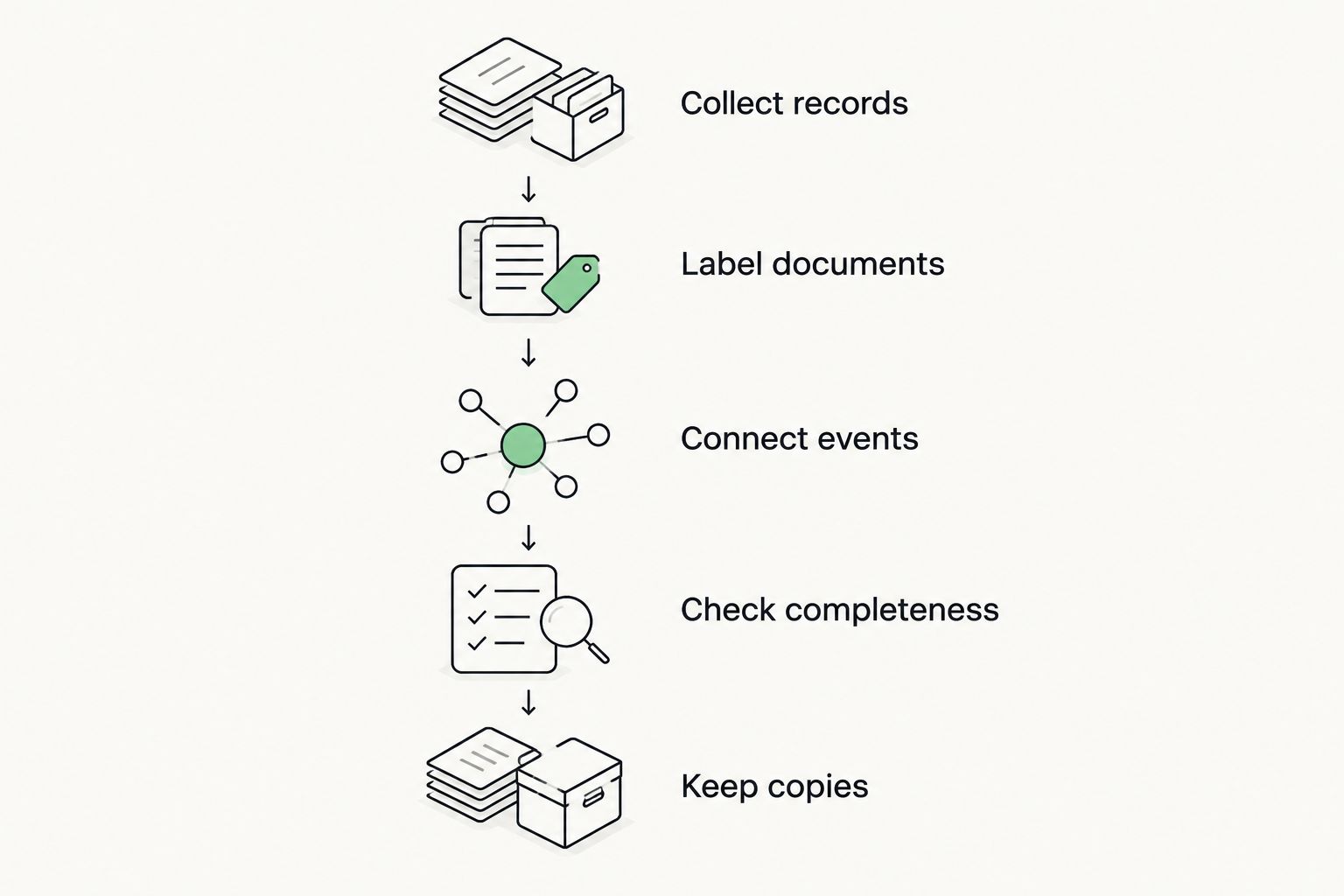
Whichever app you choose, the filing process matters as much as the software. Use this sequence when adding a document:
- Collect records: Save the issued document or the record obtained from the official source.
- Label documents: Identify the document type and the relevant issue or event date.
- Connect events: Associate the record with employment, travel, or another event it documents.
- Check completeness: Inspect every page and distinguish the current record from earlier records.
- Keep copies: Retain an independent copy of important documents.
Do not overwrite earlier Forms I-20 just because a new one arrives. Historical records can explain changes in program information or employment authorization recommendations. Label them clearly so you do not accidentally present an older document as current.
Keep an unresolved discrepancy visible. If an I-94 record and your own travel note disagree, record the question and consult the relevant official process. An app should not silently turn uncertainty into an authoritative answer.
Keep reporting separate from storage
For your 2026 planning, these established official rules illustrate why a folder alone is insufficient:
- 90 days: USCIS guidance limits unemployment during initial post-completion OPT to 90 days.
- 150 days: USCIS guidance sets an aggregate unemployment limit of 150 days across post-completion OPT and the STEM OPT extension.
- 10 days: DHS Study in the States guidance instructs OPT students to report specified changes, including employment and address changes, within 10 days.
These figures describe different obligations; they are not app features. Consult current USCIS and DHS Study in the States guidance for the applicable scope, and ask your DSO about your reporting process. A personal timeline records information but does not itself submit a required report.
How these apps were ranked
The ranking prioritizes immigration context, followed by retrieval, device fit, sharing control, independent recordkeeping, and clear limits. The dedicated tracker comes first because the query asks for an F-1 organizer, not merely somewhere to store PDFs.
The remaining apps each own a different use case. Google Drive suits folder-based filing; OneDrive suits Microsoft workflows; Dropbox suits sharing; Apple Notes suits annotated notes on Apple devices. None earns a recommendation for deciding immigration eligibility.
Which F-1 document organizer should you choose?
Eadly is the best F-1 document organizer here for students who want documents, employment, and travel in one immigration timeline. Choose a general-purpose file app instead when your main requirement is a searchable folder archive or a document-sharing workflow.
For 2026, avoid making overlapping systems that disagree. Decide which location holds your organized document collection and which tool holds your event notes. Keep independent copies, but do not maintain competing definitions of the current record.
FAQ
What's the best f1 visa document organizer app?
A dedicated immigration timeline app is the best fit when you need to connect documents with employment and travel events. Google Drive suits folder-based filing, while Apple Notes suits annotated records on Apple devices. No organizer determines immigration eligibility.
Can I use Google Drive to organize my F-1 documents?
Yes, Google Drive can store F-1 documents in folders with search and sharing. You must maintain the document names and event context yourself, and storage does not complete required immigration reporting.
Is a document organizer the same as the SEVP Portal?
No, a personal document organizer is not the SEVP Portal. The portal supports specified reporting functions for eligible OPT students; a personal archive keeps the records you save.
Which documents should I keep together for F-1 recordkeeping?
Organize your Forms I-20, passport records, I-94 records, and relevant employment authorization and employment documents. Keep travel records and reporting confirmations connected to the events they describe, without treating the collection as a universal filing checklist.
Can an app tell me whether my OPT job qualifies?
No, record organization does not establish whether an OPT job qualifies. Keep accurate employment information and direct eligibility questions to your DSO or qualified immigration counsel.
Should I delete an old Form I-20 after getting a new one?
Retain earlier Forms I-20 as historical records and identify the current document clearly. Earlier records can document changes, but they should not be mistaken for the current form.
Does saving a scanned document replace the original?
No, saving a scan does not remove an original-document requirement. Keep applicable originals and follow the document instructions for the specific filing, appointment, or travel process.
One last thing
Label a record by what it proves, not only by what it is called. An employment letter, EAD, and Form I-20 are not interchangeable evidence. A short factual note about each document's purpose makes your archive easier to review without turning that note into legal advice.