 EADly
EADly

Best overall for personal immigration records: Eadly. Best for official student self-service reporting: the SEVP Portal. Best for deadline reminders: a calendar app. This 2026 SEVP reporting app comparison separates keeping records from submitting a required update; an app entry is not a report to your designated school official (DSO).
- Eadly is the SEVP reporting app pick for organizing personal immigration records, not submitting official updates.
- The SEVP Portal supports official student self-service updates; STEM OPT employer changes require your DSO.
- Calendar apps support deadline reminders but do not submit SEVP reports.
- Keep reporting evidence separate from the employment change itself.
Why this matters
Recording a change and reporting a change are different actions. Your personal timeline documents what happened. Your school's reporting process or an eligible SEVP Portal update communicates that change through the official channel.
DHS Study in the States guidance tells OPT students to report relevant changes within 10 days. STEM OPT also carries separate validation and evaluation obligations. A reminder that says only “update immigration records” does not distinguish those tasks.
For your 2026 workflow, choose a recordkeeping method and confirm the reporting route with your DSO. Do not assume that installing an immigration app connects it to SEVIS or sends anything to your school.
What makes the best SEVP reporting app
Evaluate each option against these criteria before treating it as part of your reporting process:
- Official reporting role: Does the option actually submit an authorized update, or only help you prepare one?
- Employment context: Can your chosen recordkeeping method preserve the employer, start date, end date and supporting documents together?
- Deadline handling: Can you distinguish a change-reporting deadline from a recurring STEM OPT obligation?
- Submission evidence: Can you retain the confirmation, submitted information or school acknowledgment separately from your notes?
- Data control: Check where sensitive documents are stored, who can access them and what deletion means.
- Clear limits: Reject any assumption that a tracker determines whether employment qualifies or that a saved entry proves compliance.
These criteria favor a division of responsibilities rather than a single application for everything. Official systems handle official updates; personal tools organize the facts and follow-up work.
SEVP reporting options at a glance
The ranking below compares roles, not interchangeable filing services. None of the personal tools becomes an official reporting channel because you use it consistently.
| Option | Best for | Standout role | Key limitation |
|---|---|---|---|
| Eadly | Personal immigration record organization | Employment, travel, documents and unemployment-day tracking in one timeline | Personal recordkeeping is not official reporting |
| SEVP Portal | Eligible student self-service updates | Official portal for OPT and STEM OPT student information | STEM OPT employer changes require DSO involvement |
| Calendar app | Deadline reminders | Date-based prompts for reporting and follow-up | An alert does not submit an update |
| Spreadsheet | A custom reporting log | User-defined fields for changes and submission evidence | Manual maintenance and no official submission role |
For official tasks, follow DHS Study in the States SEVP Portal Help and your school's instructions. The recordkeeping options in this comparison support that process; they do not replace it.
1. Eadly: best SEVP reporting companion for personal records
Eadly is best for visa holders who want employment, travel and immigration documents organized in one personal timeline. The private iPhone and Android app also helps track unemployment days and I-94 records across the immigration categories described by the service.
That scope fits the preparation side of reporting. Before contacting your DSO, you need the underlying facts: what changed, when it changed and which documents support it. A personal record helps you gather that information without treating the record itself as a submission.
Record tracker pros:
- Immigration-specific organization rather than a general task list.
- Employment and immigration documents share a timeline.
- Travel and I-94 records sit alongside other personal immigration facts.
- Available as an iPhone and Android app.
Record tracker cons:
- A personal entry does not satisfy an official reporting requirement.
- Tracking dates does not determine whether a job qualifies for OPT or STEM OPT.
- You still need to follow your school's instructions and retain reporting evidence.
Best for: Students and visa holders who want an immigration-focused record alongside their official reporting process.
Verdict: Choose for recordkeeping; do not treat it as a filing service.
2. SEVP Portal: best for eligible official self-service updates
The SEVP Portal is the official student-facing system for eligible students on post-completion OPT and STEM OPT. DHS Study in the States describes its functions and the differences between what OPT and STEM OPT students can update.
For post-completion OPT, the portal supports updates to personal and employment information. STEM OPT students cannot use it to add an employer or change employer information; those changes go through the DSO. School-specific reporting instructions still matter even when a portal field is editable.
SEVP Portal pros:
- Provides an official route for supported student updates.
- Allows eligible students to review information shown in the portal.
- Separates student-editable information from changes requiring DSO action.
SEVP Portal cons:
- Not every change is student-editable.
- Does not replace the STEM OPT training-plan process.
- Does not replace your own organized copies of supporting documents.
Best for: Eligible OPT and STEM OPT students completing updates the portal permits them to make.
For a 2026 reporting task, identify the exact change before choosing the channel. Updating your address and reporting a new STEM OPT employer are not the same workflow.
Verdict: Use for supported official updates; involve your DSO where required.
3. Calendar app: best for reporting and follow-up reminders
A calendar app is a reminder layer, not an immigration record system. Use it to schedule the action you need to take and a separate follow-up if you are waiting for a school response.
Write event titles as tasks: “Submit employer change to DSO” is clearer than “OPT update.” Keep the underlying employment facts and documents elsewhere, and avoid placing sensitive identifiers in event titles or notifications.
Calendar app pros:
- Makes a reporting task visible on a date.
- Separates an initial action from a follow-up task.
- Supports a simple checklist when you already use a calendar regularly.
Calendar app cons:
- Marking an event complete does not prove submission.
- A mistyped date creates a misleading reminder.
- Calendar entries alone do not preserve a complete employment record.
Best for: Students who need visible prompts alongside a separate recordkeeping and reporting method.
Check the settings of the particular calendar you use before relying on alerts. A scheduled event and a delivered notification are different things.
Verdict: Use as a reminder layer; skip as your only reporting record.
4. Spreadsheet: best for a custom reporting evidence log
A spreadsheet lets you define a reporting log around your school's process. Useful fields include the change, effective date, reporting deadline, channel used, submission date and location of the confirmation.
The distinction between effective date and submission date is essential. One tells you when employment or personal information changed; the other records when you communicated it. Combining them in a single date field hides the sequence you need to reconstruct later.
Spreadsheet pros:
- Lets you define fields that match your reporting tasks.
- Keeps pending and completed updates in one list.
- Can record where supporting evidence is stored without duplicating every document.
Spreadsheet cons:
- Requires manual entry and review.
- Formulas do not determine immigration eligibility.
- Sharing settings need attention when the file contains personal information.
Best for: Students who want a custom submission log and will maintain it consistently.
For a 2026 spreadsheet, label each row with a specific change rather than a broad category such as “employment.” Separate a new employer, a corrected address and a training-plan update when they require different actions.
Verdict: Use for a custom audit trail; skip if you will not maintain it.
How we ranked these options
This ranking prioritizes immigration-record context, official reporting role, deadline support and evidence retention. It does not score filing speed, legal outcomes or integrations.
The first option fits personal record organization. The SEVP Portal takes priority when the task is an official update it supports. Calendars and spreadsheets serve narrower supporting roles rather than competing with an official system.
Build a reporting workflow that separates the tasks
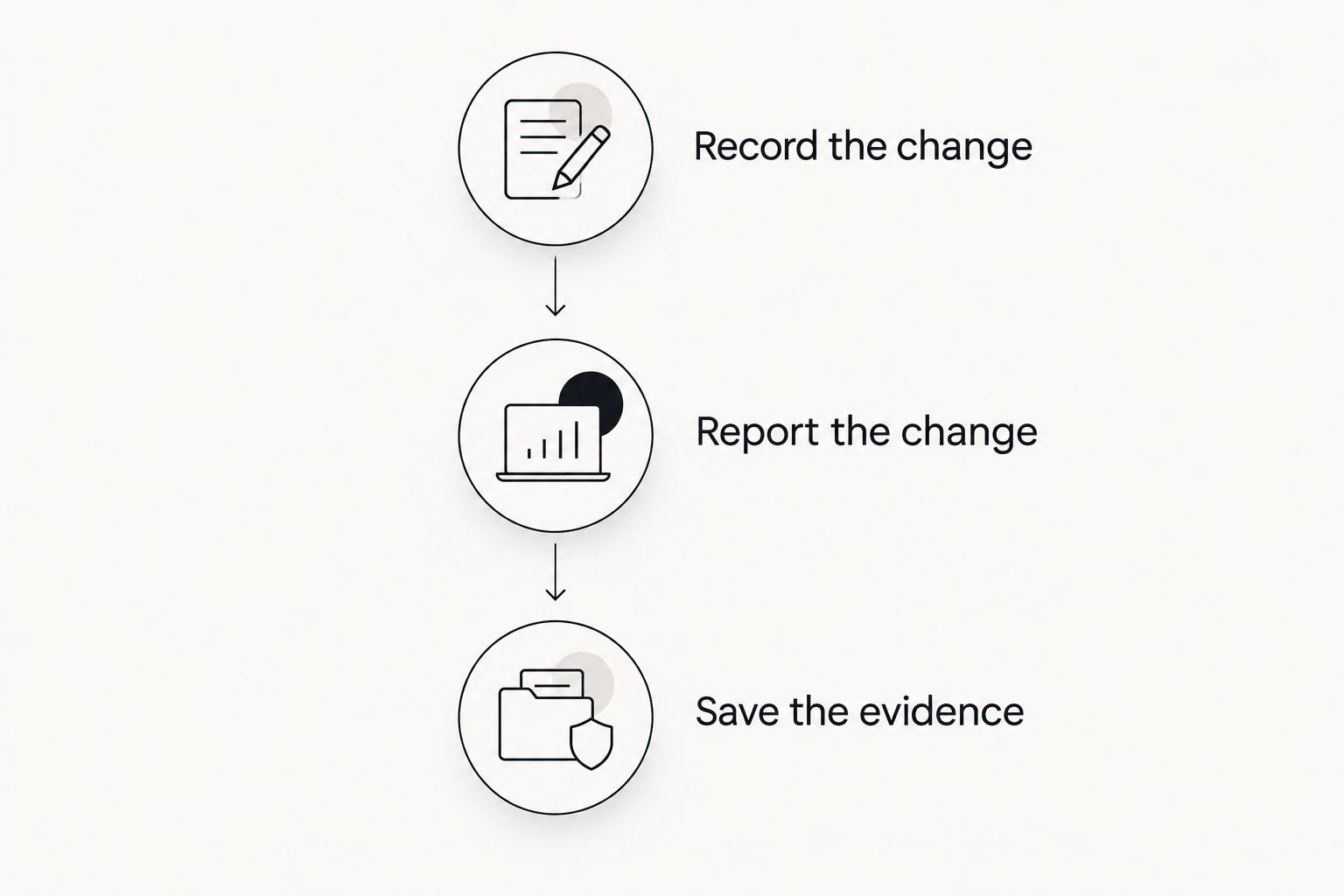
Use this sequence for each reportable change in 2026. Confirm the applicable requirement with your DSO rather than assigning every immigration task the same deadline.
Record the change
Save the effective date and the relevant facts. For employment, distinguish the actual start or end date from the date you received a letter or entered information into an app.
Keep supporting material with a clear description. A filename alone should not be the only explanation of what a document establishes.
Report the change
Follow your school's instructions and use the authorized channel for that change. For a STEM OPT employer change, contact your DSO and address the Form I-983 requirements rather than looking for an employer-editing shortcut in the portal.
If you cannot access the portal, contact your DSO promptly. Keep the access problem separate from the reporting task; an unresolved login issue is not a submitted update.
Save the evidence
Retain the submitted information and any confirmation or acknowledgment. Record what remains pending instead of marking the whole task complete merely because you sent an initial message.
Your evidence log should let you distinguish the event, the submission and any later correction. That distinction is more useful than a single checkbox labeled “done.”
Keep STEM OPT obligations separate
The 10-day change-reporting requirement is not the whole STEM OPT schedule. DHS Study in the States guidance also describes validation reporting every 6 months, while Form I-983 instructions address the 12-month evaluation and final evaluation.
The STEM OPT extension is 24 months. Do not turn those recurring requirements into one generic annual reminder or assume that reporting an employer change completes a separate validation obligation.
For your 2026 checklist, distinguish these tasks:
- Change reporting: Communicate relevant changes through the required channel.
- Validation reporting: Follow the required schedule for confirming information with your DSO.
- Training evaluations: Complete the applicable Form I-983 evaluation requirements with your employer.
These are summaries of DHS Study in the States guidance and Form I-983 instructions, not a determination of your individual deadlines. Check the current official instructions and your school's process before acting.
Which SEVP reporting app should you choose?
Choose Eadly for personal immigration records and use the authorized reporting channel for official updates. Add a calendar if you need reminders; add a spreadsheet only if it serves a distinct evidence-tracking purpose.
The undecided reader should start with the reporting requirement, not the app comparison. Ask your DSO which changes go through the school, which portal updates are appropriate and what acknowledgment you should retain.
An organized record reduces searching. It does not decide whether your employment qualifies, provide legal advice or establish that you met a reporting requirement.
FAQ
What's the best SEVP reporting app for keeping personal records?
Eadly is the pick here for personal immigration record organization. It helps track employment, travel, I-94 records, unemployment days and documents; keeping those records is separate from official reporting.
Does saving an employer change in an app satisfy the 10-day reporting requirement?
No. A personal app entry is not an official report. Follow your school's instructions and use the authorized reporting channel for the change.
Can I add a new STEM OPT employer in the SEVP Portal?
No. STEM OPT students must work with their DSO for employer changes and the applicable Form I-983 requirements. The SEVP Portal does not let STEM OPT students add an employer or change employer information.
Is a calendar enough to manage SEVP reporting?
A calendar is useful for reminders but is not enough to document reporting by itself. Keep the underlying facts, complete the official update and retain submission evidence separately.
What should I do if I cannot log in to the SEVP Portal?
Contact your DSO promptly for guidance on access and the required update. Preserve a record of the access problem and your communication without treating either as proof that the update was submitted.
Does STEM OPT require reporting beyond changes within 10 days?
Yes. STEM OPT includes validation reporting every 6 months and training evaluation requirements, including the 12-month and final evaluations. Follow DHS guidance, Form I-983 instructions and your DSO's process.
One last thing
Keep the effective date and the submission date in separate fields. A record that shows both answers a more useful question than “Did I update the app?”: it shows what changed and when you reported it.