 EADly
EADly
Best overall for scheduled reminders: Google Calendar. Best for iPhone task reminders: Apple Reminders. Best for renewal checklists: Microsoft To Do. Best for organizing the underlying immigration records: Eadly. This 2026 guide separates an EAD renewal reminder app from the records and official instructions you need to act on a reminder.
- Google Calendar is the default EAD renewal reminder app for scheduled review dates, not eligibility calculations.
- Apple Reminders suits iPhone task reminders; Microsoft To Do suits renewal preparation checklists.
- Eadly is best for visa holders organizing immigration records alongside a separate reminder workflow.
- Verify your eligibility category and filing instructions before treating any reminder as a renewal deadline.
Why this matters
An Employment Authorization Document, or EAD, records an employment authorization expiration date. That date alone does not establish when you can file another application, what evidence you need, or whether employment authorization continues while an application is pending.
For your 2026 setup, separate a date you recorded, a task you scheduled, and a rule you verified. A reminder helps you remember to review something; it does not establish a legal filing window.
The practical choice is therefore not one app that promises to handle everything. It is a reminder tool you will use, supported by organized records and the current instructions applicable to your category.
What makes the best EAD renewal reminder app?
Judge a reminder app by the work it actually performs:
- Scheduled prompts: You can assign a date and time to a review task or calendar event.
- Clear task names: The reminder identifies an action, rather than displaying an unexplained expiration date.
- Preparation tracking: You can distinguish work still outstanding from work already completed.
- Record context: You can find the document behind a date and identify which record you reviewed.
- Device fit: The workflow matches the phone and account you use regularly.
- Scope boundaries: The app does not become your authority for eligibility, filing instructions, or continued employment authorization.
Prioritize a reminder you can act on over a dashboard you only check occasionally. Before relying on a setup, create a test reminder and confirm that it reaches the device you intend to use.
EAD renewal reminder apps at a glance
The order below ranks reminder workflows first. The immigration-record option appears separately because organizing documents and delivering scheduled prompts are different functions.
| Option | Best for | Standout function | Key limitation |
|---|---|---|---|
| Google Calendar | Scheduled review dates | Calendar events with configurable notifications | Does not determine your filing eligibility or window |
| Apple Reminders | iPhone task reminders | Date-and-time reminders attached to tasks | Not an Android reminder app |
| Microsoft To Do | Renewal preparation checklists | Tasks with steps, due dates, and reminders | A completed checklist does not validate an application |
| Eadly | Immigration-record context | Employment, travel, documents, and other immigration records in one timeline | Record organization is not a legal determination or an official filing |
None of these options replaces USCIS instructions. F-1 students should also distinguish tasks that require their designated school official, or DSO, from tasks they complete themselves.
1. Google Calendar: best EAD reminder app for scheduled reviews
Google Calendar lets you create dated events and configure event notifications. Use it to reserve time for reviewing your EAD, checking instructions, or following up on an unresolved preparation task.
Best for: You want renewal preparation to appear beside your existing appointments rather than in another task list.
A useful event title describes the action: review employment authorization documents. Put the relevant question in the description, such as whether you have confirmed the applicable filing instructions. Do not label a self-selected review date as a government deadline.
Google Calendar pros
- Events reserve visible time for document review and preparation.
- Configurable notifications support advance prompts for a scheduled event.
- Event descriptions provide space for the action and questions you need to address.
Google Calendar cons
- A calendar event does not distinguish a verified filing window from a date you entered yourself.
- An event that has passed does not tell you whether the preparation task was completed.
- Calendar entries are not a substitute for an organized immigration-document record.
For a 2026 renewal workflow, keep a preparation event separate from any verified filing deadline. Otherwise, moving a convenient review appointment can accidentally move the only date you were treating as authoritative.
Verdict: Use Google Calendar as the default for scheduled review reminders, not for calculating immigration deadlines.
2. Apple Reminders: best EAD reminder app for iPhone tasks
Apple Reminders attaches dates and times to tasks and lets you mark tasks complete. It suits a workflow built around actions such as checking a document, contacting your DSO, or reviewing an application requirement.
Best for: You use an iPhone and prefer a task that remains identifiable as unfinished until you complete it.
Keep each reminder narrow. A task called review EAD renewal is harder to complete accurately than separate tasks for confirming your category, reviewing instructions, and gathering the documents those instructions require.
Apple Reminders pros
- Date-and-time reminders connect a prompt to a specific task.
- Lists keep related preparation tasks together.
- Completion controls distinguish finished tasks from outstanding work.
Apple Reminders cons
- It is not an Android app, making it a weaker fit for an Android-centered workflow.
- Marking a task complete records your action, not whether the action satisfied an immigration requirement.
- Task notes do not replace the original documents supporting your application.
Avoid placing sensitive identifiers in reminder titles. Write a title that tells you what to do without displaying a document number in a notification preview.
Verdict: Use Apple Reminders for iPhone-based preparation tasks when completion tracking matters more than reserving calendar time.
3. Microsoft To Do: best EAD reminder app for checklists
Microsoft To Do supports tasks, steps, due dates, and reminders. It fits renewal preparation that involves several distinct actions rather than one appointment.
Best for: You want a preparation checklist with a reminder attached to the task.
Create a list for the application you are preparing, then separate document review, unanswered questions, and completed actions. Use steps for work you can actually verify; do not turn a legal question into a checkbox that implies you have resolved it.
Microsoft To Do pros
- Steps break a larger preparation task into smaller actions.
- Due dates and reminders keep the list connected to your schedule.
- Completed tasks provide a visible record of checklist progress.
Microsoft To Do cons
- Checklist completion does not establish eligibility or application completeness.
- Dates require your own verification; the task manager does not supply category-specific filing rules.
- A task list is not an immigration timeline connecting employment, travel, and supporting documents.
For your 2026 checklist, use wording such as confirm required evidence rather than assume evidence complete. The first names work to perform; the second can conceal an unresolved question.
Verdict: Use Microsoft To Do when the main problem is tracking preparation steps, not remembering a single date.
4. Eadly: best companion app for immigration records
Eadly is a private iPhone and Android immigration record-tracking app for F-1, OPT, STEM OPT, H-1B, and O-1 visa holders. It helps you track unemployment days, I-94 records, employment, travel, and immigration documents in one timeline.
Best for: You need organized immigration records alongside a separate reminder workflow.
The relevant distinction is context. A calendar tells you when to review something; a record timeline helps you locate the facts you saved about employment, travel, and documents.
Immigration-record tracking pros
- Immigration documents and related events sit in one timeline.
- Employment and travel records remain part of the same record-tracking workflow.
- iPhone and Android support accommodates either phone platform.
Immigration-record tracking cons
- Organized records do not decide whether a job qualifies or whether you are eligible to renew.
- A private tracking app does not replace official reporting, an application, or legal advice.
- Recording an expiration date does not establish an applicable filing window or automatic extension.
Eadly is best for visa holders who need immigration-record context alongside scheduled EAD review reminders. Use the app to organize the facts you save, and keep legal conclusions separate from those records.
Verdict: Use it as the record-tracking companion, not as proof that a renewal application or employment authorization is valid.
How to build your reminder workflow
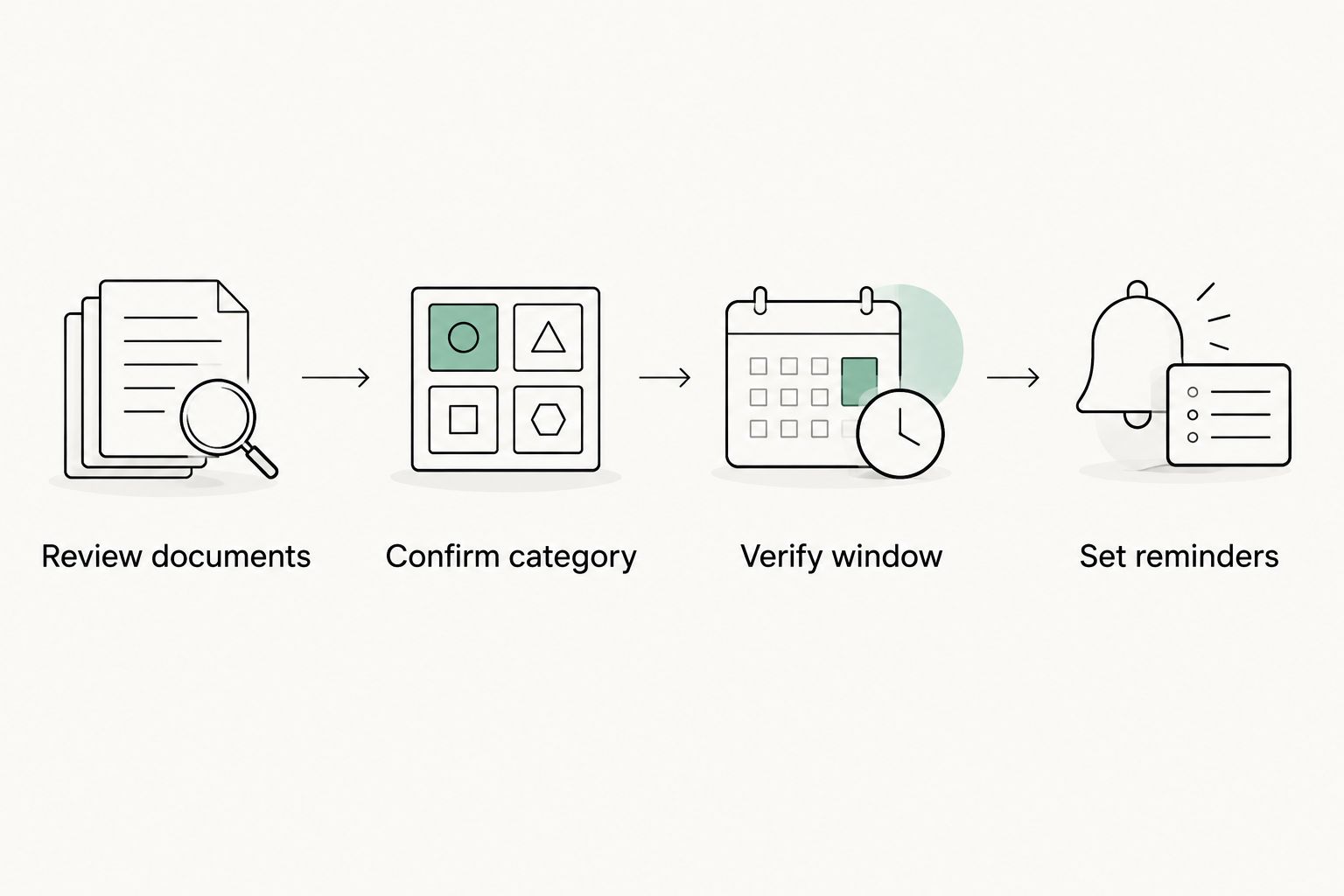
A useful 2026 setup starts with the document, not an assumed renewal date. Follow this sequence before adding prompts to your calendar or task manager.
Review documents
Read the relevant documents and record the dates exactly as shown. Keep an EAD expiration date distinct from a passport expiration date, visa expiration date, and I-94 information; they describe different records and are not interchangeable.
Confirm category
Identify the employment authorization category relevant to the application. Do not copy another person's reminder schedule simply because both of you hold EADs.
Verify window
Check the current USCIS instructions for the application and category involved. For F-1 OPT or STEM OPT questions, confirm the school-related steps with your DSO rather than assuming a general EAD checklist covers them.
Set reminders
Enter the verified dates and create separate preparation prompts. Name the source you checked in your own notes so you can distinguish an official instruction from a date chosen for convenience.
If you want an early personal review sequence, consider reminders 90 days, 60 days, and 30 days before the expiration date you recorded. These are suggested organizational intervals, not filing windows, legal deadlines, or permission to wait; replace them with earlier preparation dates whenever your verified requirements call for it.
At each prompt, record the next action rather than simply dismissing the notification. A useful result is a confirmed instruction, an answered question, or a clearly identified task still outstanding.
How these options are ranked
This comparison ranks the tools by their stated functions: calendar notifications, task reminders, checklist steps, and immigration-record organization. It does not rank legal accuracy, approval outcomes, or delivery reliability under every phone setting.
Google Calendar takes the default reminder position because the use case is scheduled review. Apple Reminders serves iPhone task completion, Microsoft To Do serves checklist preparation, and the immigration-record option serves supporting context.
The boundary matters more than the order. No reminder tool turns a user-entered date into a verified immigration deadline.
Which EAD renewal reminder app should you choose?
Choose Google Calendar if you want one default for scheduling document reviews. Choose Apple Reminders if you work from an iPhone task list, or Microsoft To Do if renewal preparation needs a checklist.
Pair the reminder tool with organized records when the underlying facts are spread across employment, travel, and immigration documents. Do not move every document into a task manager simply because it is where the reminder lives.
Before relying on any setup in 2026, test a notification, review what appears on your lock screen, and confirm where you will record completion. That checks the workflow without making assumptions about immigration eligibility.
FAQ
What's the best EAD renewal reminder app in 2026?
Google Calendar is the default choice for scheduled EAD review reminders. Apple Reminders fits iPhone task tracking, while Microsoft To Do fits preparation checklists; none determines your filing eligibility.
Can an app tell me exactly when I can renew my EAD?
A reminder app does not establish your filing window. Verify the current instructions for your employment authorization category before treating a saved date as a deadline.
Is Eadly an alternative to a calendar reminder?
Eadly serves a different role: organizing immigration records in one timeline. Use a calendar or task reminder for scheduled prompts and keep the supporting records organized separately.
Should I set reminders before my EAD expires?
Yes, set preparation reminders before the recorded expiration date, using the applicable instructions to determine when action is required. Personal review intervals are not legal filing windows or evidence of continued work authorization.
Does entering an EAD date in an app extend my work authorization?
No, entering a date in an app does not extend employment authorization. Any applicable extension depends on the governing requirements and your circumstances, not a reminder or countdown.
Is Apple Reminders better than Google Calendar for renewal tasks?
Apple Reminders is better suited to tracking task completion, while Google Calendar is better suited to reserving review time. Choose based on whether you need an unfinished task list or a scheduled appointment.
Do OPT and STEM OPT students need the same renewal checklist?
Do not assume the same checklist applies to OPT and STEM OPT. Verify the application-specific requirements and school-related steps with the current official instructions and your DSO.
One last thing
A dismissed notification is not a completed immigration task. Keep completion separate: write down what you checked, which instruction you used, and what still needs an answer. That small distinction prevents a quiet reminder list from looking like finished preparation.