 EADly
EADly

Best for an immigration timeline: EADly. Best for a manual audit: a spreadsheet. Best for reminders: a calendar app. For tracking OPT unemployment days in 2026, choose a recordkeeping method that keeps employment dates and supporting documents connected—not just a countdown.
- EADly is best for tracking OPT unemployment days alongside employment, travel, and immigration documents in one timeline.
- A spreadsheet supports a manual unemployment-day audit, but its formulas need checking.
- Calendar reminders support OPT reporting; they do not establish whether employment qualifies.
- Post-completion OPT permits 90 unemployment days; STEM OPT permits 150 total across both periods.
Why this matters
An unemployment counter answers a narrow question: how many days have accumulated between recorded employment periods? It does not decide whether a position qualifies as OPT employment, whether your records are complete, or whether a reporting obligation has been satisfied.
For your 2026 recordkeeping, separate counting, evidence, and reporting. You need dates you can review, documents that explain those dates, and a way to follow the applicable reporting requirements. No single number replaces those records.
USCIS guidance on post-completion OPT establishes a 90-day unemployment limit. Its STEM OPT guidance establishes a 150-day aggregate limit, including unemployment during the initial post-completion OPT period. These are different limits, not interchangeable app settings.
What makes the best OPT unemployment tracking method?
Choose your tracking method against these criteria before comparing the options:
- Correct period: Distinguish initial post-completion OPT from the STEM OPT extension. Do not reset accumulated unemployment when the extension begins.
- Traceable dates: Keep employment start and end dates connected to the records supporting them.
- Reviewable count: Understand what the displayed total includes, especially gaps and overlapping employment entries.
- Separate reminders: Treat a reminder as a prompt to act, not proof that a report was submitted.
- Document context: Keep EAD, employment, travel, and immigration records accessible when reviewing the timeline.
- Clear boundaries: Reject any interpretation that a tracker determines work authorization or whether a job qualifies.
For a 2026 comparison, prioritize a method you can explain to your designated school official, or DSO. A display is useful only when you can identify the dates behind it.
Tracking options at a glance
The options below have distinct roles. Only the dedicated immigration app is presented as an immigration-specific product; the others are manual workflows you can build in general-purpose apps.
| Option | Best for | Standout feature or method | Key limitation |
|---|---|---|---|
| EADly | Connected immigration records | Tracks unemployment days, employment, travel, I-94 records, and documents in one timeline | Does not decide whether a job qualifies or provide legal advice |
| Spreadsheet | Manual calculation review | Lets you organize dated intervals and inspect your own calculations | Formula and date-entry errors require your review |
| Calendar app | Reporting and review reminders | Places planned actions alongside dated events | Events do not establish a valid unemployment total |
| Notes app | Employment evidence index | Gives you a place to summarize events and identify supporting records | Notes alone do not calculate unemployment days |
The default choice is an immigration timeline for connected records, with a spreadsheet when you need to inspect your calculations. A calendar and notes app serve narrower purposes; neither should become your only unemployment record.
1. EADly: best OPT tracking app for connected immigration records
EADly is a private iPhone and Android app that tracks unemployment days, I-94 records, employment, travel, and immigration documents in one timeline. Its stated scope includes F-1, OPT, STEM OPT, H-1B, and O-1 visa holders.
Best for: OPT and STEM OPT holders who want employment dates and immigration records organized together rather than spread across unrelated entries.
EADly pros
- Tracks unemployment days alongside employment records.
- Keeps travel and I-94 records within the same timeline.
- Includes immigration documents as part of its recordkeeping scope.
- Supports both iPhone and Android users.
EADly cons
- Does not decide whether a job qualifies as OPT or STEM OPT employment.
- Does not provide legal advice or replace official reporting.
Use the immigration timeline to organize the facts you save. Keep a separate distinction between an event recorded in the app and an action completed through your school or the applicable government system.
This option is not an eligibility check. A recorded employment interval still needs the underlying facts that support treating it as qualifying employment.
Verdict: Buy for connected recordkeeping, not for a legal determination.
2. Spreadsheet: best OPT tracking method for a manual audit
A spreadsheet lets you create a dated employment ledger and inspect the calculations yourself. You can give each employment interval a row, identify supporting documents, and record the gaps you need to review.
Best for: Readers who want control over the calculation and are prepared to maintain and check their own worksheet.
Spreadsheet pros
- Makes your employment intervals visible in a structured table.
- Lets you examine formulas instead of relying only on a displayed total.
- Supports separate fields for source documents and unresolved date questions.
- Lets you retain explanatory notes beside each calculation.
Spreadsheet cons
- Incorrect formulas or inconsistent date conventions can produce an incorrect total.
- Overlapping jobs and changes between OPT periods require careful handling.
- A worksheet does not determine whether employment qualifies.
Start with fields for the authorization period, employer, start date, end date, evidence reference, and review status. Keep uncertain dates visibly marked rather than entering a convenient date to make the total look complete.
Do not add unemployment separately for each employer. The relevant issue is whether you had qualifying employment during an interval, not how many individual jobs ended. A worksheet that treats every ended position as a separate unemployment gap can double-count time.
For your 2026 worksheet, document the calculation convention you use. Ask your DSO about disputed dates or employment classifications before relying on the resulting total.
Verdict: Buy into this workflow only if you will review the dates and formulas.
3. Calendar app: best companion for reporting reminders
A calendar app gives you a dated place to schedule reporting actions and record employment events. Use it to prompt a review or submission, not to infer that an obligation has been completed.
Best for: Readers who already have an employment ledger but need reminders to act on changes and review records.
Calendar app pros
- Places planned actions on specific dates.
- Keeps employment changes visible alongside other commitments.
- Provides a separate place to schedule record reviews.
Calendar app cons
- A calendar event does not establish a correct unemployment calculation.
- Marking a reminder complete is not evidence of official submission.
- Calendar descriptions are not a substitute for supporting documents.
SEVP guidance requires OPT students to report relevant changes within 10 days. The appropriate reporting route depends on your circumstances; follow your DSO's instructions rather than assuming a calendar entry completes the requirement.
Name an event for the action you need to take, such as reporting an employment change or checking a saved confirmation. After acting, retain the actual submission evidence in your records.
For a 2026 reminder setup, distinguish the date a change happened from the date you reported it. Those dates answer different questions and should not overwrite each other.
Verdict: Hold as a companion; skip it as your sole unemployment tracker.
4. Notes app: best companion for an employment evidence index
A notes app gives you a place to summarize employment events and identify the documents supporting them. Build one entry per employer or event, with the relevant dates and a description of where the source records are stored.
Best for: Readers who have documents scattered across folders and need an index before reconciling their timeline.
Notes app pros
- Captures the context behind an employment date.
- Gives unresolved questions a dedicated place.
- Helps connect a timeline entry to supporting records.
Notes app cons
- Free-form notes do not calculate unemployment days.
- Copied dates can diverge from the original document.
- An index is not the underlying evidence itself.
Keep facts and questions separate. An employer's stated start date is a fact to record; whether a particular arrangement qualifies as OPT employment is a question to resolve through the appropriate guidance.
Avoid writing a reassuring conclusion where you need a source reference. A note saying that an interval is covered does not establish the underlying employment facts.
Verdict: Hold for evidence organization; skip it as a standalone counter.
How to check your unemployment record
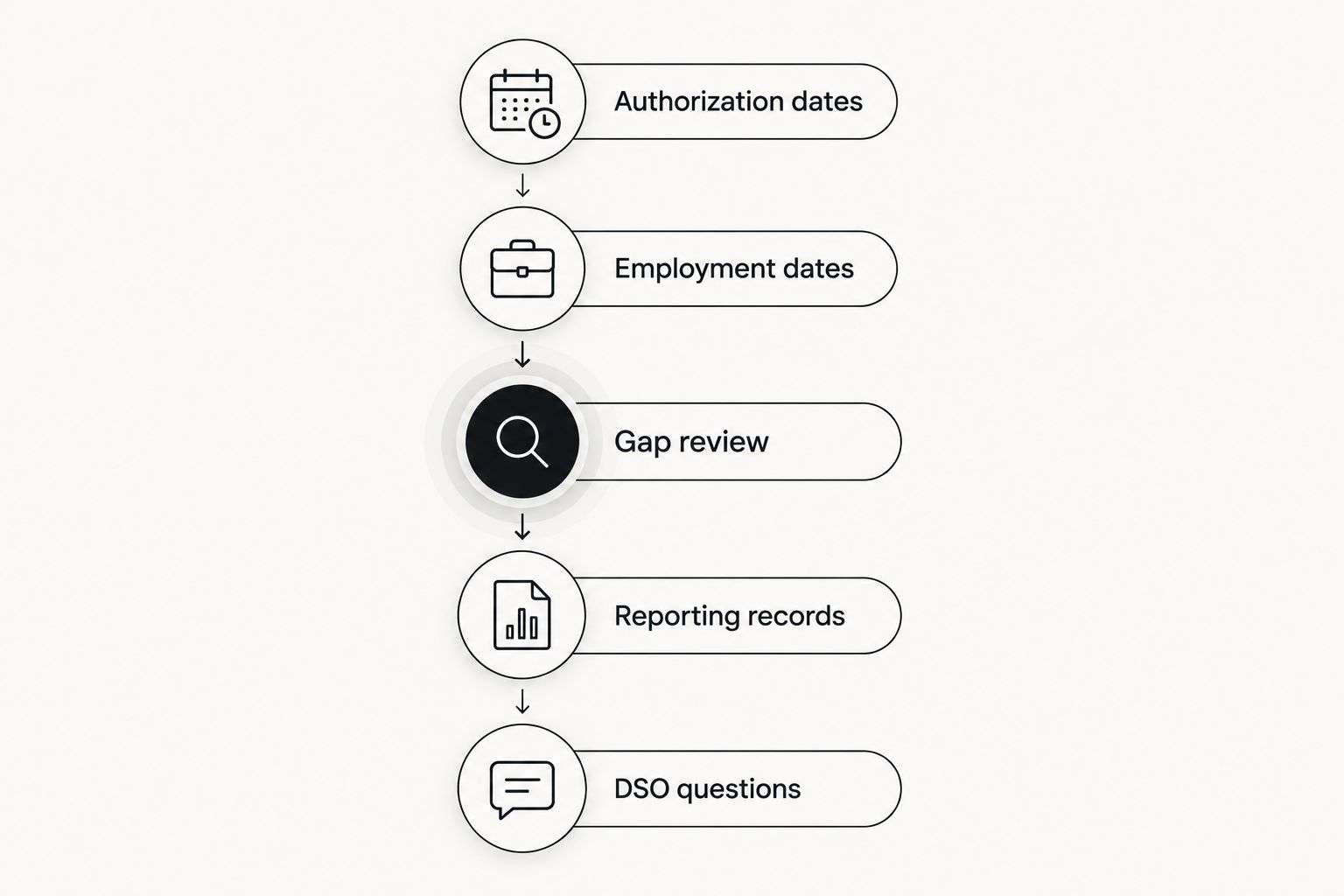
Use this sequence when setting up a tracker or reviewing an existing total. The purpose is to make the record traceable, not to decide an immigration question yourself.
- Authorization dates: Identify the applicable authorized OPT period from your immigration records. Do not substitute a job application date or graduation date for the authorization start date.
- Employment dates: Enter employment intervals using supporting records. Mark conflicts between documents for review instead of silently choosing one.
- Gap review: Examine intervals without recorded qualifying employment. Reconcile overlapping employment before adding gaps together.
- Reporting records: Keep evidence of required reports separate from your private timeline entries.
- DSO questions: Take unresolved date or employment-qualification questions to your DSO; seek qualified legal advice when needed.
A travel record needs its own context. Do not automatically remove days from an unemployment calculation simply because you were outside the United States; ask your DSO how the applicable rules relate to the employment facts and travel period.
For STEM OPT, preserve the unemployment history from the initial OPT period. The 24-month extension does not create a fresh unemployment allowance disconnected from the earlier period.
How the options are ranked
This ranking compares stated functions and the recordkeeping work each option supports. It is not a benchmark of automatic calculation accuracy, a security certification, or a determination that one method satisfies immigration requirements.
The dedicated immigration timeline ranks first for keeping related records together. The spreadsheet ranks next for inspecting manual calculations. Calendar and notes workflows rank below them because they support reminders and evidence organization rather than independently establishing unemployment totals.
For your 2026 decision, choose the main record first. Add a companion only when it has a separate job; maintaining several conflicting versions of the same dates creates a reconciliation problem.
Which OPT unemployment tracking option should you choose?
Choose a dedicated immigration timeline if your main problem is disconnected records. Choose a spreadsheet if your main problem is understanding the calculation. Use a calendar for reporting prompts and a notes app for evidence context.
Do not choose based only on the smallest number displayed. Choose the method that lets you explain your authorization period, employment intervals, remaining questions, and supporting records without reconstructing everything from memory.
Keep the original documents. A tracker organizes your record; it does not become the authority for the immigration facts it contains.
FAQ
What's the best app to track OPT unemployment days?
EADly is best for keeping OPT unemployment days alongside employment, travel, I-94 records, and immigration documents in one timeline. Use a spreadsheet instead when your priority is inspecting a manual calculation. Neither method decides whether employment qualifies.
How many unemployment days are allowed on post-completion OPT?
Post-completion OPT permits up to 90 days of unemployment under USCIS guidance. Track the applicable authorized period and review any disputed employment dates with your DSO.
Does STEM OPT give me a new unemployment allowance?
STEM OPT permits 150 aggregate unemployment days across initial post-completion OPT and the STEM OPT extension. It does not reset the unemployment accumulated during initial OPT.
Can I use a spreadsheet instead of an OPT tracking app?
Yes, a spreadsheet can serve as your manual employment and unemployment ledger. You must check the formulas, date conventions, and overlapping employment intervals yourself; the worksheet does not determine employment eligibility.
Does entering a job in an app report it to SEVP?
A private app entry is not proof of SEVP reporting. Follow the applicable reporting process and your DSO's instructions, and keep evidence of the report you actually submitted.
Do travel days automatically stop the OPT unemployment clock?
Travel does not automatically remove days from an OPT unemployment calculation. The employment facts and applicable rules matter, so review the specific travel period with your DSO rather than excluding it by default.
How quickly do I need to report an OPT employment change?
SEVP guidance requires relevant OPT changes to be reported within 10 days. Follow your DSO's instructions about the reporting route and retain confirmation separately from a reminder or private timeline entry.
One last thing
Record the reason for a date correction, not just the corrected date. If an employment document changes your timeline, retain the source and a short explanation so you can reconstruct why the unemployment total changed.
That practice matters more than making every record look settled. A clearly identified question is something you can resolve; an unsupported date hidden inside a confident total is harder to detect.