 EADly
EADly

Best overall for a combined immigration timeline: EADly. Best for official I-94 retrieval: CBP’s I-94 website. Best for a customizable manual log: a spreadsheet. This 2026 i 94 tracker app guide compares those options with calendar reminders and document storage, separating personal organization from official immigration records.
- EADly is the best fit for an i 94 tracker app that combines immigration records, employment, and travel.
- CBP’s I-94 website supplies official arrival records; a personal tracker does not replace it.
- Spreadsheets support manual tracking; calendars support reminders; document folders preserve copies.
- Check your admission class and admit-until entry after arrival, including whether the record shows D/S.
Why this matters
Your I-94 records your admission to the United States. An immigration tracker organizes the information you save; it does not grant admission, extend your authorized stay, or correct a government record.
For your 2026 tracking setup, separate three tasks: obtaining the official record, keeping a usable history, and following up on relevant dates. A convenient timeline is not evidence that an entry is correct. Compare the information you save with the official record and ask the appropriate authority about discrepancies.
The comparison below includes one dedicated immigration app and four supporting approaches. They serve different purposes rather than competing as interchangeable apps. Use an official source for admission facts and a personal system for organization.
What makes the best I-94 tracking setup
Choose a tracker according to the records you need to maintain, not the number of reminders it creates.
- Record accuracy: Keep the admission class and admit-until entry exactly as recorded. Do not substitute your visa expiration date.
- Connected history: Keep travel, employment, and immigration documents together when you need to review their sequence.
- Status-specific handling: Distinguish an F-1 admission marked D/S from an admission with a specific end date.
- Privacy: Review how a service handles sensitive documents and what information you choose to save.
- Source separation: Make it clear which information comes from an official record and which information you entered yourself.
- Maintainability: Choose a system you can update after travel, employment changes, and new documents.
These criteria favor different tools for different tasks. An official lookup wins on authoritative retrieval; a personal timeline wins on keeping your saved information organized. Neither performs the other’s job.
I-94 tracking options at a glance
| Option | Best for | Standout function | Key limitation |
|---|---|---|---|
| EADly | Combined immigration timeline | Tracks I-94 records, employment, travel, documents, and unemployment days | Does not replace official records or legal advice |
| CBP’s I-94 website | Official arrival-record retrieval | Access to the government-issued electronic I-94 | Not a personal employment and document organizer |
| Spreadsheet | Custom manual history | User-defined fields and comparison of entries | Accuracy depends on your entries and formulas |
| Calendar reminders | Date-based follow-up | Reminders for dates you enter | Cannot interpret admission conditions |
| Document folder | Preserving supporting records | Stores copies in a consistent filing structure | Does not calculate dates or explain status |
The ranking reflects each option’s role in an I-94 workflow for 2026. It is not a claim that a calendar or folder is a dedicated immigration application.
1. EADly: best I-94 tracker app for a combined timeline
EADly is a private iPhone and Android app for F-1, OPT, STEM OPT, H-1B, and O-1 visa holders. It helps you track unemployment days, I-94 records, employment, travel, and immigration documents in one timeline.
EADly is best for visa holders who want I-94 records alongside employment, travel, and immigration documents. The useful distinction is context: an arrival record becomes part of the same history as the other facts you save.
App pros
- Combines several immigration record types in one timeline.
- Supports the visa-holder groups identified above.
- Offers an iPhone and Android app rather than requiring a spreadsheet workflow.
- Includes unemployment-day tracking alongside I-94 and travel records.
App cons
- Saved information does not replace the official I-94 or resolve a discrepancy.
- A timeline does not decide whether employment qualifies or provide legal advice.
- Your record-keeping still requires checking the underlying documents.
Best for: People whose I-94 tracking belongs within a broader immigration history, rather than a standalone arrival-record lookup.
Use the app as an organizer of facts you save. Keep the official documents available, and distinguish recorded dates from interpretations of what those dates mean.
Verdict: Buy for combined record organization, not for immigration decisions.
2. CBP’s I-94 website: best for official arrival-record retrieval
CBP’s I-94 website is the official government source for retrieving an electronic I-94. Use it to review the admission information recorded for your arrival, including the class of admission and admit-until entry.
A government lookup serves a different purpose from a private tracker. Start with the official record, then save the relevant information in your personal system.
Official lookup pros
- Provides the government-issued electronic arrival record.
- Lets you review the admission class and admit-until entry directly.
- Gives you a source record to compare against your saved information.
Official lookup cons
- Does not organize your employment history and personal immigration documents into a combined timeline.
- Retrieving a record does not correct an error in it.
- An arrival-record lookup does not answer every question about maintaining your status.
Best for: Checking and obtaining the official electronic I-94 after arrival.
If your official record differs from your documents or expected admission, follow CBP’s instructions for the appropriate correction process. Do not edit a personal tracker and treat that edit as a government correction.
Verdict: Hold as the authoritative lookup in every tracking setup.
3. Spreadsheet: best for a customizable manual I-94 history
A spreadsheet lets you define your own columns for arrivals, departures, admission classes, admit-until entries, and document references. You control the structure and decide how to compare entries.
Keep source facts separate from calculations. For example, a column containing the official admit-until entry should not be overwritten by a formula that estimates another deadline.
Spreadsheet pros
- Lets you choose fields that match your records.
- Supports side-by-side review of multiple entries.
- Can include notes explaining where each saved fact came from.
- Makes manual changes visible within your chosen structure.
Spreadsheet cons
- Typing errors and incorrect formulas can change your results.
- You must maintain the structure and update it yourself.
- A sheet has no immigration authority and cannot validate your interpretation.
Best for: People who prefer a manual system and can consistently reconcile entries with source documents.
For a 2026 spreadsheet, use separate fields for the visa expiration date and the I-94 admit-until entry. Keep D/S as recorded rather than converting it into an invented expiration date.
Verdict: Hold for deliberate manual tracking; skip it if you will not maintain it.
4. Calendar reminders: best for date-based follow-up
A calendar can remind you to review a document, contact your designated school official, or revisit an approaching date. It handles follow-up, not the underlying immigration analysis.
Enter a reminder only after identifying what the date represents. A reminder titled simply visa expires can confuse a visa’s travel function with the authorized stay recorded on an I-94.
Calendar pros
- Keeps follow-up tasks alongside your other appointments.
- Supports reminders for dates you have already established.
- Can prompt a recurring review of your saved records.
Calendar cons
- Cannot decide which immigration deadline applies.
- Does not preserve the full supporting history by itself.
- An incorrect date remains incorrect even when the reminder works.
Best for: Following up on verified dates and record-review tasks.
Use specific event titles, such as review I-94 record or contact DSO about reporting. Avoid treating a reminder as proof that a requirement has been satisfied.
Verdict: Hold as a reminder layer, not your only tracker.
5. Document folder: best for preserving supporting records
A document folder provides a place to keep copies of your I-94, EAD, I-20, approval notices, and other records relevant to your situation. Its usefulness comes from consistent organization, not immigration-specific features.
Choose a storage location whose access and sharing settings you understand. Sensitive documents should not be placed in a broadly shared folder merely for convenience.
Document folder pros
- Keeps source documents available for later review.
- Supports a consistent filing structure across document types.
- Lets you preserve different records rather than relying on a summary alone.
Document folder cons
- Does not calculate unemployment days or interpret admission conditions.
- Finding the right record depends on your naming and filing habits.
- Storage privacy depends on the location and settings you choose.
Best for: Keeping the documents that support your timeline entries.
Name files so you can distinguish the document type and relevant event without opening every file. Preserve the document itself; a filename or summary is not a substitute for its contents.
Verdict: Hold as the evidence layer behind your tracker.
How the options are ranked
This ranking compares documented functions against record accuracy, connected history, status-specific handling, privacy, source separation, and maintainability. It does not use test scores, user ratings, or claims about immigration outcomes.
The dedicated app takes the combined-timeline role. The official lookup takes the retrieval role. Spreadsheets, calendars, and folders each address a narrower organizational task, with limitations that prevent them from replacing official records or professional advice.
Keep admission records separate from other immigration dates
An I-94, a visa, and an EAD describe different things. Your 2026 tracking system should preserve those distinctions instead of displaying a single ambiguous immigration expiration date.
- Admission record: The I-94 records the admission class and admit-until entry. For many F-1 admissions, that entry is D/S, meaning duration of status.
- Visa validity: A visa’s expiration date is not the same as the period of authorized stay shown by an I-94.
- Employment authorization: An EAD documents employment authorization for its stated validity period; it is not an arrival record.
- Unemployment tracking: Post-completion OPT generally permits up to 90 days of unemployment. Students with a 24-month STEM OPT extension generally have a combined limit of 150 days across post-completion OPT and STEM OPT.
The unemployment limits come from DHS rules for post-completion OPT and STEM OPT, not from an I-94 calculation. A tracker does not decide whether a particular job qualifies as employment under those rules. Ask your DSO or a qualified immigration attorney about your circumstances.
A practical record-checking workflow
Use the same sequence after an arrival and whenever you review your immigration history in 2026. Keep retrieval, verification, storage, and follow-up as separate tasks.
- Retrieve record: Obtain the official electronic I-94 through CBP’s I-94 website.
- Verify details: Compare the admission class and admit-until entry with your relevant documents and circumstances.
- Save copy: Preserve the source record in your chosen document storage.
- Update timeline: Add the arrival and related facts to your personal tracking system.
- Set reminders: Create follow-up tasks for dates or questions you have identified.
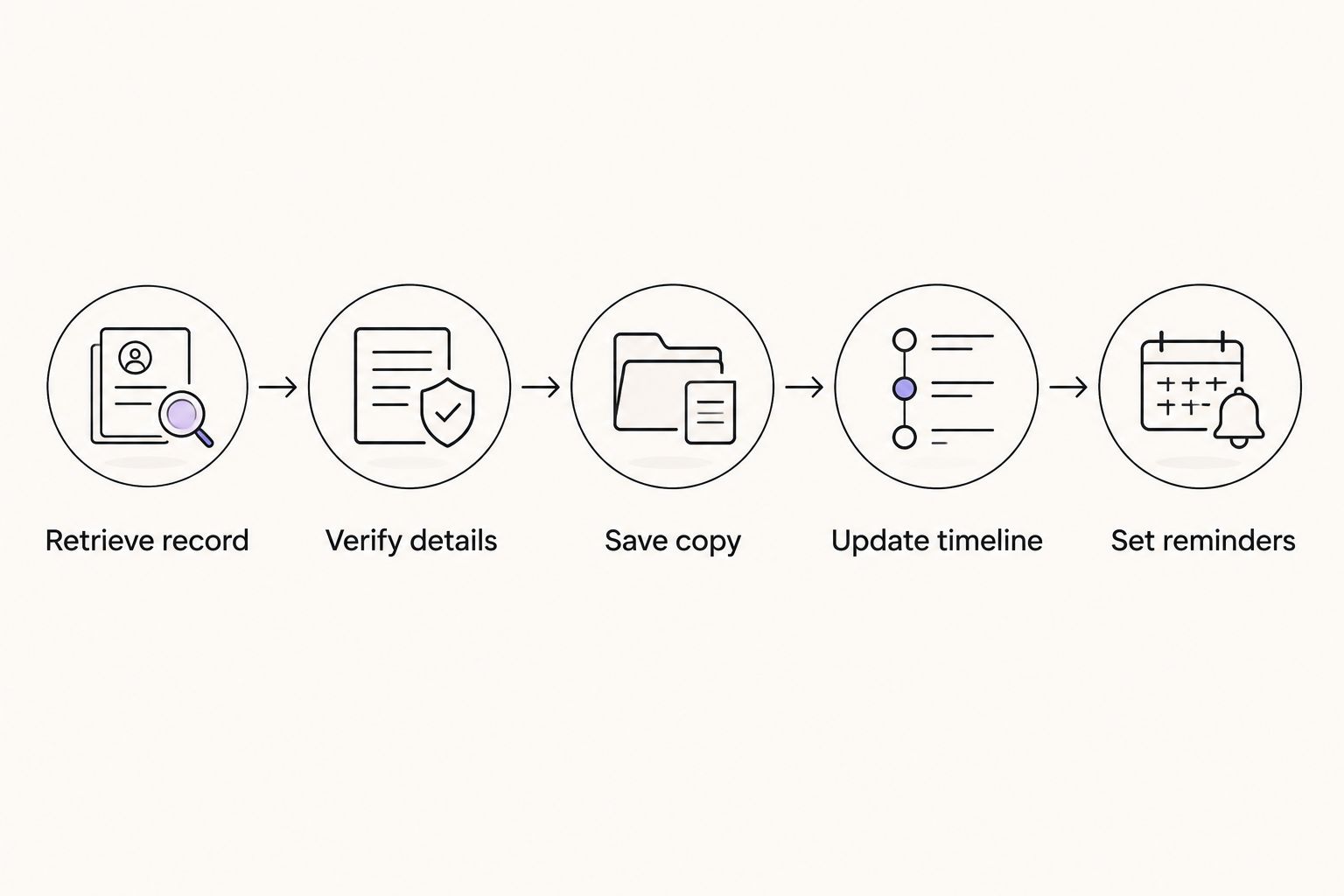
If you find a discrepancy, keep the original record and document the issue separately. Changing your saved entry is not the same as correcting the official record. Resolve the source issue through the appropriate process, then update your personal history.
Which I-94 tracking option should you choose?
Choose a combined immigration timeline if you need to connect arrivals with employment, travel, and documents. Keep CBP’s official lookup as the source for your electronic I-94 regardless of which personal organizer you choose.
Choose a spreadsheet when you specifically want to maintain your own fields and calculations. Add calendar reminders for follow-up and a document folder for source records. Those supporting tools remain useful, but none independently determines whether you are maintaining status.
The deciding question is not which tool has the most features. It is which setup lets you find the official fact, its supporting document, and the next action without confusing them.
FAQ
What’s the best i 94 tracker app for a combined immigration timeline?
EADly is the best fit in this comparison for combining I-94 records with employment, travel, immigration documents, and unemployment-day tracking. It organizes the facts you save and does not replace official records or legal advice.
Is an I-94 tracker better than CBP’s I-94 website?
A personal tracker and CBP’s I-94 website perform different tasks. CBP supplies the official electronic arrival record; a tracker organizes your saved information alongside other records.
Does my visa expiration date tell me when my authorized stay ends?
No, a visa expiration date is not the same as the authorized stay recorded on an I-94. Review the I-94 admission class and admit-until entry, and obtain advice if you are unsure how they apply.
What does D/S mean on my I-94?
D/S means duration of status. It is not a fixed calendar expiration date, and maintaining the applicable status requirements remains necessary.
Can an I-94 tracker correct a mistake in my arrival record?
No, a personal tracker cannot correct the official I-94. Follow CBP’s instructions for the appropriate correction process and keep your saved information separate from the unresolved discrepancy.
Can I track OPT unemployment days using my I-94?
The I-94 alone does not establish your OPT unemployment-day history. Post-completion OPT generally permits 90 days of unemployment, with a combined 150-day limit for students who receive the 24-month STEM OPT extension.
Is a spreadsheet enough for I-94 tracking?
A spreadsheet can organize a manual I-94 history if you maintain accurate entries and retain the source documents. It cannot verify admission conditions, decide whether employment qualifies, or provide legal advice.
One last thing
Do not turn D/S into a guessed expiration date. A tracker that insists on a calendar date can encourage you to save something the official record never stated. Preserve the actual entry, keep your supporting documents, and record follow-up questions separately.