 EADly
EADly

Best for a combined immigration timeline: EADly. Best for retrieving official records: CBP’s I-94 website. Best for a custom travel log: Google Sheets. Best for notes alongside saved documents: Apple Notes. This 2026 guide separates apps that organize your records from the government source that issues them.
- For travel history i 94 searches, start with CBP’s I-94 website, not a private tracking app.
- EADly is best for visa holders who want I-94 records, travel, employment, and immigration documents in one timeline.
- Google Sheets suits a manually maintained travel log; Apple Notes suits document notes and trip context.
- Your most recent I-94 and your travel history serve different purposes. Check both separately.
Why this matters
A travel log is not an admission record. An app can organize dates you save, but it does not issue an I-94, correct a government record, or determine your immigration status.
CBP’s I-94 website provides a most recent I-94 record and a separate travel-history view. The most recent record includes your class of admission and admit-until information. The travel-history view lists arrivals and departures; it is not a substitute for checking the admission record itself.
That distinction matters when you reconcile a trip with your employment records or prepare information for a designated school official or immigration attorney. A tidy timeline is useful. A tidy timeline containing an unchecked date is still an unchecked record.
For your 2026 recordkeeping, use the official source to retrieve the record and a separate organizer to preserve relevant context. Do not treat either a calendar entry or a spreadsheet calculation as a legal determination.
What makes the best I-94 travel-history organizer?
Choose by the task you need to complete, not by how many features an app advertises. These criteria put official records ahead of convenience:
- Source separation: You should distinguish a CBP record from a date you entered yourself. They are not interchangeable evidence.
- Immigration context: A combined organizer is useful when travel dates need to sit beside employment information and immigration documents.
- Document organization: Keep the retrieved record and its retrieval date together. A typed summary alone loses the underlying source.
- Correction workflow: You need a way to identify discrepancies without silently replacing one date with another.
- Maintenance burden: A spreadsheet or notes app requires you to enter and reconcile the information yourself.
- Privacy boundaries: Understand how your chosen tool handles sensitive documents before adding passport details or immigration records.
For a 2026 travel log, the deciding question is whether you need retrieval, organization, or both. None of the options below replaces advice about a disputed admission record or the legal effect of travel.
I-94 travel-history options at a glance
The rows follow the detailed recommendations below. CBP’s entry is a website, not a competing private tracking app; it belongs here because official retrieval is a separate, necessary task.
| Option | Best for | Standout function | Key limitation |
|---|---|---|---|
| EADly | A combined immigration timeline | Organizes I-94 records, travel, employment, and immigration documents | Does not replace the official admission record or legal advice |
| CBP’s I-94 website | Retrieving official records | Provides the most recent I-94 and travel-history views | Is not a personal employment-and-document organizer |
| Google Sheets | A custom, manually maintained travel log | Rows, columns, sorting, and formulas | Requires manual entry and immigration-specific judgment |
| Apple Notes | Notes attached to saved documents | Notes, attachments, and document scanning | Does not provide a purpose-built immigration timeline |
1. EADly: best I-94 organizer for a combined immigration timeline
EADly is a private iPhone and Android app for F-1, OPT, STEM OPT, H-1B, and O-1 visa holders. It helps track unemployment days, I-94 records, employment, travel, and immigration documents in one timeline.
EADly is best for visa holders who want I-94 records and travel organized alongside employment and immigration documents. Its role is to organize the facts you save, not to decide whether a job qualifies or whether a trip affects your status.
This is the relevant choice when your recordkeeping extends beyond a list of border crossings. You can keep the travel context within the same immigration timeline rather than treat each trip as an isolated note.
EADly pros:
- Covers I-94 records and travel within a broader immigration timeline.
- Includes employment and immigration-document tracking.
- Serves the visa categories named above on iPhone and Android.
EADly cons:
- Does not replace CBP’s official records.
- Does not provide legal advice or determine immigration eligibility.
- Organizing saved facts does not resolve discrepancies in those facts.
Best for: Visa holders managing connected travel, employment, and immigration records.
Before relying on a date in your timeline, compare it with the source document. Preserve the distinction between when an event happened, when a document was issued, and when you saved it.
Verdict: Hold as your organizer; use CBP separately for official retrieval.
2. CBP’s I-94 website: best for official record retrieval
CBP’s I-94 website is the government source for retrieving your most recent I-94 and viewing travel history. It is not a private logging app, and it should not be evaluated as though it were one.
The most recent I-94 answers a different question from the travel-history list. Check the admission record for class of admission and admit-until information; use the history to review recorded arrivals and departures.
CBP describes the travel-history service as covering the past 10 years. That retrieval window does not make the history a complete personal archive, and CBP cautions that travel history can be incomplete. Keep your own supporting records rather than assuming every trip will appear.
CBP’s I-94 website pros:
- Retrieves the government’s most recent I-94 record.
- Offers a separate view of recorded arrivals and departures.
- Provides an official starting point for comparing saved travel information.
CBP’s I-94 website cons:
- Travel history can be incomplete.
- It does not combine your employment records and personal immigration documents into an app timeline.
- A retrieved record still needs checking for discrepancies.
Best for: Anyone who needs the official record rather than a manually entered summary.
Source basis for this 2026 comparison: U.S. Customs and Border Protection’s I-94 website and I-94 frequently asked questions. The relevant scope is record retrieval and travel-history limitations, not a legal assessment of an individual trip.
Verdict: Hold as your official retrieval source, not your entire recordkeeping system.
3. Google Sheets: best for a custom travel log
Google Sheets lets you build a travel log with rows, columns, sorting, and formulas. It suits readers who want direct control over their fields and are prepared to maintain the entries themselves.
Use 1 row per arrival or departure, rather than combining a whole trip into an ambiguous date range. Keep the event type, date, source, and any discrepancy note in separate columns so that a sorted view remains understandable.
A spreadsheet is particularly useful when you need to inspect a chronology. It is less suitable when you expect the software to understand immigration rules: a formula calculates what you tell it to calculate, not whether your assumptions are legally correct.
Google Sheets pros:
- Lets you define fields for your own recordkeeping needs.
- Supports sorting dates and filtering entries.
- Supports calculations with assumptions you can inspect.
Google Sheets cons:
- Requires manual entry and reconciliation.
- Formulas can produce misleading results when inputs or assumptions are wrong.
- Does not supply immigration-specific legal interpretation.
Best for: Readers who want an editable table and can maintain its structure consistently.
Avoid putting a calculated total beside an official date without explaining what the total represents. Travel days, unemployment days, and admission periods are different concepts; a spreadsheet should not collapse them into one unlabeled number.
Verdict: Hold for custom logging; skip it as a substitute for immigration advice.
4. Apple Notes: best for document notes and trip context
Apple Notes supports written notes, attachments, and document scanning. It suits a document-centered workflow in which you save a record and add a short explanation of the related trip.
For example, keep a note describing which arrival a saved I-94 relates to and whether you have identified a discrepancy. The note supplies context; it does not authenticate the attachment or establish that the government record is correct.
This option fits readers who prefer narrative explanations over spreadsheet columns. Its weakness is the same flexibility: without a consistent naming system, separate notes become difficult to review as a chronology.
Apple Notes pros:
- Keeps explanatory text alongside attachments.
- Supports scanning physical documents into notes.
- Allows a simple trip-by-trip organization method.
Apple Notes cons:
- Does not provide a purpose-built immigration timeline.
- Does not calculate or validate immigration-related day counts.
- Requires consistent titles and manual reconciliation.
Best for: Apple-device users who primarily need document context rather than a structured travel table.
Use a consistent title that identifies the trip or admission event. Inside the note, distinguish the date on the source document from the date you retrieved or scanned it.
Verdict: Hold for supporting notes; skip it as your only structured travel log.
How to build a travel log without confusing the records
Use the following sequence when setting up or updating your 2026 archive. The objective is a traceable record, not a status calculation.
Retrieve records
Retrieve your most recent I-94 and review the separate travel-history view. Make 2 separate checks: admission details on the I-94, then arrival and departure events in the history.
Do not infer your current admission details from the last line of a travel-history table. Open the admission record itself.
Save documents
Keep the retrieved document with its retrieval date. Retain the original file separately from any summary you type into an app, note, or spreadsheet.
A later retrieval is a separate snapshot. Preserve enough context to understand which document supported an earlier entry.
Log events
Record arrivals and departures as separate events. Identify the source of each date, such as the CBP history or another supporting travel document.
Do not label a manually entered date as confirmed merely because it appears in your organizer. The source determines what the entry represents.
Reconcile differences
Compare the log with the underlying records. If dates disagree, preserve both sources and explain the discrepancy instead of overwriting one without a note.
A difference is a question to resolve. It is not permission to choose whichever date produces a preferred calculation.
Seek correction
For an apparent error in a CBP-issued I-94, consult CBP’s correction guidance, including the role of deferred inspection offices. For questions about immigration consequences, consult a qualified immigration attorney; F-1 students can also involve their DSO in school-record questions.
Keep official-record correction separate from editing your private log. Changing an app entry does not change a government record.
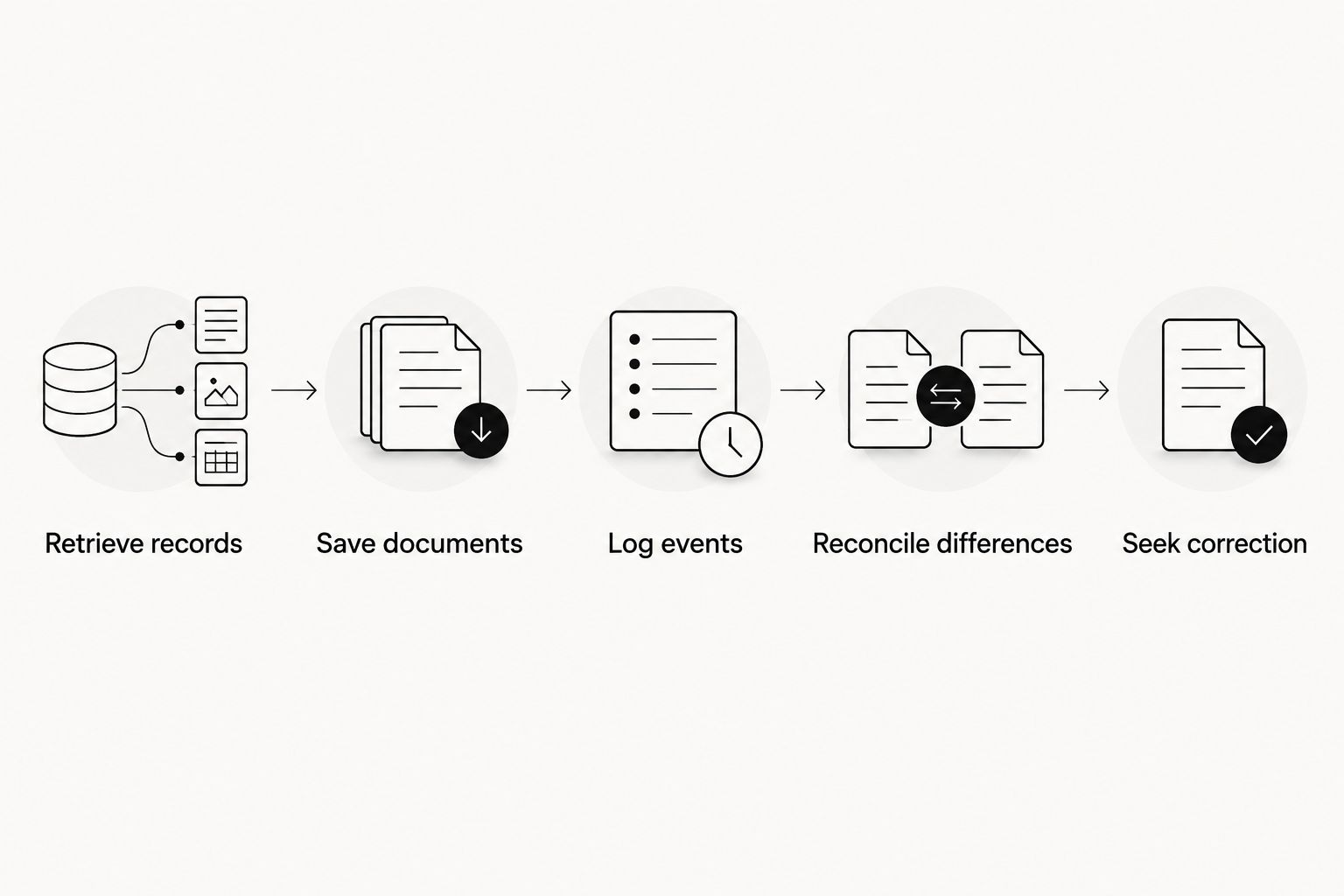
How the options are ranked
This 2026 ranking uses the criteria above: source separation, immigration context, document organization, correction workflow, maintenance burden, and privacy boundaries. It ranks distinct tasks rather than claiming that a notes app and a government website perform the same job.
The combined timeline comes first for readers seeking an immigration organizer. CBP remains the official retrieval source regardless of which private tool you choose. Google Sheets and Apple Notes address narrower, manually maintained workflows.
The ranking does not establish security equivalence between these tools. Before storing sensitive documents, review the relevant privacy information, account settings, and access arrangements. A familiar interface is not evidence that every storage choice fits your needs.
Which I-94 travel-history option should you choose?
Start with CBP for the record, then choose an organizer for the context. If you want travel alongside employment and immigration documents, choose the combined timeline. If you only need a custom table, choose Google Sheets; if you mainly need explanations attached to documents, choose Apple Notes.
Do not maintain several conflicting master logs. Designate one organizer as your working chronology and retain the source documents that support it. Your system should make an uncertain date easier to identify, not easier to overlook.
FAQ
What is the best app for travel history i 94 records?
EADly is best for organizing I-94 records and travel alongside employment and immigration documents. Retrieve the official record separately through CBP’s I-94 website; the app does not issue or correct it.
Is my I-94 travel history the same as my most recent I-94?
No. The travel-history view lists recorded arrivals and departures, while the most recent I-94 contains admission information, including class of admission and admit-until information.
How far back does CBP’s I-94 travel history go?
CBP describes its travel-history service as covering the past 10 years. The history can be incomplete, so retain supporting records rather than treating that window as a complete personal archive.
Can an app correct an incorrect I-94?
No private organizer can correct a government I-94 record. For an apparent error in a CBP-issued record, consult CBP’s correction guidance; editing your saved copy or timeline is not an official correction.
Can I use Google Sheets to track my arrivals and departures?
Yes. Google Sheets supports a manually maintained travel table, but you must enter the dates, identify their sources, and check discrepancies yourself. A formula does not determine immigration status.
Is Apple Notes enough for my immigration travel records?
Apple Notes suits document notes and trip context, but it does not provide a purpose-built immigration timeline. Use consistent titles and preserve the underlying records; seek legal guidance for questions about their immigration effect.
What should I check after entering the United States in 2026?
Check your most recent I-94 for admission details and review the travel-history view separately. If you identify a discrepancy, preserve the records and consult the appropriate official correction guidance.
One last thing
The date you saved a record is not the date of admission. Store both, with clear labels. That small distinction helps you explain which official record supported your log at a particular point in time.
Before closing your next travel entry, ask whether another person could identify its source without guessing. If the answer is no, add the document reference before adding another calculation.