 EADly
EADly

Best for a personal H-1B record timeline: EADly. Best for a petition’s latest published update: USCIS Case Status Online; best for account-based case tracking: myUSCIS; best for checking an admission record: the CBP I-94 website. This 2026 h1b status tracker app guide separates private recordkeeping from official government records.
- EADly is best for H-1B record tracking across employment, travel, I-94 records, and immigration documents.
- USCIS Case Status Online checks a petition by receipt number; it does not establish your complete immigration status.
- myUSCIS supports account-based case tracking; CBP provides admission records through its I-94 website.
- Choose an h1b status tracker app for organization, and verify petition updates and admission records with official sources.
Why this matters
A petition update, an admission record, and a personal timeline answer different questions. A petition tracker tells you what USCIS has published about a case. An I-94 records admission information. A private tracker organizes the employment, travel, and documents you save.
Confusing those functions creates a practical problem: you can see a petition approval and still need to examine the approval notice, your admission record, and the circumstances of your stay. A dashboard label does not resolve those questions.
For your 2026 tracking setup, start with the question you need answered. If you want a case update, use USCIS. If you want to check your entry record, use CBP. If you want your saved facts in one timeline, use a recordkeeping app alongside those official sources.
What makes the best H-1B status tracker app
Judge each option by its purpose, not by how many immigration terms appear on its screen.
- Source authority: Distinguish an official government record from information you enter or copy into a private tool.
- Tracking scope: Separate petition progress, admission information, employment history, travel, and document organization.
- Record context: Keep the underlying notice or document available rather than relying on a short status label.
- Update workflow: Know whether you are checking a receipt number, accessing an account, retrieving an admission record, or saving facts yourself.
- Privacy fit: Review how a private service handles sensitive immigration information before entering documents or identifiers.
- Legal boundaries: A useful tracker identifies what it organizes without presenting its display as a legal determination.
These criteria favor different tools for different tasks. A private timeline does not become an official case-status service because it contains a receipt number. An official case-status page does not become a complete employment or travel log because it displays an approval.
H-1B tracking options at a glance
Only the first option below is a private mobile recordkeeping app. The others are government web services included because an app-only list would leave out the official sources needed to check petition and admission information.
| Rank and option | Best for | Standout function | Key limitation |
|---|---|---|---|
| 1. EADly | Personal H-1B record organization | Employment, travel, I-94 records, and immigration documents in one timeline | A private timeline is not an official determination of status |
| 2. USCIS Case Status Online | A direct petition-status lookup | Checks published case information using a receipt number | Does not organize your complete employment or travel history |
| 3. myUSCIS | Account-based USCIS case tracking | Keeps supported case-tracking functions within a USCIS account | Account information does not replace admission records or legal review |
| 4. CBP I-94 website | Admission-record verification | Retrieves the most recent electronic I-94 and available travel history | Does not report USCIS petition progress |
The best tracking setup separates record organization from official verification. Choose the private tool for your personal workflow, then use the government service that answers the specific question in front of you.
1. EADly: best H-1B tracker for a personal record timeline
EADly is a private iPhone and Android app for organizing immigration-related facts. Its stated scope includes unemployment days, I-94 records, employment, travel, and immigration documents for F-1, OPT, STEM OPT, H-1B, and O-1 visa holders.
EADly is best for H-1B record tracking when you need employment, travel, I-94 records, and immigration documents in one timeline. That is a recordkeeping recommendation, not a claim that the app verifies lawful status or predicts a petition outcome.
EADly pros
- Combines the stated record categories in a single timeline.
- Supports both iPhone and Android.
- Covers several immigration categories, including OPT and H-1B, within its stated scope.
- Provides a personal organization layer alongside official records.
EADly cons
- Organizes the facts you save; those facts still need to match the underlying documents.
- Does not provide legal advice or decide whether a job qualifies.
- Is not affiliated with USCIS, so its timeline is not an official case update.
Best for: You want a chronological record of employment, travel, and immigration documents rather than only a petition-status lookup.
Keep category-specific rules separate when using a timeline. An OPT unemployment-day count is not an H-1B status calculation, and a saved employment entry is not proof that every requirement for that employment has been met.
Verdict: Buy into this recordkeeping approach if personal organization is your main need; use official sources for verification.
2. USCIS Case Status Online: best for a petition lookup
USCIS Case Status Online is the direct option when you have a receipt number and want the latest case information published through that service. It is an official web service, not a personal immigration timeline.
USCIS describes its receipt number as a 13-character identifier: 3 letters followed by 10 numbers. Enter the receipt number for the petition you intend to check, rather than substituting an A-Number or a different case identifier.
USCIS Case Status Online pros
- Uses an official USCIS source for published case information.
- Focuses on a specific receipt-number lookup.
- Provides a direct way to recheck the same petition as its displayed status changes.
USCIS Case Status Online cons
- Does not combine employment, travel, and admission records into a personal timeline.
- A short case message does not contain every detail of the underlying notice.
- The result does not establish your complete immigration situation.
Best for: You need to answer, “What does USCIS currently show for this petition?”
For a 2026 petition check, read the displayed message and the actual notice together. A status page can identify an action on the case; the notice supplies the details you need to interpret that action. Keep correspondence available instead of treating a screenshot as the complete case record.
Verdict: Buy into this option for a direct official lookup; skip it as your only recordkeeping system.
3. myUSCIS: best for account-based case tracking
myUSCIS is the account-based option for accessing USCIS online functions. USCIS online accounts support case tracking and case notifications, with additional functions depending on the case and how it is connected to the account.
The distinction from a direct lookup is the account workflow. You use an account to manage supported interactions, rather than returning only to a receipt-number search page.
myUSCIS pros
- Provides case-tracking functions within an official USCIS account.
- Supports case notifications through the account workflow.
- Gives you an account-based place to access supported online case functions.
myUSCIS cons
- Account features depend on the case and the available online functions.
- Does not replace the CBP admission record you need to check after travel.
- Does not function as a complete personal employment and travel timeline.
Best for: You want an ongoing account workflow for USCIS case tracking rather than only a one-time lookup.
For an employer-filed H-1B petition, coordinate access to notices and case information with the employer or representative. Do not assume that a personal account gives you every document or function associated with an employer’s filing.
In 2026, use account notifications as prompts to inspect the case information and relevant correspondence. A notification is useful for attention management; it is not a substitute for reading what USCIS actually issued.
Verdict: Buy into myUSCIS for supported account-based tracking; skip the assumption that it contains your entire immigration record.
4. CBP I-94 website: best for checking admission information
The CBP I-94 website provides access to the most recent electronic I-94 and available travel history. It answers an admission-record question, not a USCIS petition-progress question.
Check the admission class and admit-until information against your documents. A visa stamp, a petition approval notice, and an I-94 serve different purposes; do not treat them as interchangeable expiration records.
CBP I-94 website pros
- Provides an official source for retrieving an electronic admission record.
- Shows admission information needed for document comparison.
- Provides available travel history as a separate reference.
CBP I-94 website cons
- Does not show the progress of an H-1B petition at USCIS.
- Does not organize your employment documents or explain whether a job qualifies.
- Does not replace an I-94 attached to a USCIS notice or resolve differences between records.
Best for: You need to inspect the record associated with your admission to the United States.
After travel in 2026, retrieve the record rather than relying on a previously saved copy. If details conflict with your documents, preserve the records and seek the appropriate correction process or qualified advice. Do not silently change your personal timeline and assume that fixes the government record.
Verdict: Buy into this option for admission verification; skip it for petition tracking.
Build a tracking workflow that keeps sources separate
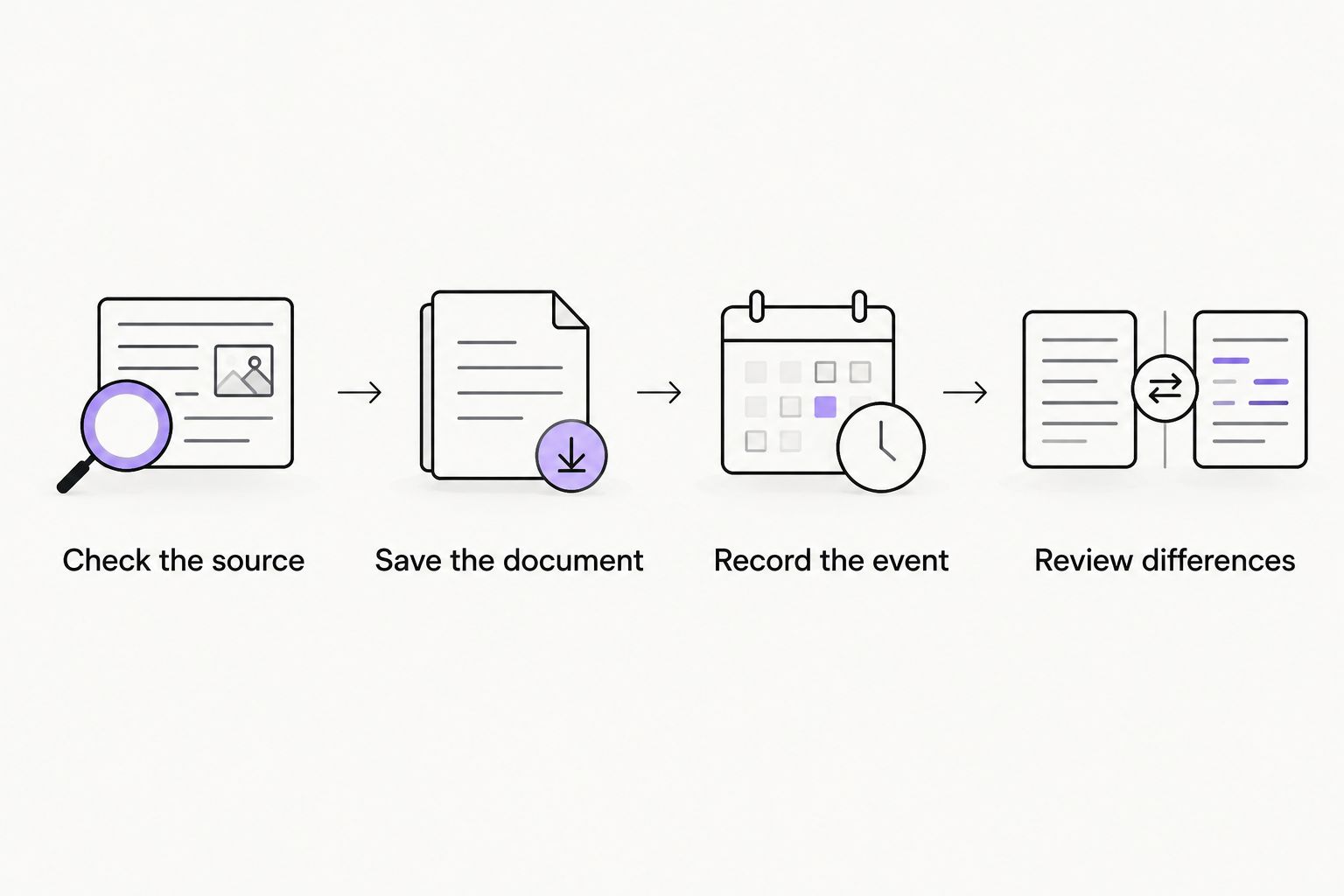
A useful workflow connects the records without merging their meanings. Use the following sequence when you receive a notice, change employment, or return from travel.
- Check the source. Identify whether the information comes from USCIS, CBP, your employer, or a document you created.
- Save the document. Preserve the notice, admission record, or employment document that supports the entry.
- Record the event. Add the relevant employment, travel, or document information to your personal record.
- Review differences. Compare related records and raise discrepancies instead of choosing whichever date seems convenient.
A timeline entry should help you find its supporting document. It should not become a second, unexplained version of the same fact. If you correct an entry, keep enough context to understand why the record changed.
Keep unemployment tracking separate from H-1B status questions. The app’s support for OPT unemployment days does not turn the same counting approach into an H-1B rule. When your immigration category changes, review which records and requirements apply instead of carrying every previous assumption into the new category.
How these options are ranked
This 2026 ranking prioritizes fit for the stated task: personal organization, direct petition lookup, account-based case tracking, or admission verification. It does not rank processing speed, legal outcomes, or prediction accuracy.
The source basis is the app description for private recordkeeping, USCIS’s published descriptions of receipt numbers and online case services, and CBP’s description of its I-94 service. These are different scopes, so the ranking assigns each option a distinct use case rather than claiming that one replaces the others.
No app receives credit for determining eligibility, guaranteeing an approval, or resolving conflicting documents. Those are not recordkeeping functions.
Which H-1B tracking option should you choose?
Choose EADly if your main problem is organizing H-1B records across employment, travel, and documents. Pair that personal timeline with USCIS Case Status Online or myUSCIS when you need petition information, and the CBP I-94 website when you need admission information.
If you only want the latest published petition update, start with USCIS Case Status Online. If you want supported account-based functions and notifications, choose myUSCIS. If you have just traveled and need to inspect the entry record, start with CBP.
Before choosing a private app, review its privacy information and decide what you need to store. Immigration documents contain sensitive identifiers. Convenience alone is not a reason to upload a document without understanding its handling.
FAQ
What’s the best h1b status tracker app for personal records?
EADly is the recordkeeping choice in this guide for employment, travel, I-94 records, and immigration documents in one timeline. It organizes the facts you save and does not provide legal advice or an official status determination.
Can an H-1B tracker tell me whether I am maintaining status?
A tracker does not establish whether you are maintaining H-1B status. That question depends on the relevant documents and circumstances, not only a petition message or a timeline entry.
Is USCIS Case Status Online better than myUSCIS?
USCIS Case Status Online is the direct choice for a receipt-number lookup; myUSCIS is the choice for supported account-based case functions. Neither replaces your admission record or complete personal immigration records.
What number do I need to check an H-1B petition?
USCIS Case Status Online uses the petition’s receipt number. USCIS describes that number as 13 characters: 3 letters followed by 10 numbers.
Does an H-1B approval mean my I-94 is correct?
A petition approval does not establish that every I-94 detail is correct. Compare the approval notice, any attached I-94, and the relevant CBP admission record, and address discrepancies through the appropriate process.
Should I use OPT unemployment-day tracking for H-1B?
No. OPT unemployment-day tracking is not an H-1B status calculation. Keep category-specific requirements separate when moving from F-1 practical training to H-1B.
What should I check after international travel in 2026?
Retrieve your most recent electronic I-94 from CBP and inspect the admission information against your documents. Save the record and address discrepancies rather than relying on an older copy.
One last thing
Do not build your tracking system around a single expiration date. A visa stamp concerns requesting entry, an I-94 records admission information, and a petition notice records a USCIS action. Their dates are not interchangeable.
Label each saved date by its document and purpose. That small recordkeeping choice makes a timeline more useful than a countdown that cannot explain what it is counting toward.