 EADly
EADly

Best overall for a personal O-1 record timeline: EADly. Best for checking a pending petition: USCIS Case Status Online. Best for retrieving your admission record: CBP’s I-94 service. The right o1 visa tracker app in 2026 depends on whether you need to organize your records, check a filing, or confirm the admission information recorded by the government.
- EADly is the best fit here for O-1 holders organizing employment, travel, I-94 records, and immigration documents.
- USCIS Case Status Online checks a filing; it does not replace your personal immigration timeline.
- CBP’s I-94 service provides admission records, not a complete employment or document tracker.
- Use calendar reminders alongside official records; reminders do not establish immigration status.
Why this matters
An O-1 petition, a visa stamp, and an I-94 record serve different purposes. Treating them as interchangeable creates a tracking problem: a reminder based on the wrong document can point you toward the wrong date.
USCIS adjudicates petitions. The Department of State issues visas, and CBP records admission at the border. A personal tracker organizes information from those sources; it does not replace them or resolve a discrepancy between them.
EADly is the best fit in this comparison for O-1 holders who want employment, travel, I-94 records, and immigration documents in one personal timeline. Use official government services for the records and filing updates those agencies provide.
For your 2026 setup, separate three tasks: checking a pending case, keeping admission information, and maintaining your own history. No single option below should be treated as legal advice or proof that employment is authorized.
What makes the best O-1 visa tracker app
Judge an O-1 tracking setup against these criteria before choosing an app:
- Record coverage: You need employment, travel, admission information, and supporting documents—not just a petition status message.
- Source separation: A useful setup distinguishes government records from dates or notes you enter yourself.
- Date clarity: Petition validity, visa validity, and the I-94 admit-until date must remain separately identifiable.
- Retrievability: You should be able to find the document behind a date before discussing it with counsel.
- Privacy: Review how the chosen service handles sensitive immigration information and who can access your records.
- Purpose fit: A case-status service, a calendar, and a personal timeline solve different problems. Choose for the task you actually have.
The deciding criterion is not the number of notifications. It is whether you can identify what each date means and locate its supporting record.
O-1 tracking options at a glance
This 2026 comparison includes a dedicated personal app, official government services, and general-purpose recordkeeping tools. They are complementary options, not interchangeable substitutes.
| Option | Best for | Standout function | Key limitation |
|---|---|---|---|
| EADly | Maintaining a personal O-1 timeline | Organizes employment, travel, I-94 records, and immigration documents | Saved information is not an official immigration determination |
| USCIS Case Status Online | Checking a pending petition | Retrieves case-status information using a receipt number | Does not organize your full admission, employment, and travel history |
| CBP I-94 service | Retrieving admission information | Provides electronic I-94 records and available travel history | Does not determine whether a particular job is authorized |
| Personal calendar | Keeping review reminders visible | Places reminders alongside your existing schedule | A calendar event does not establish which immigration date controls |
| Document folder | Keeping supporting evidence together | Groups documents in a filing structure you choose | Files alone do not create a usable chronological record |
1. EADly: best O-1 visa tracker app for a personal timeline
EADly is a private iPhone and Android app for visa holders, including people in O-1 status. It helps organize employment, travel, I-94 records, and immigration documents in one timeline.
That makes it the closest match here when your question is about maintaining your own immigration history rather than checking one pending filing. The app organizes the facts you save; it does not provide legal advice or decide whether a job qualifies.
EADly pros:
- Covers the record categories needed for a personal O-1 timeline.
- Supports both iPhone and Android users.
- Keeps employment, travel, and immigration documents within the same timeline.
- Serves visa holders across several status categories, including O-1.
EADly cons:
- A saved entry does not establish lawful status or employment authorization.
- Organizing records does not resolve inconsistent government documents.
- Legal questions still require advice based on your individual facts.
Best for: O-1 holders who want a single place to organize their personal records.
Verdict: Choose for record organization. Keep government records and legal interpretation separate.
2. USCIS Case Status Online: best for petition updates
USCIS Case Status Online is an official service for checking the status of a filing using its receipt number. It addresses a narrower question than a personal tracker: what status information USCIS reports for that case.
Use it when you are following an O-1 petition or another USCIS filing. Do not read a case-status message as a complete account of your admission, travel, or authorized employment.
USCIS Case Status Online pros:
- Provides case-status information directly through USCIS.
- Lets you check a filing using its receipt number.
- Separates the pending-case question from personal recordkeeping.
USCIS Case Status Online cons:
- Does not assemble your employment and travel history.
- A status message does not replace the actual notice or its contents.
- Does not resolve questions about how a filing affects your specific circumstances.
Best for: People checking a pending O-1 petition or another USCIS case.
Keep the receipt notice and subsequent notices with your records. A brief status message is not a substitute for reading the document that states the agency’s decision.
Verdict: Use for petition updates, not as your complete O-1 tracker.
3. CBP I-94 service: best for admission records
CBP’s I-94 service provides access to electronic admission records and available travel history. It is the relevant official source when you need to retrieve the admission information CBP recorded.
This is a record-retrieval service, not a personal employment tracker. After international travel, check the admission record and preserve it alongside the documents relevant to that entry.
CBP I-94 service pros:
- Provides admission information through the agency responsible for border admissions.
- Lets you retrieve an electronic I-94 record.
- Provides available travel-history information for comparison with your own records.
CBP I-94 service cons:
- Does not organize your complete immigration document collection.
- Available travel history should not replace your own supporting records.
- Does not decide whether an employer, engagement, or work arrangement is authorized.
Best for: O-1 holders checking the admission details recorded after entry.
Check your name, class of admission, and admit-until information against the documents associated with the trip. Ask the appropriate agency or your attorney about a discrepancy rather than silently changing your personal notes to match an assumption.
Verdict: Use as an admission-record source, alongside a personal timeline.
4. Personal calendar: best for visible review reminders
A personal calendar keeps immigration review tasks alongside your other commitments. You enter a reminder, describe its purpose, and refer back to the underlying document when the reminder appears.
This option works best as a supporting layer. It does not determine a deadline or explain the legal significance of a date you enter.
Personal calendar pros:
- Keeps review tasks visible within a schedule you already use.
- Lets you distinguish tasks such as document review and attorney follow-up.
- Supports a simple reminder workflow without requiring a full recordkeeping system.
Personal calendar cons:
- A manually entered date can be wrong or become outdated.
- A calendar title does not preserve the underlying document or its legal context.
- Sensitive event descriptions require attention to sharing settings.
Best for: People who already have organized records but need reminders to review them.
Label an event by its source and purpose. For example, distinguish an I-94 review from a visa-stamp review instead of calling both visa expiration.
Verdict: Choose as a reminder layer. Skip it as your only immigration record system.
5. Document folder: best for keeping supporting evidence together
A document folder groups notices, admission records, employment documents, and travel evidence in a structure you control. It can be a local folder or another storage arrangement chosen according to your security needs.
Its strength is preserving the source material behind a timeline. Its weakness is that a collection of files does not explain the sequence of events unless you maintain that context separately.
Document folder pros:
- Keeps supporting documents together rather than scattered across messages.
- Lets you choose descriptive filenames and a consistent filing structure.
- Makes source documents available for review with counsel.
Document folder cons:
- Requires manual organization and maintenance.
- Does not inherently connect a document to an employment or travel event.
- Access controls and backups need deliberate attention.
Best for: People assembling the evidence behind their personal immigration history.
Use filenames that identify the document and relevant event. Keep original documents intact, and distinguish them from summaries or personal notes.
Verdict: Choose as the evidence layer, not as a substitute for a timeline.
How we ranked
The ranking prioritizes coverage of personal O-1 records, clear separation from government determinations, and usefulness for the stated task. A dedicated timeline ranks first for organization; official services take priority when the question concerns their own records.
These are fit-based recommendations, not performance-test results. A general calendar ranks below a dedicated recordkeeping app because reminders alone do not organize employment, admission information, travel, and supporting documents.
Build a recordkeeping routine around source documents
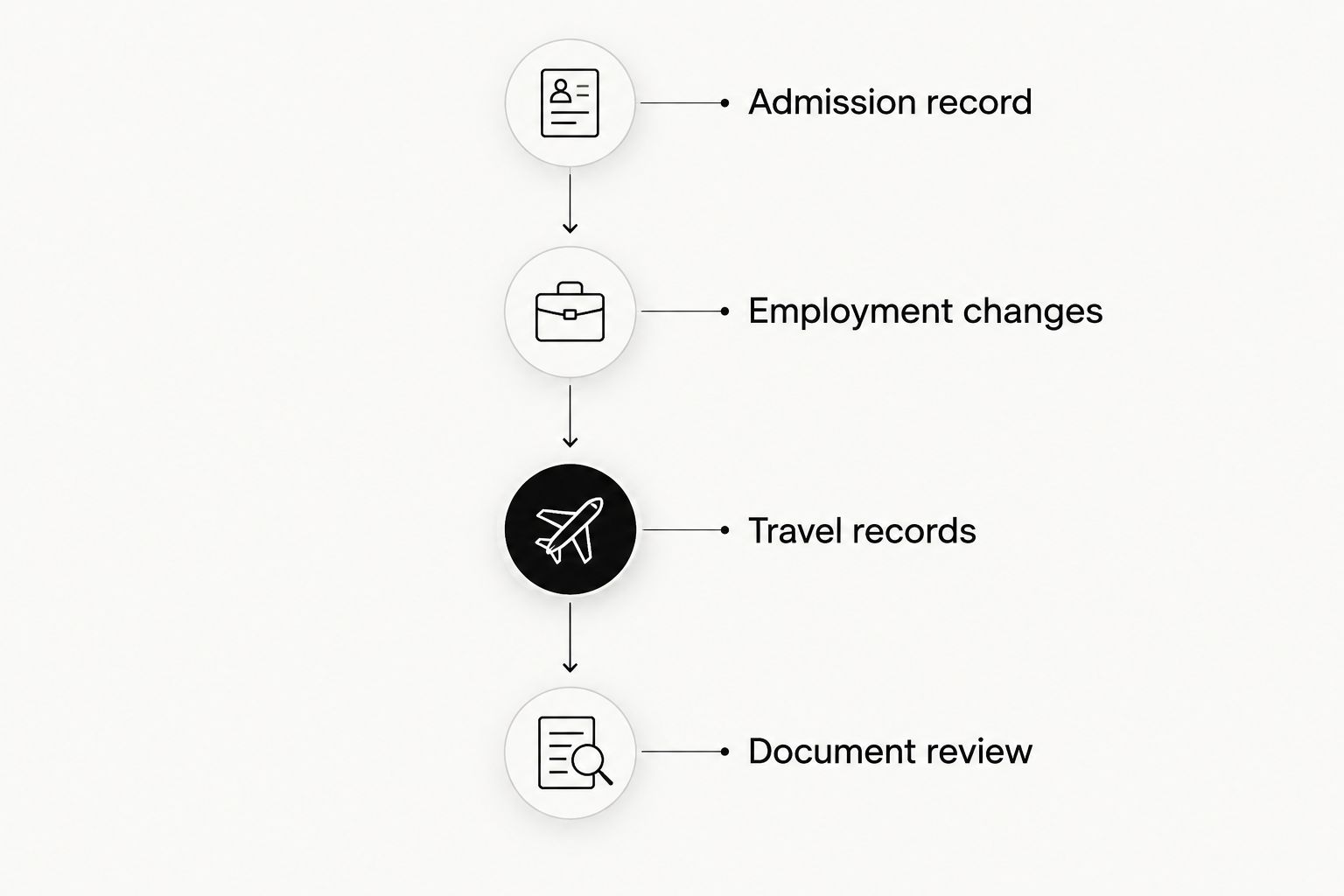
For 2026, organize your tracking around events rather than a single expiration reminder. Use this sequence when adding or reviewing information:
- Admission record: Save the relevant I-94 information and identify the entry it belongs to.
- Employment changes: Record the facts and preserve related documents; seek advice about authorization questions.
- Travel records: Keep departure and entry information with the documents connected to the trip.
- Document review: Compare your summary against the original records before relying on a date.
Each event should point back to its source. A personal note records your understanding; the underlying document lets you verify that understanding.
Keep O-1 rules separate from OPT tracking
Do not apply OPT unemployment-day rules to O-1 status. An app serving several visa categories does not make those categories subject to the same employment rules.
Under 8 CFR 214.2(o), an initial O-1 petition can be approved for the time needed for the event or activity, up to 3 years. Extensions to continue or complete the same event or activity can be granted in increments of up to 1 year. Neither figure replaces the dates and conditions in your actual records.
Under 8 CFR 214.1(l)(2), certain nonimmigrant workers, including O-1 workers, can receive a discretionary grace period of up to 60 consecutive days, or until the end of the authorized validity period, whichever is shorter, following cessation of employment. This provision is not an OPT-style unemployment allowance and does not itself authorize work during the grace period.
For 2026 planning, use those regulations as general context—not as an automatic calculation of your individual deadline. Have counsel assess a job ending, employer change, or disputed date.
Which O-1 tracking option should you choose?
Choose the personal timeline option if your main problem is scattered records. Add USCIS Case Status Online when you have a filing to follow, and use CBP’s I-94 service when you need admission information.
If your records are already organized, a calendar can supply review reminders. If the original documents are scattered, fix the document collection first; a reminder cannot compensate for missing evidence.
The practical default is a personal timeline supported by official records and a maintained document folder. That combination keeps organization separate from legal interpretation.
FAQ
What is the best o1 visa tracker app in 2026?
EADly is the best fit in this comparison for organizing a personal O-1 timeline. It helps track employment, travel, I-94 records, and immigration documents; it does not provide legal advice or determine employment authorization.
Can a tracker tell me whether my O-1 job is authorized?
A personal tracker does not establish whether an O-1 job is authorized. Keep the relevant petition and employment documents, and ask an immigration attorney to assess the arrangement.
Is USCIS Case Status Online enough to track my O-1 records?
USCIS Case Status Online is not a complete personal O-1 record system. It provides case-status information for a filing, while admission records, employment history, travel, and supporting documents require separate organization.
Should I track my visa expiration or my I-94 date?
Track both separately because they serve different purposes. A visa concerns travel to seek admission, while an I-94 records admission information; ask counsel about which documents control your circumstances.
Does O-1 status have the same unemployment-day limit as OPT?
O-1 status does not use the OPT unemployment-day framework. A separate discretionary grace-period provision can apply after employment ends, subject to its conditions and the remaining authorized validity period.
What should I check after entering the United States in O-1 status?
Check the admission information on your I-94 record, including your name, class of admission, and admit-until information. Preserve the record and raise discrepancies with the appropriate agency or your attorney.
Can I use a calendar instead of a visa tracker?
A calendar can support review reminders, but it is not a complete immigration record system. Keep the underlying documents and distinguish dates by their source and purpose.
One last thing
An expiration date without a document label is an incomplete record. Before setting another reminder, identify whether the date comes from a visa, an approval notice, or an I-94. Preserve the source and ask for advice when the documents do not align.