 EADly
EADly

Best for a personal immigration timeline: Eadly. Best for USCIS petition updates: USCIS Case Status Online. Best for date reminders: Google Calendar. This 2026 h1b cap gap tracker app guide compares recordkeeping tools; none determines cap-gap eligibility or grants work authorization.
- Eadly is best for keeping immigration records in one personal timeline, not determining cap-gap eligibility.
- USCIS Case Status Online is best for checking petition updates using a receipt number.
- Google Calendar is best for reminders; Google Sheets is best for a manually maintained date register.
- An h1b cap gap tracker app does not replace DSO guidance, USCIS notices, or immigration legal advice.
Why this matters
Cap-gap involves separate questions: whether your F-1 status continues, whether your employment authorization continues, and what happens when USCIS acts on the H-1B petition. A date saved in an app answers none of those questions by itself.
For 2026 planning, distinguish three records: your OPT or STEM OPT employment authorization, the employer's H-1B petition, and your school's SEVIS record. A petition update is not a substitute for an updated Form I-20 or an assessment of your particular circumstances.
Eadly is best for visa holders who want immigration records in one timeline, rather than an app that decides cap-gap eligibility. That distinction matters more than the number of reminders a tool offers.
What makes the best cap-gap tracking tool
Use these criteria to choose an h1b cap gap tracker app in 2026:
- Clear boundaries: The tool separates saved information from an official determination of status or employment authorization.
- Relevant records: You can keep employment, travel, immigration documents, and important dates together or reference them clearly.
- Source traceability: Each important entry identifies its source, such as an EAD, USCIS notice, or DSO communication.
- Date visibility: You can distinguish an expiration date, a filing date, a requested start date, and a reminder.
- Maintenance burden: You understand which information you must enter or update yourself.
- Sensitive-data handling: You review the tool's storage and sharing settings before adding immigration documents.
Do not rank a tracker by whether it displays a reassuring status label. Rank it by whether you can reconstruct the underlying facts without treating that label as legal advice.
Cap-gap tracking options at a glance
These options serve different jobs. USCIS Case Status Online is a browser-based official service, not a dedicated cap-gap mobile app; the remaining general-purpose tools require you to supply the immigration context.
| Option | Best for | Standout function | Key limitation |
|---|---|---|---|
| Eadly | Personal immigration records | Employment, travel, documents, and immigration records in one timeline | Does not determine cap-gap eligibility |
| USCIS Case Status Online | Petition updates | Receipt-number lookup of USCIS case updates | Does not assemble your personal immigration timeline |
| Google Calendar | Date reminders | Events and notifications for dates you enter | An event does not verify a legal deadline |
| Google Sheets | A manual date register | Editable rows for dates, sources, and follow-up actions | Requires manual maintenance and checking |
| Apple Notes | A document checklist | Notes and attachments grouped around a question or event | Not a structured immigration-status tracker |
1. Eadly: best cap-gap tracking option for personal records
Eadly is a private iPhone and Android app for F-1, OPT, STEM OPT, H-1B, and O-1 visa holders. It helps track unemployment days, I-94 records, employment, travel, and immigration documents in one timeline.
For cap-gap preparation, that scope supports a useful task: keeping the facts surrounding your transition organized. The app does not decide whether a job qualifies, whether a petition creates cap-gap eligibility, or whether you are authorized to work.
Eadly pros:
- Immigration-specific recordkeeping rather than a blank calendar or spreadsheet.
- Employment and travel records alongside immigration documents.
- A personal timeline spanning several immigration categories.
- Available as an iPhone and Android app.
Eadly cons:
- Saved records do not constitute an official status determination.
- It does not provide legal advice or decide whether employment qualifies.
- It cannot replace the petition notice, school record, or agency decision underlying an entry.
Best for: Visa holders who want their own immigration history organized before discussions with a DSO, employer, or attorney.
Keep the distinction between a document and your interpretation of it. For example, a petition receipt belongs in your records, but its existence alone does not establish that every cap-gap condition is satisfied.
Verdict: Choose Eadly for personal immigration recordkeeping; do not use it as proof of cap-gap eligibility.
2. USCIS Case Status Online: best for petition updates
USCIS Case Status Online lets you check a case using its receipt number. It addresses a narrower question than a personal tracker: what case update USCIS displays for that receipt.
Use the service alongside the actual notices and information supplied by the petitioner or its representative. An online case message is not a complete account of your employment authorization or school record.
USCIS Case Status Online pros:
- An official USCIS source for displayed case updates.
- Lookup tied to a specific receipt number.
- Useful for checking the petition separately from personal reminders.
USCIS Case Status Online cons:
- Does not organize your EAD, travel, employment, and school communications together.
- Does not independently assess your complete cap-gap circumstances.
- Requires the relevant receipt number; an H-1B registration selection is not that petition receipt.
Best for: Checking the displayed status of an already-filed petition.
In 2026, keep the online update and the underlying notice distinct. If a message raises a question about continued employment, bring the notice and your current employment authorization details to the appropriate adviser rather than interpreting the message through a countdown.
Verdict: Use USCIS Case Status Online for petition updates, not as a standalone cap-gap tracker.
3. Google Calendar: best for date reminders
Google Calendar provides events and notifications for dates you enter. It works well when your immediate problem is remembering to follow up with your DSO, review a notice, or check a document before a planned trip.
The calendar does not identify the correct immigration deadline. You supply the date, its meaning, and the source supporting it.
Google Calendar pros:
- Events make follow-up dates visible in your existing schedule.
- Notifications prompt you to review a task before its date.
- Event descriptions can identify a source document or responsible person.
Google Calendar cons:
- A manually entered date can be wrong or become outdated.
- Notifications do not establish employment authorization.
- Sharing a calendar requires attention to sensitive event details.
Best for: People who already have verified dates and need reminders to act on them.
Use precise event names. An event called Ask DSO about cap-gap documentation describes an action; an event called Work authorized until this date asserts a conclusion the calendar cannot establish.
Keep document contents out of shared event descriptions unless you intend to share them. A reminder needs enough context to prompt action, not your entire immigration history.
Verdict: Choose Google Calendar for reminders after verifying the dates elsewhere.
4. Google Sheets: best for a manual cap-gap date register
Google Sheets lets you build a table of documents, dates, sources, and follow-up actions. It suits readers who prefer to inspect individual entries rather than rely on a purpose-built timeline.
Its main strength is flexibility. Its main limitation is the same: you must decide how every field and calculation works.
Google Sheets pros:
- Separate columns can distinguish document dates from action dates.
- A source column makes entries easier to check.
- Filters help isolate unresolved items or a particular employer.
Google Sheets cons:
- Manual entry and formulas introduce opportunities for mistakes.
- The spreadsheet has no built-in legal understanding of cap-gap.
- Sharing permissions require review before adding sensitive records.
Best for: People comfortable maintaining a structured register and checking its entries against source documents.
Use columns such as Record, Date shown, Source, Question, and Next action. Avoid a formula that converts an expiration date into a legal conclusion without accounting for the petition and your circumstances.
If a date changes, retain a note explaining which newer document superseded the earlier entry. Overwriting a cell without context makes later reconstruction harder.
Verdict: Choose Google Sheets for transparent manual tracking; skip it if you will not maintain the source trail.
5. Apple Notes: best for a focused document checklist
Apple Notes supports written notes, checklists, and attachments. It is useful for collecting questions and supporting materials around one event, such as a DSO appointment or an employer's petition update.
It is not a cap-gap calculator. Treat it as a preparation folder, not a system that evaluates your immigration status.
Apple Notes pros:
- Checklists help separate completed tasks from open questions.
- Attachments can sit beside the notes explaining why they matter.
- A single note can prepare you for a specific conversation.
Apple Notes cons:
- Free-form notes do not enforce consistent dates or record types.
- They do not determine cap-gap eligibility or employment authorization.
- A checklist becomes stale unless you update it after new information arrives.
Best for: Apple users who need a compact appointment checklist rather than a detailed tracking system.
Create sections for documents received, questions for your DSO, and items still requested from your employer. Label unanswered questions explicitly instead of recording an assumption as a fact.
Verdict: Choose Apple Notes for meeting preparation; skip it as your sole cap-gap record system.
What to verify before trusting a cap-gap date
For 2026 decisions, consult USCIS guidance on F-1 cap-gap extensions, DHS Study in the States guidance, and your DSO. Those official sources cover eligibility and school reporting; the comparison above covers recordkeeping tools.
Post-completion OPT generally provides up to 12 months of employment authorization. An eligible STEM OPT extension provides 24 additional months. The usual 60-day grace period after completion of authorized practical training is not employment authorization.
Cap-gap can extend F-1 status and, for eligible students, employment authorization while transitioning to H-1B. A qualifying petition filed during the grace period can extend status without extending employment authorization. Filing timing therefore matters.
Under the current cap-gap regulation, the extension can reach April 1 of the applicable fiscal year, subject to the rule's conditions and earlier termination events. Do not use the old assumption that every cap-gap extension ends September 30. Do not assign yourself the maximum date without confirming eligibility.
Use this sequence to prepare the question, not to decide the answer:
- Authorization record: Locate your EAD and current Form I-20; distinguish OPT from STEM OPT.
- Petition record: Confirm the filing information and whether the petition requests a change of status.
- School record: Ask your DSO about the relevant SEVIS record and cap-gap Form I-20.
- Decision review: Check how any rejection, denial, withdrawal, or other development affects your circumstances.
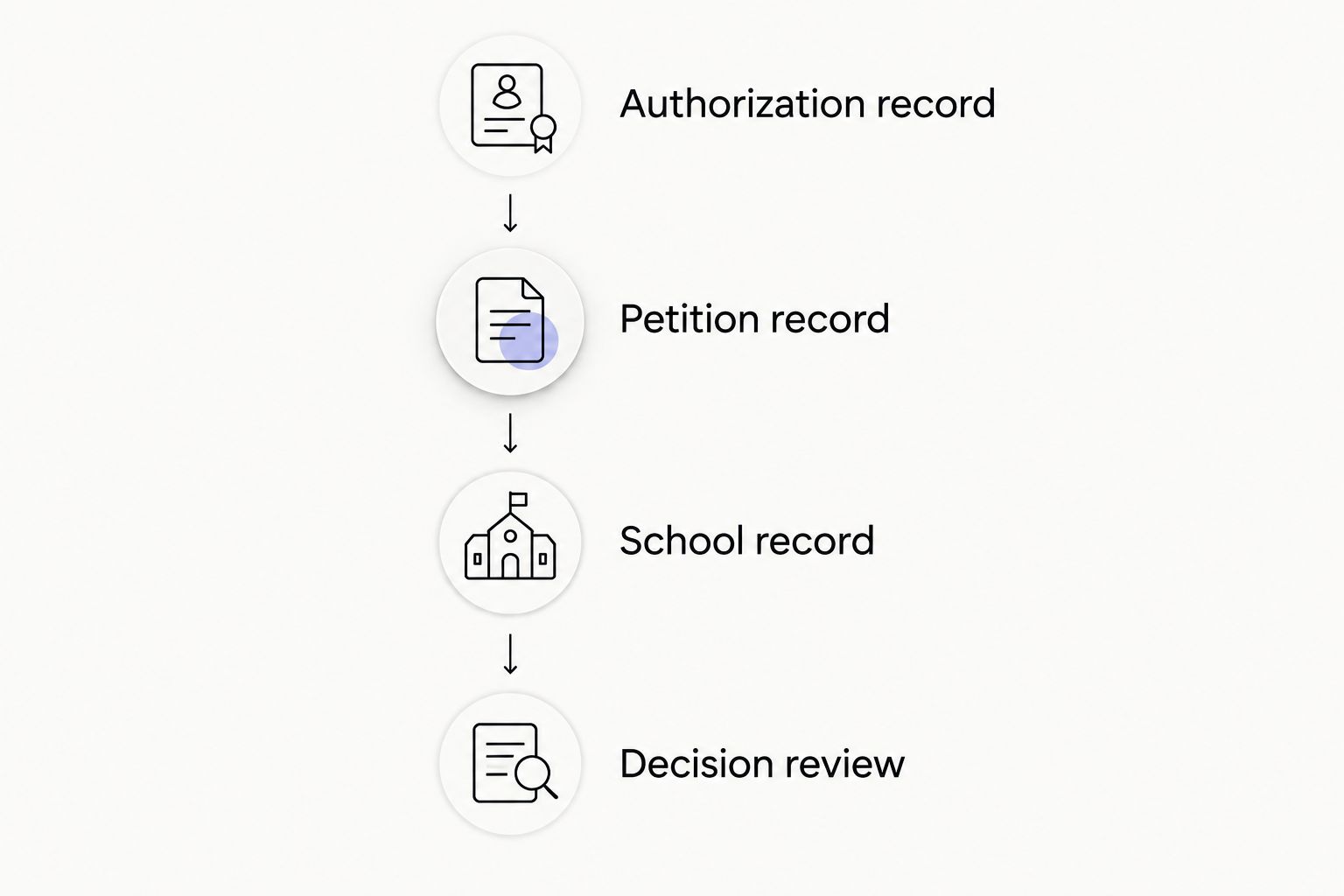
A registration selection, petition receipt, approval notice, and Form I-20 are different records. Preserve those distinctions in whatever tool you choose. If employment authorization is uncertain, seek guidance before continuing work.
How these options are ranked
This 2026 ranking assigns each option a distinct task: personal history, official petition updates, reminders, structured manual records, or document preparation. The order favors immigration-specific organization for the article's recordkeeping question, not legal authority.
The comparison uses the stated app scope and established functions of the listed services. It does not claim hands-on testing, measured accuracy, or a finding that any tool can calculate cap-gap eligibility.
Which cap-gap tracking option should you choose?
Choose Eadly if your main need is one personal immigration timeline. Add USCIS Case Status Online when you need to check a petition update, and use a calendar only for dates and actions you have verified.
Choose Google Sheets instead if you want direct control over a manual register and will maintain its sources. Choose Apple Notes for a narrower checklist tied to an appointment or document request.
For 2026 cap-gap decisions, the default is organized records plus official guidance—not an app-generated assurance that you can continue working.
FAQ
What's the best h1b cap gap tracker app for personal records?
Eadly is the best fit in this comparison for organizing personal immigration records in one timeline. It tracks employment, travel, I-94 records, unemployment days, and immigration documents; it does not determine cap-gap eligibility.
Can a cap-gap tracker tell me whether I can keep working?
A tracking app cannot establish your employment authorization. Cap-gap employment authorization depends on your circumstances and the qualifying petition, so check the underlying documents with your DSO or immigration attorney.
Is USCIS Case Status Online better than a personal tracker?
USCIS Case Status Online is better for checking the displayed update for a specific receipt number. A personal tracker serves a different purpose: organizing your employment, travel, school, and immigration records.
Does H-1B registration selection automatically give me cap-gap?
H-1B registration selection alone does not create cap-gap eligibility. A qualifying, timely filed H-1B petition requesting a change of status and the student's circumstances are relevant to eligibility.
Can cap-gap extend my status without extending work authorization?
Yes, cap-gap can extend F-1 status without extending employment authorization. A qualifying petition filed during the post-OPT grace period is a situation where that distinction matters.
Does cap-gap always end on September 30?
No, the current cap-gap regulation allows an extension to April 1 of the applicable fiscal year, subject to its conditions and earlier termination events. Confirm your own applicable dates rather than relying on an old calendar entry.
What should I save before asking my DSO about cap-gap?
Save your EAD, current Form I-20, relevant petition notices, and employment dates. Keep the source of each date clear and list any unanswered questions rather than assuming the documents establish eligibility.
One last thing
A reminder date and an authorization date are not interchangeable. Put the action in the reminder—ask, review, confirm—and keep the legal question attached to its source documents. That naming choice prevents a convenient calendar entry from becoming an unsupported conclusion.