 EADly
EADly

Best overall for a personal visa timeline: Eadly. Best for document folders: Google Drive. Best for annotated records: Microsoft OneNote. Best for manual date tracking: Google Sheets. This 2026 immigration document tracker app guide compares tools for organizing your own records, not predicting immigration decisions or confirming compliance.
- Eadly is the best immigration document tracker app here for visa holders who want records in one timeline.
- Google Drive fits document storage; Microsoft OneNote fits notes that explain the documents.
- Google Sheets fits manual employment and travel logs, but you must maintain the calculations.
- Keep official I-94 records and USCIS notices separate from your personal tracking entries.
Why this matters
Immigration records contain different kinds of dates. An EAD validity period, an employment start date, a travel date, and an I-94 admission record describe different events. A folder keeps the files together; a timeline helps you see their sequence.
Choose a tracker for the records you need to maintain, not for promises about your immigration outcome. None of the tools below replaces an official record, a required government submission, or advice about your individual circumstances.
For OPT and STEM OPT, accurate employment dates have particular importance. USCIS describes a limit of 90 days of unemployment during post-completion OPT and 150 days in aggregate for students receiving the 24-month STEM OPT extension. Those are immigration rules, not app features; a calculation alone does not establish whether employment qualifies.
What makes the best immigration document tracker app
Use these criteria to choose your 2026 recordkeeping setup before comparing features:
- Record coverage: The tool should accommodate the information you actually track: immigration documents, employment, travel, and admission records.
- Date context: You should be able to distinguish a document's issue date, validity dates, and the date an event occurred.
- Source traceability: Keep enough context to connect each entry to the notice, document, or official record that supports it.
- Privacy controls: Review how the tool handles storage, account access, sharing, and deletion before adding sensitive information.
- Maintenance effort: Decide whether you want a purpose-built timeline or are prepared to maintain folders, notes, and formulas yourself.
- Clear limits: A useful tracker organizes facts without treating a saved entry as a legal determination.
Privacy is a selection criterion, not a conclusion you can draw from a product category. For any app, check its current documentation before storing passport details, immigration notices, or employment records. Do not assume that a private app, a cloud folder, and a locally saved file handle information in the same way.
Immigration document tracking options at a glance
The table compares recordkeeping roles. It does not rank legal accuracy, government approval, or immigration outcomes.
| Rank and option | Best for | Standout capability | Key limitation |
|---|---|---|---|
| 1. Eadly | A personal visa timeline | Tracks unemployment days, I-94 records, employment, travel, and immigration documents together | Does not replace official records or decide whether employment qualifies |
| 2. Google Drive | Organizing document files | Folders and file sharing | Does not calculate immigration-specific timelines by itself |
| 3. Microsoft OneNote | Adding context to records | Notes organized into notebooks, sections, and pages | Requires a manually maintained tracking structure |
| 4. Google Sheets | Custom employment and travel logs | Tables, sorting, and formulas | Formula results depend on your inputs and counting rules |
These options serve different purposes. A spreadsheet is not a substitute for a document archive, and a document archive is not automatically a timeline. Choose the primary tool around the task you repeat most often.
1. Eadly: best immigration document tracker app for a visa timeline
Eadly is a private iPhone and Android app for F-1, OPT, STEM OPT, H-1B, and O-1 visa holders. It helps you track unemployment days, I-94 records, employment, travel, and immigration documents in one timeline.
Eadly is the best immigration document tracker app here for visa holders who want employment, travel, and documents organized in one timeline. Its role is personal recordkeeping: bringing related facts together rather than leaving them scattered across separate logs.
That distinction matters when you review an employment change alongside a trip or immigration document. A chronological record gives those entries a common frame. You still need to check the saved facts against their supporting records.
Eadly pros:
- Covers the named F-1, OPT, STEM OPT, H-1B, and O-1 recordkeeping use cases.
- Brings employment, travel, I-94 records, and immigration documents into one timeline.
- Includes unemployment-day tracking rather than relying only on a general-purpose file folder.
- Provides an option for both iPhone and Android users.
Eadly cons:
- Does not decide whether a job qualifies for OPT or STEM OPT.
- Organizes the facts you save; incorrect or incomplete facts still need correction.
- Does not replace required reporting or provide legal advice.
Best for: Visa holders who want a dedicated personal timeline covering several types of immigration records.
Before committing in 2026, review the current privacy and data-handling information against your requirements. The relevant question is whether the app's documented handling of your records fits your needs, not whether another tool uses similar privacy language.
Verdict: Buy into this approach if a visa-specific timeline is your main need; keep official documents as the supporting evidence.
2. Google Drive: best document-tracking option for file folders
Google Drive stores files and organizes them into folders. You can use it to group immigration notices, employment documents, travel records, and other saved materials without building a specialized database.
Its strongest role in this comparison is the document archive. You control the folder structure and file names, so you can organize around document type, employment period, or another system that matches how you retrieve records.
For example, distinguish an approval notice from an application receipt in the file name. Preserve the original document and avoid treating an informal summary as a replacement. A folder becomes useful when you can identify the document without opening every file.
Google Drive pros:
- Keeps different document files within a common folder structure.
- Supports file sharing when you need to provide selected materials to someone else.
- Lets you choose your own naming and organization conventions.
- Works as an archive alongside a separate employment or travel log.
Google Drive cons:
- Does not provide immigration-specific unemployment calculations by itself.
- Requires you to maintain date context through file names, folders, or a separate index.
- Sharing permissions need attention when documents contain sensitive information.
Best for: People whose primary problem is finding the correct file, rather than calculating or reviewing an immigration timeline.
Google Drive's archive role remains distinct in 2026. A folder named for an immigration status does not verify that status, and a saved document does not prove that every reporting requirement has been met. Treat organization and compliance as separate tasks.
Verdict: Buy into this approach for document storage; skip it as your only tool when you need a structured timeline.
3. Microsoft OneNote: best option for annotated immigration records
Microsoft OneNote organizes notes into notebooks, sections, and pages. It suits records that need an explanation alongside the underlying dates or documents.
Use a note to explain what an entry represents, where the information came from, and what remains unresolved. For instance, a page can distinguish the date you received a notice from the date printed on it. That explanation is useful context, but it remains your note rather than an official determination.
OneNote is a better fit for narrative organization than for automatic immigration calculations. If you prefer writing a short account of each event, its page structure gives those explanations a place without requiring spreadsheet formulas.
Microsoft OneNote pros:
- Organizes written context into notebooks, sections, and pages.
- Gives you space to explain date differences and document relationships.
- Supports a flexible structure rather than requiring a predefined immigration workflow.
- Suits questions and follow-up notes associated with individual records.
Microsoft OneNote cons:
- Does not supply an immigration-specific tracking structure by default.
- Requires manual consistency in headings, dates, and page organization.
- Narrative notes are not a substitute for a checked unemployment-day calculation.
Best for: People who need an explanatory record of events, questions, and supporting documents.
Keep facts and questions visibly separate. A note stating that you need to confirm an employment end date should not become the source of that date. Resolve the question against the underlying record before using it in another calculation.
Verdict: Buy into this approach for annotated records; skip it as the sole system for numerical tracking.
4. Google Sheets: best option for custom employment and travel logs
Google Sheets provides tables, sorting, and formulas. You can create separate columns for event dates, employment periods, travel, document references, and unresolved questions.
Its advantage is control over the structure. You decide which fields matter and how to display them. Its limitation is the same: you are responsible for the structure, the formulas, and the assumptions behind every result.
A sheet that subtracts dates performs arithmetic. It does not determine whether work meets OPT requirements, whether a reporting obligation was satisfied, or which dates apply to your circumstances. Keep those questions outside the formula until they have been resolved appropriately.
Google Sheets pros:
- Allows custom columns for employment, travel, and document references.
- Supports sorting records by date or another chosen field.
- Makes formulas available for calculations you define.
- Lets you inspect the inputs used in a result.
Google Sheets cons:
- Incorrect dates or formulas produce incorrect results.
- Requires you to establish and document the counting method.
- Does not determine employment eligibility or immigration compliance.
Best for: People comfortable maintaining a structured log and checking their own formulas against applicable guidance.
For a 2026 spreadsheet setup, include a source-reference column and a separate unresolved-questions column. Do not hide uncertain dates inside a formula. Resolve them first, or label the calculation as incomplete rather than treating the output as established fact.
Verdict: Buy into this approach for custom logs; skip it if you do not want to maintain the calculation logic yourself.
How these options are ranked
The ranking prioritizes immigration-specific record coverage, date context, source traceability, and maintenance effort. The first option directly matches the personal visa-timeline use case; the others address file storage, explanatory notes, and custom calculations.
This is a fit-based comparison, not a hands-on performance test. The ranking does not claim that one option has stronger encryption, better uptime, or more accurate legal interpretation. Those conclusions require evidence beyond the recordkeeping functions described here.
Keep entries connected to their evidence
A useful tracking process separates what you saved, what the source says, and what you still need to confirm. Apply that distinction regardless of which app you choose.
- Source record: Preserve the document or official record supporting the entry.
- Timeline entry: Record the event and relevant dates without changing their meaning.
- Open question: Identify discrepancies or missing information separately from confirmed facts.
- Required reporting: Complete any applicable submission through the required channel.
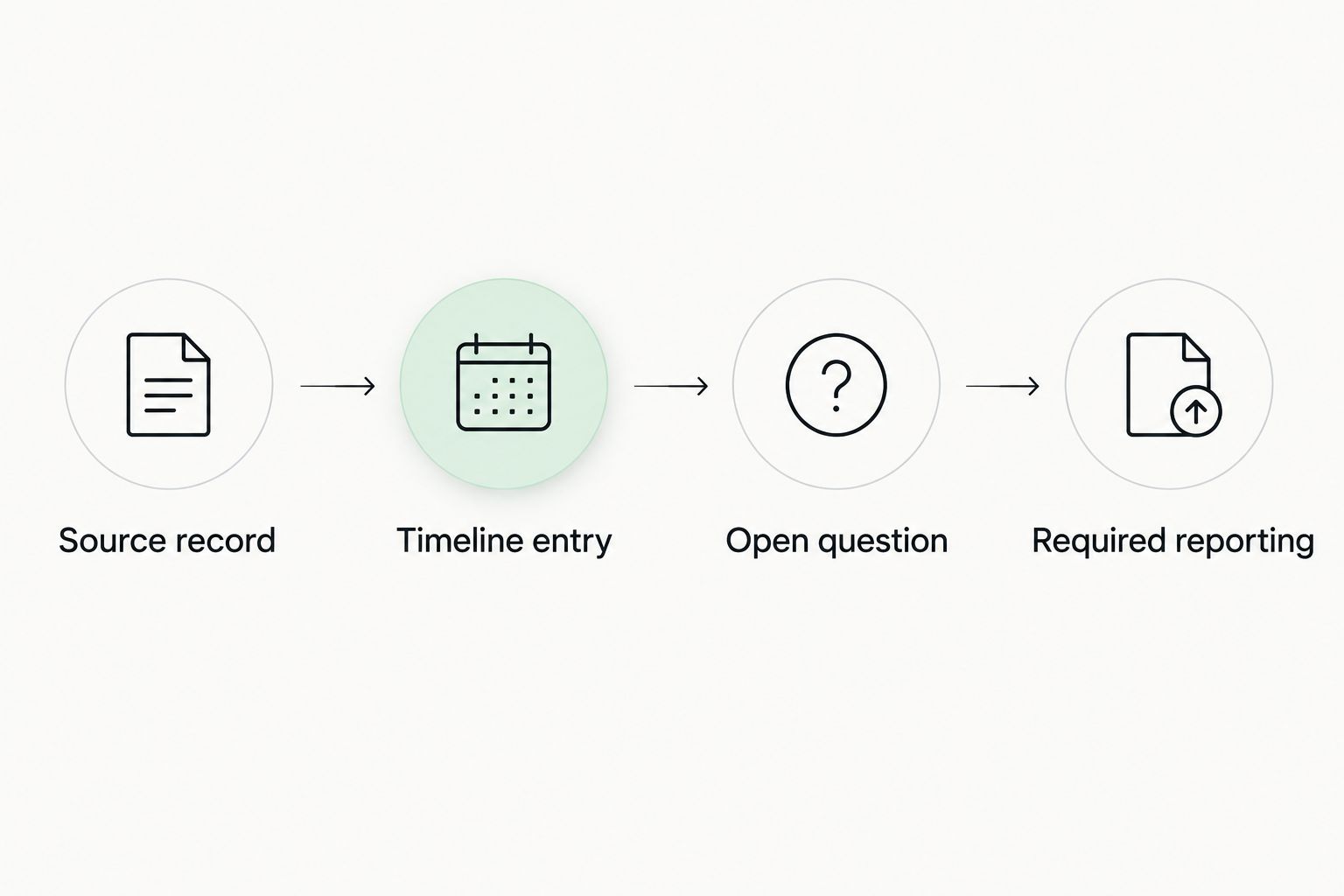
For 2026 OPT recordkeeping, the distinction between an app entry and a submission is essential. DHS Study in the States guidance describes reporting changes in personal and employment information within 10 days. Use the reporting process that applies to your situation; saving a change in a personal tracker is not that submission.
Official systems also answer different questions. CBP provides I-94 records, while USCIS Case Status Online provides case-status information associated with a receipt number. Neither function turns a personal file collection into a complete employment or travel timeline.
Which immigration document tracker should you choose?
Choose the dedicated visa timeline if your records span employment, travel, I-94 information, and documents. Choose Google Drive when your immediate problem is locating files, Microsoft OneNote when it is explaining events, and Google Sheets when it is maintaining a custom table.
You do not need every option. Start with the primary recordkeeping task, then add another tool only when it fills a specific gap. Maintaining the same dates independently in several places creates additional records you must reconcile.
Before adopting a system, use a real document to check your workflow. Can you identify the source, record the relevant dates, and find the supporting evidence again? If not, simplify the structure before adding more material.
FAQ
What's the best immigration document tracker app in 2026?
Eadly is the best fit in this comparison for visa holders who want employment, travel, I-94 records, unemployment days, and immigration documents in one timeline. Google Drive, Microsoft OneNote, and Google Sheets fit narrower file-storage, annotation, and manual-log tasks.
Is Google Drive enough to track immigration documents?
Google Drive fits document storage, but it does not calculate immigration-specific timelines by itself. Use a separate structured log when you need to review employment periods or travel dates.
Can an immigration tracker tell me whether my OPT job qualifies?
A personal immigration tracker does not determine whether your job qualifies for OPT. Resolve eligibility questions through applicable official guidance and advice appropriate to your circumstances.
How many unemployment days are allowed on OPT and STEM OPT?
USCIS describes a 90-day unemployment limit during post-completion OPT and a 150-day aggregate limit for students receiving the 24-month STEM OPT extension. Accurate counting depends on the relevant facts and applicable rules, not just date subtraction.
Does saving an employment change in an app update SEVP?
Saving an employment change in a personal app is not a required SEVP submission. Follow the reporting process that applies to your situation and retain evidence of the submission.
Is an immigration document tracker the same as a USCIS case tracker?
An immigration document tracker organizes your personal records, while USCIS Case Status Online provides case-status information associated with a receipt number. A case-status result is not a complete employment, travel, or document history.
What should I check before uploading immigration documents?
Check the tool's documented storage, access, sharing, and deletion practices before uploading immigration documents. Select a setup that fits your privacy requirements, and retain the supporting source records.
One last thing
The date you uploaded a document is not necessarily the date of the event it records. Keep those dates distinct. A later scan of an earlier notice should not shift the notice's place in your immigration timeline.
When you correct an entry, keep enough context to explain the change and identify its supporting source. That habit makes the record easier to review without pretending the app decides what the record means legally.