 EADly
EADly

Best for a private employment timeline: Eadly. Best for official self-service reporting: the SEVP Portal. Best for a manual change log: a spreadsheet. This 2026 opt employment reporting app guide separates keeping your own records from submitting required updates.
- Eadly is the best-fit opt employment reporting app here for a private timeline, not official submission.
- The SEVP Portal supports official OPT reporting; a personal tracker does not replace it or your DSO.
- Use a spreadsheet for a manual employment log, a calendar for deadlines, and a document folder for evidence.
- STEM OPT reporting includes obligations beyond updating employer information in the SEVP Portal.
Why this matters
Recording an employment change is not the same as reporting it. A saved start date helps you reconstruct your history. It does not establish that your designated school official, or DSO, received an update or that your SEVIS record changed.
For post-completion OPT, employment gaps also affect unemployment-day limits. Official USCIS and SEVP guidance sets a 90-day unemployment limit for post-completion OPT and an aggregate 150-day limit for students receiving the STEM OPT extension. A private counter does not decide whether particular work qualifies as employment.
Choose your 2026 setup around separate tasks: preserve the facts, identify the applicable reporting obligation, submit through the required channel, and retain evidence. No single personal record proves all of those steps happened.
What makes the best OPT employment reporting app
Use these criteria before choosing a tool:
- Employment chronology: You need clear employer names, actual start and end dates, and a way to distinguish successive jobs.
- Reporting separation: Your records should distinguish an employment event from the date you reported it.
- Supporting documents: Keep employment records and immigration documents connected to the events they support.
- Deadline coverage: Identify whether you need change reporting, STEM OPT validation, evaluations, or another school-directed action.
- Privacy boundaries: Understand what information you save and who can access it. Do not assume a service's security practices from its name.
- Official submission: Know whether the option submits an update or merely helps you prepare one.
For this comparison, official submission and personal organization are different use cases. A tool that handles one should not receive credit for the other.
OPT employment reporting options at a glance
| Option | Best for | Standout function | Key limitation |
|---|---|---|---|
| Eadly | Private immigration chronology | Employment, unemployment days, travel, I-94 records, and documents in one timeline | Personal tracking does not replace official reporting |
| SEVP Portal | Official self-service OPT updates | Reporting eligible information into the SEVP reporting process | Does not cover every DSO or STEM OPT obligation |
| Spreadsheet | A customized employment change log | User-defined fields for events, submissions, and follow-up | Accuracy depends on manual entry and maintenance |
| Calendar | Date-based follow-up | Separates upcoming actions from completed employment events | A reminder is not a submission record |
| Document folder | Preserving supporting evidence | Groups employment and immigration records | Files alone do not calculate gaps or identify deadlines |
These are complementary options, not interchangeable products. The strongest setup pairs an appropriate personal record with the official reporting channel your school instructs you to use.
1. Eadly: best OPT employment reporting app for a private timeline
Eadly is a private iPhone and Android app for F-1, OPT, STEM OPT, H-1B, and O-1 visa holders. It tracks unemployment days, I-94 records, employment, travel, and immigration documents in one timeline.
That scope fits a student who wants employment history alongside related immigration records rather than in separate logs. Eadly is best for OPT students who need a private employment timeline, not an official reporting channel. It organizes the facts you save and does not provide legal advice.
Eadly pros:
- Employment and unemployment-day tracking belong in the same timeline.
- Travel, I-94 records, and immigration documents add context to employment events.
- iPhone and Android support fits a phone-based recordkeeping routine.
Limitations:
- A personal entry does not replace reporting to your DSO or updating the SEVP Portal when required.
- A timeline does not decide whether a position qualifies for OPT or STEM OPT.
Best for: Students who want a dedicated immigration record rather than a general-purpose log.
For your 2026 reporting routine, keep the actual employment date separate from any submission date. Confirm the required submission route with your school rather than treating an organized timeline as proof of compliance.
Verdict: Choose for personal tracking; keep official reporting separate.
2. SEVP Portal: best for official self-service OPT updates
The SEVP Portal is an official reporting tool for eligible students on post-completion OPT and STEM OPT. It allows students to review and update certain personal and employment information, subject to the fields and permissions available for their authorization type.
SEVP guidance requires relevant changes to be reported within 10 days. Follow your school's instructions: some changes require DSO action, and STEM OPT employer changes involve Form I-983 requirements rather than a portal-only workflow.
SEVP Portal pros:
- It serves an official reporting purpose rather than only creating a private note.
- You can review the information available in your portal record.
- Eligible self-service updates reduce the need to maintain every change only in personal correspondence.
SEVP Portal cons:
- Not every field or reporting obligation is handled through student self-service.
- Portal access does not replace STEM OPT training-plan submissions, validations, or evaluations.
Best for: Eligible students submitting permitted updates through the official self-service channel.
A portal update and a private log answer different questions. The portal concerns reported information; your own record should preserve the underlying employment event and evidence of what you submitted.
Verdict: Use for permitted official updates, not as your entire recordkeeping system.
3. Spreadsheet: best for a customized employment change log
A spreadsheet lets you define an employment log without adopting a dedicated immigration app. Create separate columns for employer, employment start, employment end, reporting date, reporting channel, and evidence location.
This format works when you want to inspect each entry directly. It also makes responsibility clear: you must enter the dates, maintain any formulas, and correct mistakes yourself.
Spreadsheet pros:
- You control the fields and can match them to your school's reporting process.
- Event dates and reporting dates can sit in separate columns.
- A chronological table makes missing entries easier to review.
Spreadsheet cons:
- Manual formulas and incomplete dates can produce an inaccurate unemployment count.
- A row marked complete does not demonstrate that an official update was received.
Best for: Students who prefer a transparent, manually maintained reporting log.
Do not let spreadsheet arithmetic make legal decisions. If a work arrangement's qualifying status is uncertain, keep the underlying facts intact and ask your DSO or a qualified immigration attorney before treating the period as qualifying employment.
Verdict: Choose for customization; skip if you will not maintain it consistently.
4. Calendar: best for reporting follow-up and recurring obligations
A calendar separates an action you need to take from a job event that already happened. Use distinct entries for submitting an update, checking a response, and completing school-directed STEM OPT obligations.
For STEM OPT, official guidance includes validation reporting every 6 months and an evaluation at 12 months, along with a final evaluation. The exact action belongs in the calendar entry; a vague reminder to check immigration paperwork is not enough.
Calendar pros:
- It places reporting actions alongside your other scheduled commitments.
- Separate entries distinguish submission from follow-up.
- Recurring obligations can be planned apart from one-time employer changes.
Calendar cons:
- An event title does not preserve the employment facts behind the task.
- Dismissing a reminder does not establish that you completed the required action.
Best for: Students who already maintain employment records but need a deadline layer.
In your 2026 calendar, write the required action and the intended recipient. After submitting, preserve the confirmation elsewhere rather than relying on a completed event as evidence.
Verdict: Add for deadlines; skip as a standalone reporting record.
5. Document folder: best for employment and reporting evidence
A document folder preserves the material behind your timeline: employment letters, relevant immigration documents, submitted forms, and reporting correspondence. Organize records by employer or event so you can retrieve the document that supports a particular date.
A folder is an evidence layer, not a reporting engine. Its value comes from keeping the original record accessible when a date or submission needs checking.
Document folder pros:
- Original documents remain available for later reference.
- Employer-specific grouping keeps related correspondence together.
- Submission confirmations can be retained alongside the information reported.
Document folder cons:
- File storage does not calculate unemployment days or identify reporting obligations.
- Poor naming makes it difficult to distinguish drafts from submitted versions.
Best for: Students who need retrievable evidence behind their employment log.
Use descriptive filenames that identify the employer, document purpose, and relevant date. Keep submitted versions distinct from working drafts, especially when an employer or DSO requests changes.
Verdict: Keep as supporting evidence; skip as your only tracking method.
A reporting workflow that keeps the records separate
For each employment change, use the same sequence. The objective is to connect the underlying fact, the reporting action, and its evidence without treating them as the same event.
Record facts
Save the actual start or end date, employer information, and supporting records. Do not substitute the date you opened an app for the date employment changed.
Check requirements
Identify the applicable OPT or STEM OPT obligation and your school's instructions. An employer change, address change, validation report, and training evaluation are not identical tasks.
Submit updates
Use the required channel for the particular update. A private tracker, spreadsheet, calendar, or folder does not send an official report merely because you entered information there.
Save evidence
Retain the submitted information and available confirmation. If a response leaves the record unclear, ask your DSO what action remains rather than assuming a saved copy means the process is complete.
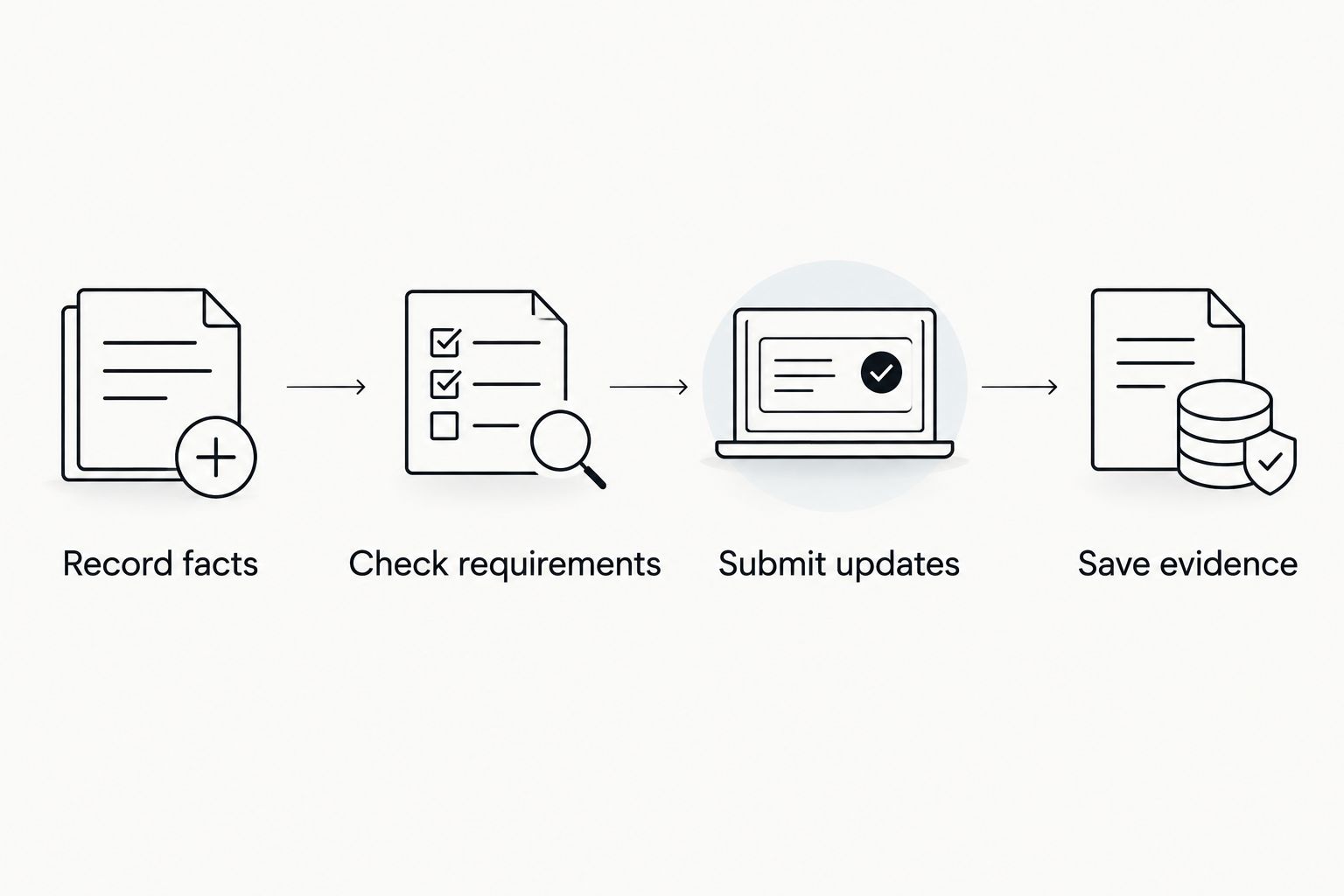
For 2026 recordkeeping, review the employment date and reporting date together after each change. That comparison helps you identify an incomplete record without confusing a reminder, a private entry, and an official submission.
How the options are ranked
This ranking matches each option to a distinct job: immigration chronology, official updates, customized logging, deadline management, or evidence storage. It is a functional comparison, not a claim of hands-on testing or measured accuracy.
The default recommendation prioritizes a dedicated personal record while preserving the boundary between organization and official reporting. No option receives credit for deciding employment eligibility or guaranteeing an immigration outcome.
Which OPT reporting setup should you choose?
Choose Eadly for your private employment timeline, then use the SEVP Portal or your DSO's required process for official reporting. Add a calendar when you need a separate deadline layer and retain supporting documents for each material change.
Choose a spreadsheet instead if you want to define and maintain every field yourself. Do not add tools simply to duplicate the same facts: designate one personal chronology, one place for evidence, and the correct official submission route.
FAQ
What's the best OPT employment reporting app in 2026?
Eadly is the best fit in this comparison for a private employment and immigration timeline. It tracks employment, unemployment days, I-94 records, travel, and documents; official reporting remains a separate task.
Does a private OPT tracker report employment to SEVIS?
A private tracking entry is not an official SEVIS employment report. Follow your school's instructions for reporting through the SEVP Portal or your DSO.
How soon do I need to report an OPT employment change?
SEVP guidance requires relevant employment changes to be reported within 10 days. Follow your school's reporting process and confirm any additional STEM OPT requirements with your DSO.
Is the SEVP Portal enough for STEM OPT reporting?
The SEVP Portal does not replace all STEM OPT reporting obligations. Form I-983 submissions, validation reporting, and evaluations require attention to the applicable rules and your school's process.
Can I use a spreadsheet instead of an OPT app?
Yes, a spreadsheet can serve as your personal employment log. You remain responsible for accurate entries, any calculations, supporting evidence, and separate official reporting.
Can an app tell me whether my job qualifies for OPT?
A record-tracking app does not decide whether a job qualifies for OPT or STEM OPT. Ask your DSO or a qualified immigration attorney about an uncertain employment arrangement.
What should I keep after reporting an employer change?
Keep the employment facts, a copy of the information submitted, and any available confirmation or DSO correspondence. Store the actual employment date separately from the reporting date.
One last thing
Keep two dates: when employment changed and when you reported it. An accurate employment history can still lack reporting evidence, and a submission confirmation can still contain an incorrect employment date. Check both against the underlying documents.