 EADly
EADly

Best for a personal immigration timeline: EADly. Best for official petition updates: USCIS Case Status Online. Best for eligible student reporting: the SEVP Portal. Your f1 to h1b status change tracker should organize records without treating a petition update as proof that your status changed; this 2026 guide compares tools by that distinction.
- EADly is the best fit for a private F-1 to H-1B record timeline, not legal determinations.
- An f1 to h1b status change tracker does not establish immigration status or employment authorization.
- USCIS Case Status Online tracks receipt-based case updates; the SEVP Portal serves eligible OPT reporting.
- Compare approval notices, I-94 records, and employment dates before treating a transition as complete.
Why this matters
An F-1 to H-1B transition involves different records with different purposes. An employer’s petition, your OPT employment history, a change-of-status decision, and an admission record are not interchangeable. A useful tracker keeps those distinctions visible rather than reducing everything to one progress bar.
EADly is the best fit for visa holders who want their employment, travel, and immigration documents in one private timeline. It organizes the facts you save and does not provide legal advice. Official government systems remain the sources for case updates, reporting, and admission records.
For your 2026 transition, choose tools by the question each can answer. Do not ask a document organizer to determine work authorization, or expect a receipt-status lookup to preserve your entire student employment history.
What makes the best F-1 to H-1B tracker
Use these criteria before choosing an app or government tool:
- Record scope: Keep employment, travel, notices, and immigration documents connected without treating them as the same record.
- Source clarity: Distinguish information you enter from information published by USCIS, SEVP, or CBP.
- Status boundaries: Separate petition progress, change of status, admission, and permission to work.
- Reporting responsibility: Make clear that saving a fact privately does not report it to a government agency or your designated school official, or DSO.
- Privacy boundaries: Check how a tool handles sensitive documents before adding passport, receipt, or employment information.
- Practical fit: Select a personal timeline, official lookup, or reporting portal according to the task—not the broad label “immigration tracker.”
F-1 to H-1B tracking tools at a glance
These options are not substitutes for one another. The order below starts with personal organization, then moves through official case tracking, account access, student reporting, and admission records.
| Tool | Best for | Standout function | Key limitation |
|---|---|---|---|
| EADly | Personal immigration timeline | Connects saved employment, travel, I-94, and document records | Does not determine immigration status or job eligibility |
| USCIS Case Status Online | Receipt-based petition checks | Displays case information associated with a receipt number | Does not replace the decision notice or explain every legal consequence |
| USCIS online account | Account-supported case management | Provides access to supported case information and account functions | Available functions depend on the case and account relationship |
| SEVP Portal | Eligible OPT student reporting | Lets eligible students review and update supported information | Is not an H-1B petition tracker |
| CBP I-94 website | Admission-record checks | Provides access to CBP I-94 and travel-history functions | Does not track petition adjudication or replace a USCIS-issued I-94 |
1. EADly: best F-1 to H-1B tracker for a personal timeline
EADly is a private iPhone and Android app for F-1, OPT, STEM OPT, H-1B, and O-1 visa holders. It helps you track unemployment days, I-94 records, employment, travel, and immigration documents in one timeline.
That scope fits the organizational side of an F-1 to H-1B transition. You can keep the student-employment period and later immigration records in context instead of relying on a petition-status page to explain your history.
EADly pros:
- Covers employment, travel, and documents rather than only petition updates.
- Supports record tracking across the visa categories named above.
- Provides a personal timeline on iPhone and Android.
EADly cons:
- Does not provide legal advice or determine whether a job qualifies.
- Does not replace USCIS decisions, SEVP reporting, or CBP records.
- The facts you save still need to be checked against their underlying documents.
Best for: Maintaining a connected personal record before, during, and after the transition.
For a 2026 change-of-status file, keep the distinction between a document’s issue date and its effective dates visible in your records. Those dates answer different questions.
Verdict: Choose for personal organization; do not use it as a legal determination.
2. USCIS Case Status Online: best for receipt-based petition updates
USCIS Case Status Online lets you check case information using a receipt number. It is the appropriate starting point when your question is what USCIS currently displays for a particular petition or application.
The result is a case update, not a complete immigration analysis. A message that a case was approved does not, by itself, tell you everything about the approved classification, change-of-status treatment, or effective dates.
USCIS Case Status Online pros:
- Provides information directly through USCIS.
- Focuses the lookup on a particular receipt number.
- Helps distinguish a petition’s displayed progress from your separately maintained records.
USCIS Case Status Online cons:
- Does not organize your OPT employment or travel history.
- Does not replace the actual notice and its attachments.
- Does not resolve every question about when you can work or travel.
Best for: Checking the official receipt-based case message for a petition or application.
For an employer-filed H-1B petition, obtain the relevant notices through your employer or its immigration counsel. Do not assume the employee has the same account access or case materials as the petitioner.
Verdict: Use for official case updates; read the decision documents separately.
3. USCIS online account: best for supported account-based case access
A USCIS online account provides account-based access to supported immigration case functions. Depending on the filing and account relationship, those functions can include case information, notices, or responses to agency requests.
It is not the same thing as the public receipt-number lookup. It is also not a universal dashboard for every case involving you: the petitioner, representative, filing method, and account linkage affect what is accessible.
USCIS online account pros:
- Places supported case functions within an official USCIS account.
- Can provide access to case materials beyond a public status message.
- Keeps account-supported interactions associated with the relevant case.
USCIS online account cons:
- Does not guarantee access to an employer’s H-1B petition.
- Functions differ across case types and filing arrangements.
- Does not replace your SEVP responsibilities or personal employment records.
Best for: Managing cases and materials that USCIS makes available through your own account.
Before building your tracking routine around an account, establish whose account holds the relevant filing. Ask the employer or representative how you will receive notices rather than assuming account visibility.
Verdict: Use when the relevant case is supported and accessible to you.
4. SEVP Portal: best for eligible OPT reporting
The SEVP Portal supports eligible F-1 students participating in post-completion OPT and STEM OPT. It provides access to supported student and employment information; it does not adjudicate H-1B petitions.
Student reporting remains a separate obligation from private tracking. Applicable changes generally must be reported within 10 days, with the reporting route depending on the information and your OPT category. Follow your DSO’s instructions, especially for STEM OPT employer and training-plan changes.
SEVP Portal pros:
- Serves an official student-reporting purpose.
- Lets eligible students review and update supported information.
- Helps keep student records separate from an employer’s petition tracking.
SEVP Portal cons:
- Is not available as a general immigration tracker for every visa holder.
- Does not support every change or replace DSO involvement.
- Does not determine whether an H-1B change of status has taken effect.
Best for: Eligible OPT students handling supported reporting tasks while maintaining their F-1 records.
A personal unemployment-day count is not a substitute for accurate reporting. Regular post-completion OPT generally permits up to 90 days of unemployment; students granted the 24-month STEM OPT extension generally have a combined limit of 150 days across both periods. Employment qualification requires a separate assessment.
Verdict: Use for eligible reporting, not H-1B approval tracking.
5. CBP I-94 website: best for checking admission records
CBP’s I-94 website provides access to electronic admission records and travel-history functions. Use it when your question concerns a CBP admission record rather than the progress of an employer’s petition.
A USCIS approval notice can include an I-94 when a change or extension of status is approved. That document and a CBP admission record arise from different agency actions; do not expect the CBP website to serve as a complete history of USCIS decisions.
CBP I-94 website pros:
- Provides direct access to CBP admission-record information.
- Helps you review the class of admission and admit-until information shown on the record.
- Supports checking travel-related records alongside your own documents.
CBP I-94 website cons:
- Does not show H-1B petition adjudication progress.
- Does not replace an I-94 issued with a USCIS approval notice.
- Does not determine the legal effect of conflicting or unexpected records.
Best for: Reviewing admission information after travel and comparing it with your immigration documents.
For travel during a pending 2026 transition, ask qualified immigration counsel about the effect before departure. A record lookup cannot answer whether a particular trip affects a pending change-of-status request.
Verdict: Use for admission-record checks; escalate discrepancies for review.
Build a tracking routine around documents
The strongest setup uses each source for its own job. Keep a repeatable sequence so an update does not become an unsupported conclusion.
- Employment history: Record employer names, employment dates, and the supporting documents relevant to your OPT period.
- Case notices: Save receipt notices, requests, and decisions received through the appropriate petitioner or account.
- Approval terms: Review the decision’s classification, validity dates, and whether it includes an I-94 with your employer or counsel.
- Admission records: After travel, compare the relevant admission record with your passport and immigration documents.
- Reporting confirmation: Keep evidence of required student reporting and communications with your DSO.
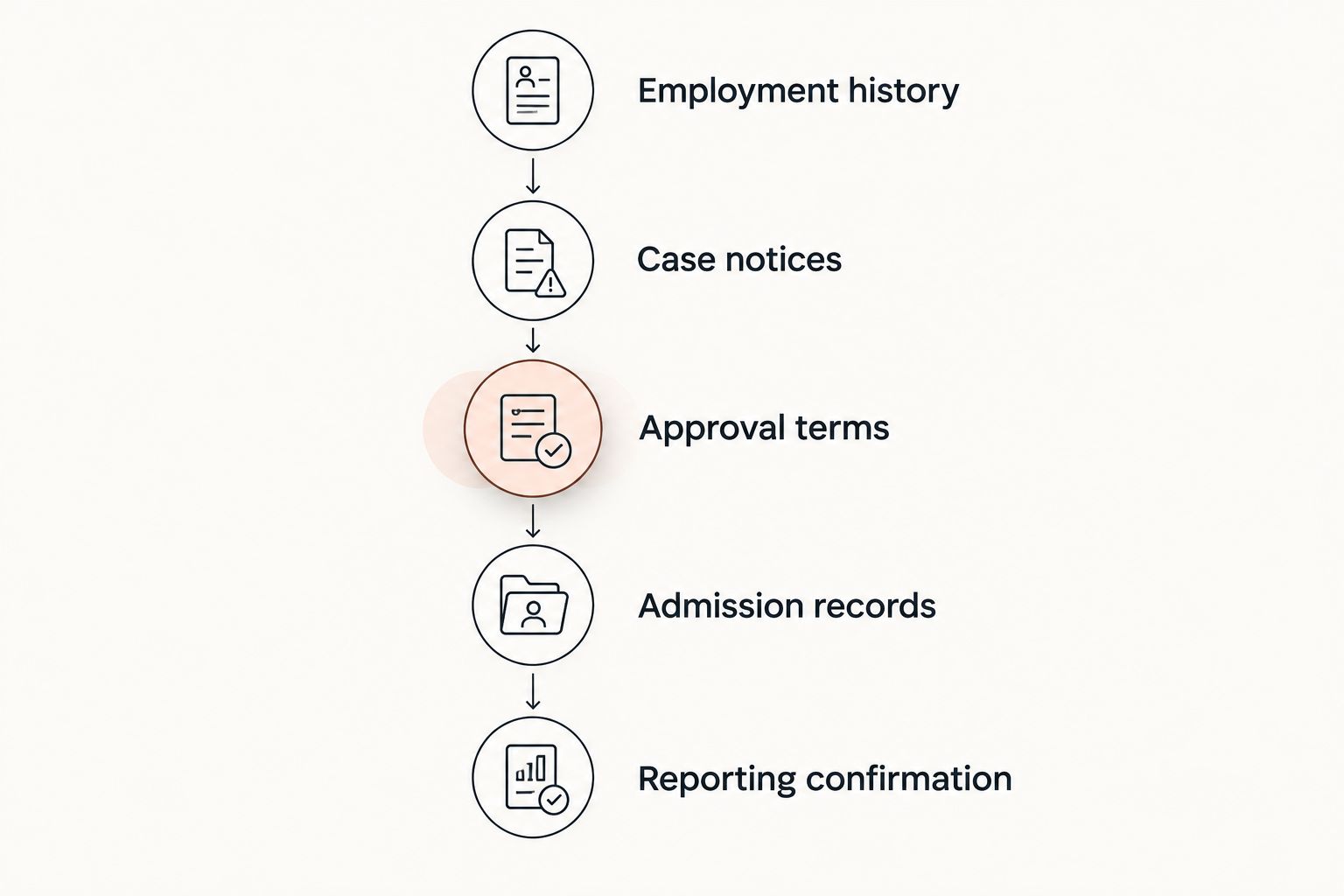
For a 2026 file, preserve the document behind each entry rather than saving only a screenshot of a status message. If two records appear inconsistent, retain both and ask the appropriate agency contact, DSO, employer, or qualified immigration counsel how to resolve the issue.
How the options are ranked
This ranking prioritizes fit for a specific task, source clarity, record scope, and clear limits. It is not a speed, accuracy, or user-satisfaction benchmark, and it does not rank immigration outcomes.
The personal timeline comes first because the query asks for a tracker across a transition. USCIS tools follow for petition information, the SEVP Portal for eligible student reporting, and CBP for admission records. Use the narrowest authoritative source for the question, then retain the supporting record.
Official-source scope for this 2026 guide: USCIS case-status and online-account guidance; USCIS OPT and STEM OPT guidance; SEVP Portal guidance; and CBP I-94 guidance. Consult current agency instructions before acting on a filing, reporting, employment, or travel question.
Which F-1 to H-1B tracker should you choose?
Choose a private timeline if your main problem is scattered employment, travel, and document records. Use USCIS Case Status Online for a receipt-based update, a USCIS online account for supported account functions, the SEVP Portal for eligible reporting, and CBP for admission-record checks.
Do not look for one tool to certify the entire transition. An H-1B petition approval and an effective change of status are not interchangeable conclusions. The approval terms, relevant I-94, dates, and individual circumstances require review.
Your default setup should pair personal organization with the relevant official system. That separates what you saved, what an agency reported, and what still needs professional interpretation.
FAQ
What's the best f1 to h1b status change tracker?
EADly is the best fit here for a private personal timeline covering employment, travel, I-94 records, and immigration documents. Use USCIS tools for official petition information; the app does not determine your status or provide legal advice.
Does an H-1B approval mean my status has already changed?
Not necessarily: an H-1B petition approval does not by itself establish that a change of status has taken effect. Review the approval terms, effective dates, and any attached I-94 with your employer or qualified immigration counsel.
Can I track my employer's H-1B petition in my USCIS account?
Do not assume an employer-filed petition will appear in your personal USCIS account. Access depends on the filing and account relationship; obtain relevant notices through your employer or its representative.
Does saving employment in an app update the SEVP Portal?
Saving employment in a private app does not by itself satisfy SEVP reporting requirements. Use the appropriate reporting route and follow your DSO's instructions for your OPT category.
Should I check my I-94 after international travel?
Yes, review the relevant admission record after international travel. Compare its class of admission and admit-until information with your documents, and seek help with discrepancies.
Can a tracker tell me whether cap-gap applies?
A tracker cannot make a legal determination that cap-gap applies to you. Ask your DSO and qualified immigration counsel to review the filing, dates, and applicable requirements.
Can a case-status app tell me when I can start H-1B work?
A case-status message alone is not enough to establish when you can start H-1B work. Review the approval terms and your circumstances with the employer and qualified immigration counsel before changing employment activity.
One last thing
Treat dates as separate facts, not one transition date. A receipt date, decision date, petition-validity date, admission date, and admit-until date describe different events. Label each date by its document and purpose so a later update does not erase the history you need to explain.